







Question: I am using Windows PowerShell- PLEASE PLEASE DO NOT USE OTHERS ANSWERS Thanks please do not copy answers from the other old answers i really
I am using Windows PowerShell- PLEASE PLEASE DO NOT USE OTHERS ANSWERS
Thanks
please do not copy answers from the other old answers i really need help. thanks again
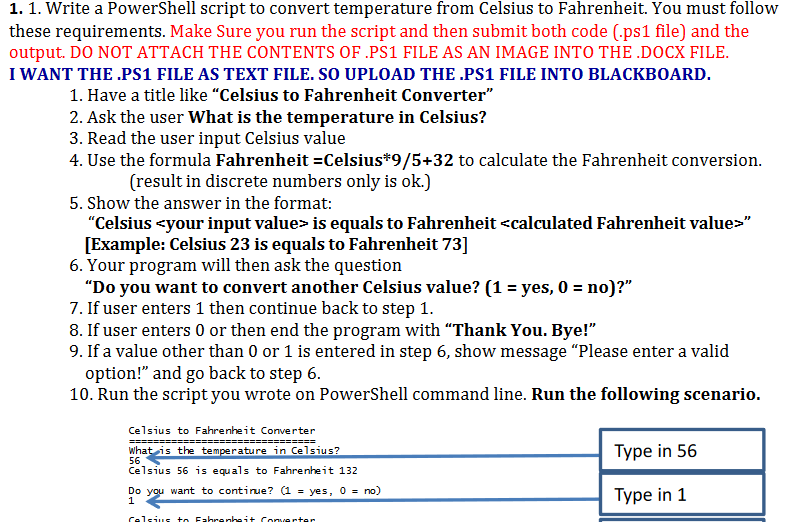
1.1. Write a PowerShell script to convert temperature from Celsius to Fahrenheit. You must follow these requirements. Make Sure you run the script and then submit both code (.ps1 file) and the output. DO NOT ATTACH THE CONTENTS OF .PS1 FILE AS AN IMAGE INTO THE DOCX FILE I WANT THE PS1 FILE AS TEXT FILE. SO UPLOAD THE PS1 FILE INTO BLACKBOARD 1. Have a title like "Celsius to Fahrenheit Converter" 2. Ask the user What is the temperature in Celsius? 3. Read the user input Celsius value 4. Use the formula Fahrenheit-Celsius*9/5+32 to calculate the Fahrenheit conversiorn (result in discrete numbers only is ok.) 5. Show the answer in the format: "Celsius your input value is equals to Fahrenheit
Step by Step Solution
There are 3 Steps involved in it

Get step-by-step solutions from verified subject matter experts
 Study Help