







Question: I am working in SQL and need help building these steps. If you could provide some brief explanation as well it would be very helpful.
I am working in SQL and need help building these steps. If you could provide some brief explanation as well it would be very helpful.
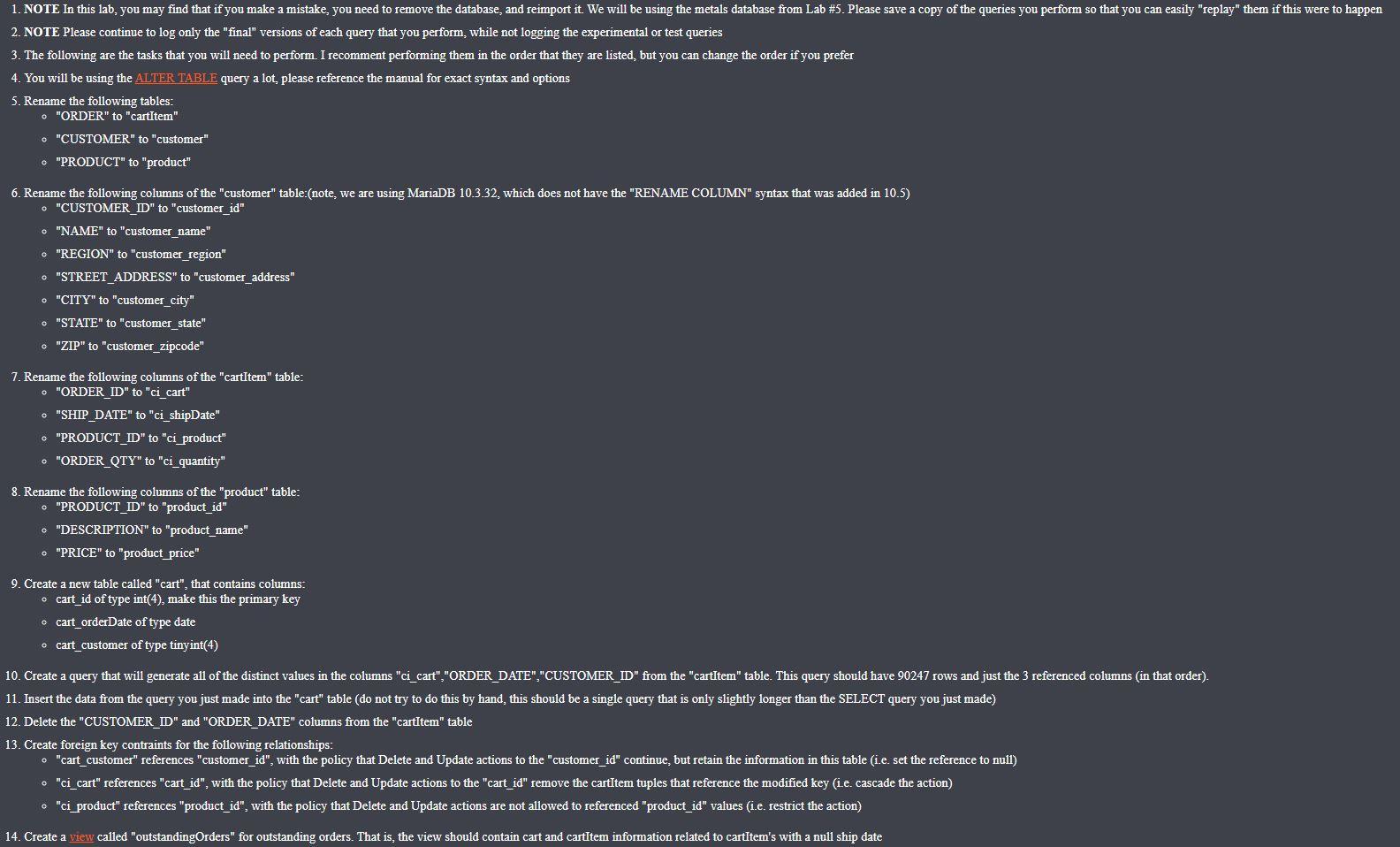
2. NOTE Please continue to log only the "final" versions of each query that you perform, while not logging the experimental or test queries 3. The following are the tasks that you will need to perform. I recomment performing them in the order that they are listed, but you can change the order if you prefer 4. You will be using the ALTER TABLE query a lot, please reference the manual for exact syntax and options 5. Rename the following tables: - "ORDER" to "cartitem" - "CUSTOMER" to "customer" - "PRODUCT" to "product" 6. Rename the following columns of the "customer" table:(note, we are using MariaDB 10.3.32, which does not have the "RENAME COLUMN" syntax that was added in 10.5) - "CUSTOMER_ID" to "customer_id" - "NAME" to "customer name" - "REGION" to "customer_region" - "STREET_ADDRESS" to "customer_address" - "CITY" to "customer_city" - "STATE" to "customer state" - "ZIP" to "customer_zipcode" 7. Rename the following columns of the "cartitem" table: - "ORDER ID" to "ci_cart" - "SHIP_DATE" to "ci_shipDate" - "PRODUCT_ID" to "ci product" - "ORDER_QTY" to "ci_quantity" 8. Rename the following columns of the "product" table: - "PRODUCT_ID" to "product_id" - "DESCRIPTION" to "product_name" - "PRICE" to "product price" 9. Create a new table called "cart", that contains columns: - cart_id of type int(4), make this the primary key - cart_orderDate of type date - cart_customer of type tinyint(4) 12. Delete the "CUSTOMER_ID" and "ORDER_DATE" columns from the "cartItem" table 13. Create foreign key contraints for the following relationships: - "ci product" references "product_id", with the policy that Delete and Update actions are not allowed to referenced "product_id" values (i.e. restrict the action) 14. Create a view called "outstandingOrders" for outstanding orders. That is, the view should contain cart and cartItem information related to cartItem's with a null ship date 2. NOTE Please continue to log only the "final" versions of each query that you perform, while not logging the experimental or test queries 3. The following are the tasks that you will need to perform. I recomment performing them in the order that they are listed, but you can change the order if you prefer 4. You will be using the ALTER TABLE query a lot, please reference the manual for exact syntax and options 5. Rename the following tables: - "ORDER" to "cartitem" - "CUSTOMER" to "customer" - "PRODUCT" to "product" 6. Rename the following columns of the "customer" table:(note, we are using MariaDB 10.3.32, which does not have the "RENAME COLUMN" syntax that was added in 10.5) - "CUSTOMER_ID" to "customer_id" - "NAME" to "customer name" - "REGION" to "customer_region" - "STREET_ADDRESS" to "customer_address" - "CITY" to "customer_city" - "STATE" to "customer state" - "ZIP" to "customer_zipcode" 7. Rename the following columns of the "cartitem" table: - "ORDER ID" to "ci_cart" - "SHIP_DATE" to "ci_shipDate" - "PRODUCT_ID" to "ci product" - "ORDER_QTY" to "ci_quantity" 8. Rename the following columns of the "product" table: - "PRODUCT_ID" to "product_id" - "DESCRIPTION" to "product_name" - "PRICE" to "product price" 9. Create a new table called "cart", that contains columns: - cart_id of type int(4), make this the primary key - cart_orderDate of type date - cart_customer of type tinyint(4) 12. Delete the "CUSTOMER_ID" and "ORDER_DATE" columns from the "cartItem" table 13. Create foreign key contraints for the following relationships: - "ci product" references "product_id", with the policy that Delete and Update actions are not allowed to referenced "product_id" values (i.e. restrict the action) 14. Create a view called "outstandingOrders" for outstanding orders. That is, the view should contain cart and cartItem information related to cartItem's with a null ship date
Step by Step Solution
There are 3 Steps involved in it

Get step-by-step solutions from verified subject matter experts
 Study Help