







Question: I am working on a Java program that reads a PPM image that the user specifies and then processes in a number of different ways
I am working on a Java program that reads a PPM image that the user specifies and then processes in a number of different ways such as negating colors. For the next step I need to write a method which negates the color red as specified in the instructions below but I am unsure of how to do this with the code I have written so far.
edit: I am not sure how to get the .ppm file from the system to here
import java.util.Scanner; import java.io.File; import java.io.PrintWriter;
public class PPM { public static void main ( String args[] ) { try { System.out.print ( " PPM Image Processor " ); Scanner keyboard = new Scanner ( System.in ); System.out.print ( " Enter input filename: " ); String inFile; inFile = keyboard.next(); File file = new File( inFile ); Scanner input = new Scanner ( file );
String first = input.next(); int columns = input.nextInt(); int row = input.nextInt(); int max = input.nextInt(); int x = ( columns * 3 ); int y = 0; int buffer[] = new int [x]; negateRed ( buffer, columns );
Scanner keyboardTwo = new Scanner ( System.in ); String outFile; System.out.print ( "Enter output filename: " ); outFile = keyboardTwo.next();
PrintWriter writer = new PrintWriter ( outFile ); writer.println ( first ); writer.print ( columns ); writer.printf ( " %d", row ); writer.printf ( " %d ", max ); while ( input.hasNext() ) { if ( y
writer.close(); }
catch ( Exception ex ) { System.out.println ( "An error has occurred!" ); ex.printStackTrace(); } }
/** * negateRed * * This method negates the red value in the image. All P3-format * PPM images have an image depth of 255, which are used in * the method's calculations. * * @param buffer an integer array containing the image buffer * @param columns an integer w/ the number of columns in the image * @return NONE */ public static void negateRed ( int [] buffer, int columns ) {
} }
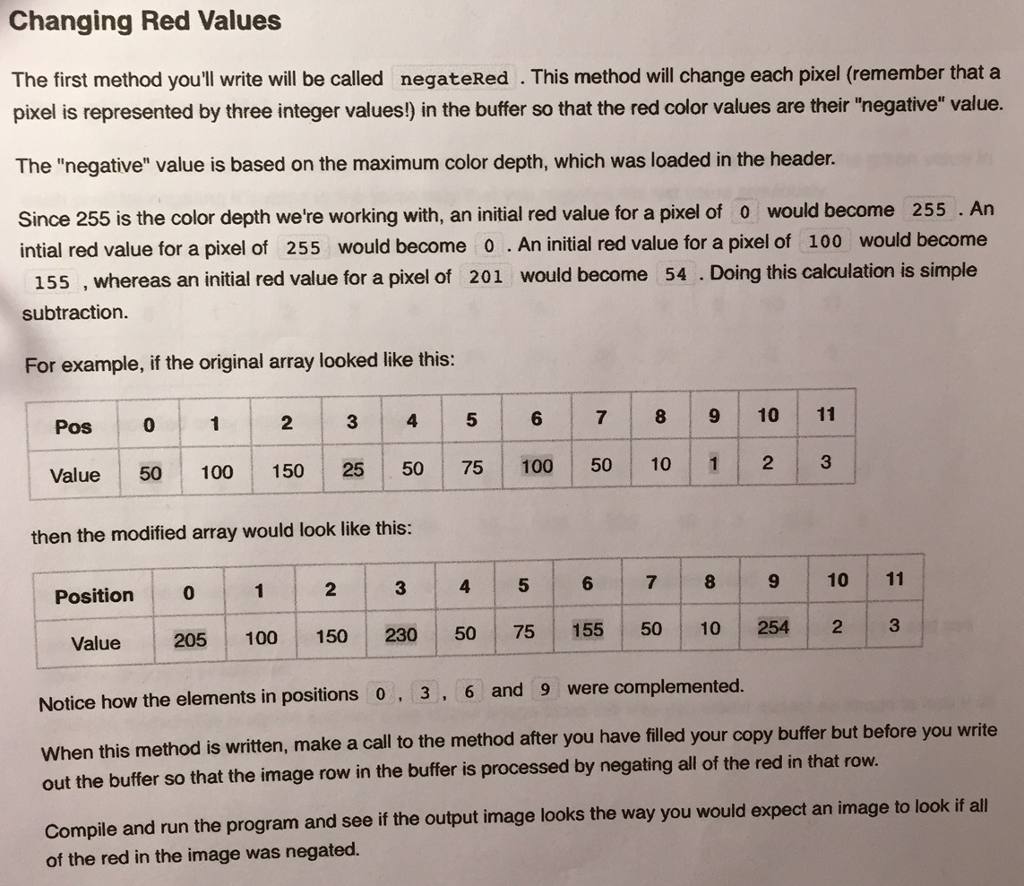
Changing Red Values The first method you'll write will be called negateRed This method will change each pixel (remember that a pixel is represented by three integer values) in the buffer so that the red color values are their "negative" value. The "negative" value is based on the maximum color depth, which was loaded in the header. Since 255 is the color depth we're working with, an initial red value for a pixel of 0 would become 255 An intial red value for a pixel of 255 would become o An initial red value for a pixel of 100 would become 15s, whereas an initial red value for a pixel of 201 would become 54 Doing this calculation is simple subtraction. For example, if the original array looked like this: 7 8 9 10 11 3 4 5 Pos 0 Value 50 100 150 25 50 75 100 50 10 1 2 then the modified array would look like this: 10 11 Position o value 205 100 150 230 50 75 155 500 10 254 2 Notice how the elements in positions o 3 6 and 9 were complemented when this method is written, make a call to the method after you have filled your copy buffer but before you write out the buffer so that the image row in the buffer is processed by negating all of the red in that row. compile and run the program and see if the output image looks the way you would expect an image to look if all of the red in the image was negated
Step by Step Solution
There are 3 Steps involved in it

Get step-by-step solutions from verified subject matter experts
 Study Help