







Question: I am working on an assignment for a computer science class that I don't even need to graduate and I'm stuck on how to change
I am working on an assignment for a computer science class that I don't even need to graduate and I'm stuck on how to change my javascript so it will display both of the
outputs. After I typed in the first code for the 'Name entered the onclick button worked, but once I added the second set of outputDiv the code wouldn't work. What do I need to change to make it so the code shows up similar to the picture below?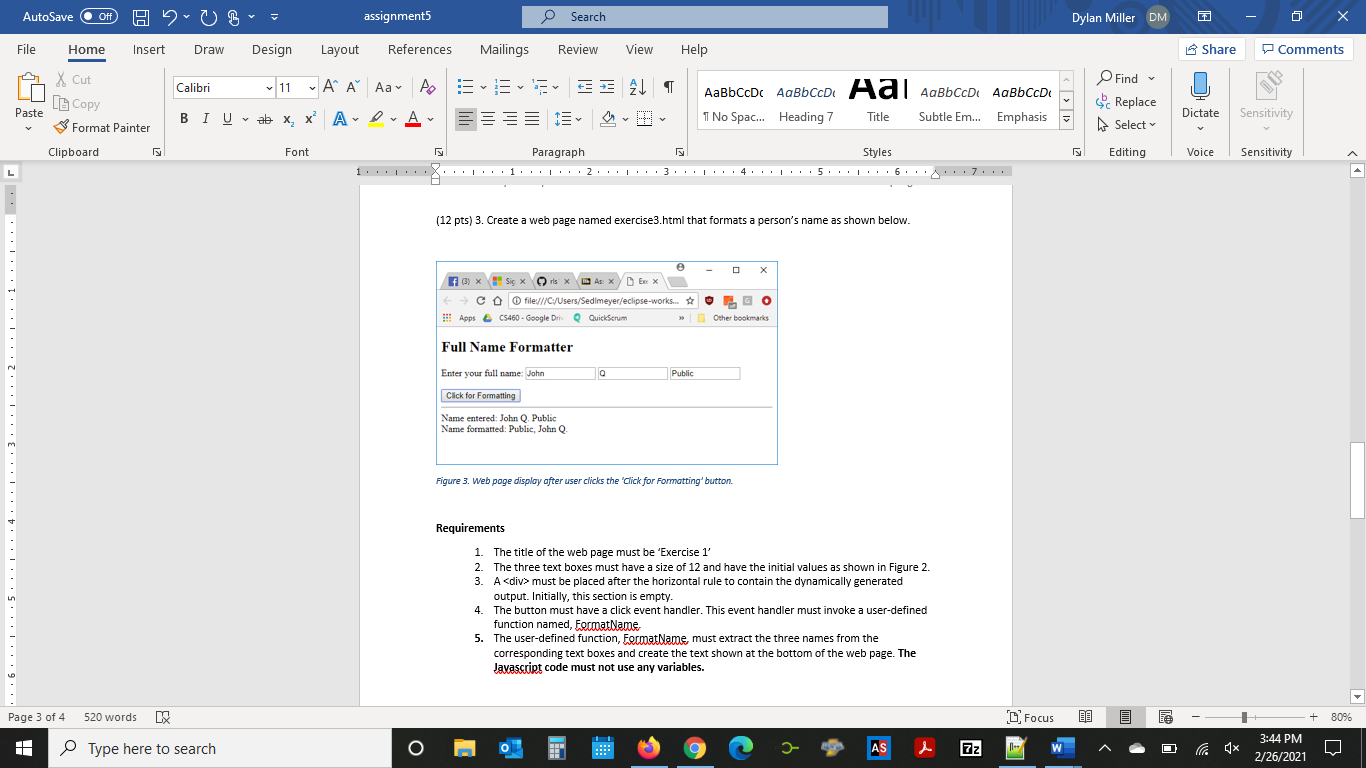
Excercise 1
AutoSave Off HUB assignment Search Dylan Miller DM 0 X File Home Insert Draw Design Layout References Mailings Review View Help Share Comments X Cut Calibri ~ 11 - A A A A A E ESE AL BIUab x, X? ADA Find c Replace Select Paste 1 No Spac... Heading 7 Title Subtle Em... Emphasis = L Copy & Format Painter Clipboard Dictate Sensitivity Font Styles Editing Voice Sensitivity Paragraph 1. IT'XLIII.1. III.2. LITL3 LTL4. LIV.5.1.1.6.,7. H (12 pts) 3. Create a web page named exercise3.html that formats a person's name as shown below. e (3) X Six rlsx Ex x Cofile:///C:/Users/Sedlmeyer/eclipse-works. # Go Apps CS460 - Google Dr QuickScrum >> Other bookmarks Full Name Formatter Enter your full name: John 10 Public Click for Formatting 6.1.1.1.5.1.1.1.4.1.1.1.3.1.1.1.2.1.1.1.1...1..... Name entered: John Q Public Name formatted: Public, John Q Figure 3. Web page display after user clicks the 'Click for Formatting' button. Requirements 1. The title of the web page must be 'Exercise 1' 2. The three text boxes must have a size of 12 and have the initial values as shown in Figure 2. 3. A
Here is the code I have as of right now.
Full Name Formatter
Enter your full name:
I am stuck on the bolded italicized part. Does it have something to do with different functions and vars?
AutoSave Off HUB assignment Search Dylan Miller DM 0 X File Home Insert Draw Design Layout References Mailings Review View Help Share Comments X Cut Calibri ~ 11 - A A A A A E ESE AL BIUab x, X? ADA Find c Replace Select Paste 1 No Spac... Heading 7 Title Subtle Em... Emphasis = L Copy & Format Painter Clipboard Dictate Sensitivity Font Styles Editing Voice Sensitivity Paragraph 1. IT'XLIII.1. III.2. LITL3 LTL4. LIV.5.1.1.6.,7. H (12 pts) 3. Create a web page named exercise3.html that formats a person's name as shown below. e (3) X Six rlsx Ex x Cofile:///C:/Users/Sedlmeyer/eclipse-works. # Go Apps CS460 - Google Dr QuickScrum >> Other bookmarks Full Name Formatter Enter your full name: John 10 Public Click for Formatting 6.1.1.1.5.1.1.1.4.1.1.1.3.1.1.1.2.1.1.1.1...1..... Name entered: John Q Public Name formatted: Public, John Q Figure 3. Web page display after user clicks the 'Click for Formatting' button. Requirements 1. The title of the web page must be 'Exercise 1' 2. The three text boxes must have a size of 12 and have the initial values as shown in Figure 2. 3. A
must be placed after the horizontal rule to contain the dynamically generated output. Initially, this section is empty. 4. The button must have a click event handler. This event handler must invoke a user-defined function named, FocooatName 5. The user-defined function, FormatName, must extract the three names from the corresponding text boxes and create the text shown at the bottom of the web page. The Javascript code must not use any variables. Page 3 of 4 520 words Focus + 80% Type here to search o E AS 7z W 3:44 PM 2/26/2021
Step by Step Solution
There are 3 Steps involved in it
1 Expert Approved Answer
Step: 1 Unlock

Question Has Been Solved by an Expert!
Get step-by-step solutions from verified subject matter experts
Step: 2 Unlock
Step: 3 Unlock
 Study Help