







Question: I cant seem to get the code for this, can someone please help with the code 2. Create the script in the SLAB_TMP directory nano
I cant seem to get the code for this, can someone please help with the code 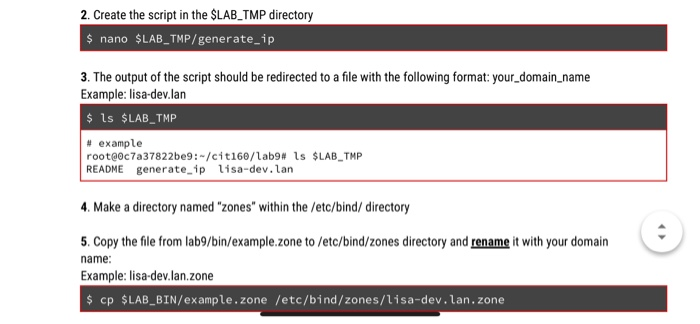
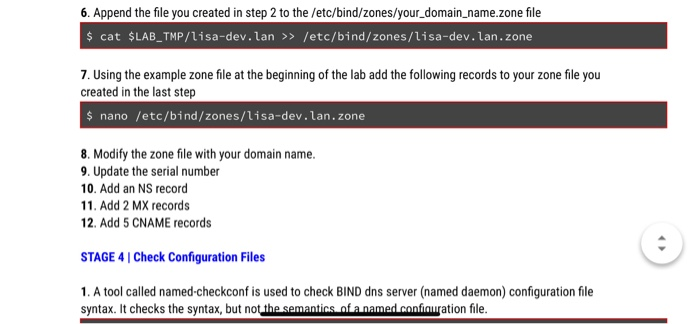
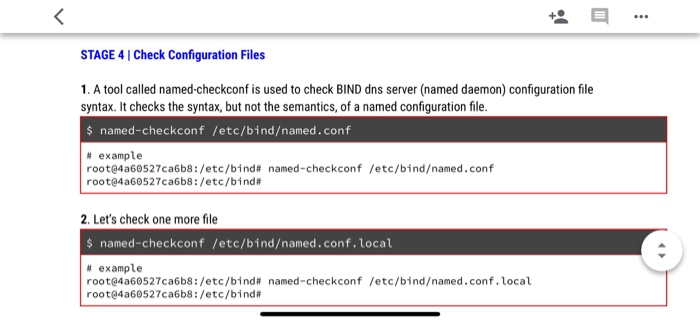
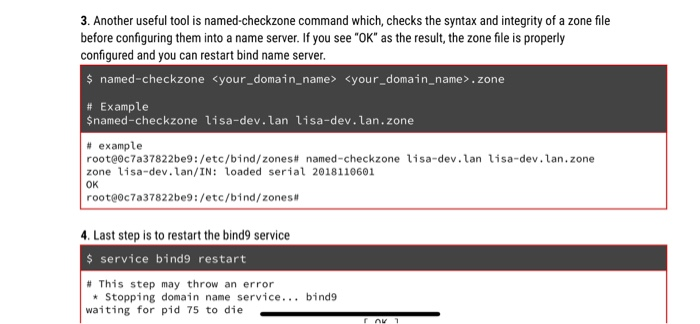
2. Create the script in the SLAB_TMP directory nano $LAB TMP/generate ip 3. The output of the script should be redirected to a file with the following format: your_domain name Example: lisa-dev.lan $ ls $LAB_TMP # example root@ec7a37822be9 : ~/cit160/lab9 # 1s README generate ip lisa-dev.lan $LAB-TMP 4. Make a directory named "zones" within the /etc/bind/ directory 5. Copy the file from lab9/bin/example.zone to /etc/bind/zones directory and rename it with your domain name Example: lisa-dev.lan.zone cp $LAB_BIN/example.zone /etc/bind/zones/lisa-dev.lan. zone
Step by Step Solution
There are 3 Steps involved in it
1 Expert Approved Answer
Step: 1 Unlock

Question Has Been Solved by an Expert!
Get step-by-step solutions from verified subject matter experts
Step: 2 Unlock
Step: 3 Unlock
 Study Help