







Question: I could really use some help with this assignment! Must be a form application in C# also must be basic as I am a beginner.
I could really use some help with this assignment!
Must be a form application in C# also must be basic as I am a beginner.
The code that must be upgraded
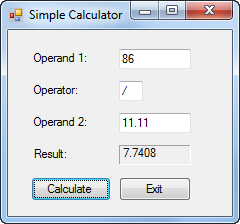
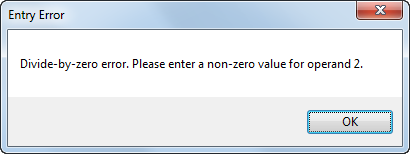
private void btnCalculate_Click(object sender, EventArgs e) { decimal operand1 = Convert.ToDecimal(txtOperand1.Text); string operator1 = txtOperator.Text; decimal operand2 = Convert.ToDecimal(txtOperand2.Text); decimal result = Calculate(operand1, operator1, operand2);
result = Math.Round(result, 4); this.txtResult.Text = result.ToString(); txtOperand1.Focus(); }
private decimal Calculate(decimal operand1, string operator1, decimal operand2) { decimal result = 0; if (operator1 == "+") result = operand1 + operand2; else if (operator1 == "-") result = operand1 - operand2; else if (operator1 == "*") result = operand1 * operand2; else if (operator1 == "/") result = operand1 / operand2; return result; }
private void btnExit_Click(object sender, EventArgs e) { this.Close(); } } }
In this exercise, youll add exception handling to the Simple Calculator form exercise A4-E1.
1.Open the SimpleCalculator project in the Assignment5\SimpleCalculatoException directory.
2. Add a try-catch statement in the btnCalculate_Click event handler that will catch any exceptions that occur when the statements in that event handler are executed.
If an exception occurs, display a dialog box with
the error message,
the type of error,
and a stack trace.
Test the application by entering a nonnumeric value for one of the operands.
3. Add three additional catch blocks to the try-catch statement that will catch
a FormatException,
an OverflowException, and
a DivideByZeroException.
These catch blocks should display a dialog box with an appropriate error message.
4. Test the application again by entering a nonnumeric value for one of the operands. Then, enter 0 for the second operand as shown above to see what happens.
Thanks!
a Simple Calculator X Operand 1 86 Operator: Operand 2 11.11 7.7408 Result: Calculate
Step by Step Solution
There are 3 Steps involved in it

Get step-by-step solutions from verified subject matter experts
 Study Help