







Question: I CREATED A CODE BUT WHEN I COMPILE IT; ITS NOT STOPPING (IT KEEPS ON LOOPING) I COULD NOT ENTER ANYTHING IT JUST KEEPS ON
I CREATED A CODE BUT WHEN I COMPILE IT; ITS NOT STOPPING (IT KEEPS ON LOOPING) I COULD NOT ENTER ANYTHING IT JUST KEEPS ON GOING. HELP
#include
using namespace std;
class Item { private: string name; int quantity; double price; public: //set name void setName(string itemName) { name = itemName; } //return name string getName() { return name; } //set price void setPrice(double itemPrice) { price = itemPrice; } //eturn price double getPrice() { return price; } //set quantity void setQuantity(int itemQuantity) { quantity = itemQuantity; } //return quantity int getQuantity() { return quantity; } };
class ShoppingCart { private: //store item class in object vector
void addItem(string name, int quantity, double price) { for (int i = 0; i
};
int main() {
ShoppingCart cart; string name; int qty; double price; int choice=0; while(1) { cout>name; cout>qty; cout>price; //Adds an item to shopping cart cart.addItem(name, qty, price); break; } //Displays the item list case 3: { cart.displayItems(); break; } case 4:// Exit program exit(0); default: cout
SCREENSHOT OF THE COMPILATION: IT KEEPS ON LOOPING 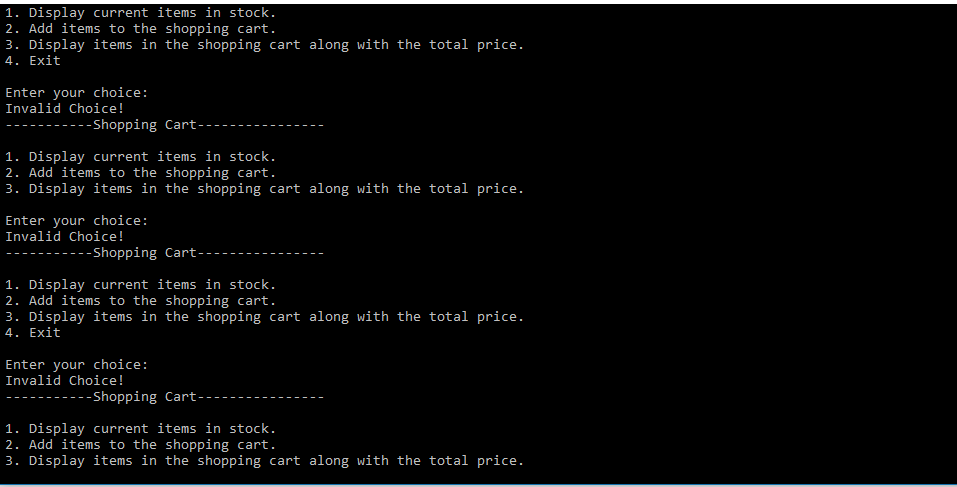
1. Display current items in stock 2. Add items to the shopping cart. 3. Display items in the shopping cart along with the total price. 4. Exit Enter your choice: Invalid Choice! ----Shopping Cart ---- 1. Display current items in stock. 2. Add items to the shopping cart. 3. Display items in the shopping cart along with the total price. Enter your choice: Invalid Choice! -----------Shopping Cart---------------- 1. Display current items in stock. 2. Add items to the shopping cart. 3. Display items in the shopping cart along with the total price. 4. Exit Enter your choice: Invalid Choice! ----Shopping Cart ---- 1. Display current items in stock. 2. Add items to the shopping cart. 3. Display items in the shopping cart along with the total price
Step by Step Solution
There are 3 Steps involved in it

Get step-by-step solutions from verified subject matter experts
 Study Help