







Question: I created a node file that will scrape the provided url: https://www.billboard.com/charts/rap-song and and send an email of all artists & songs that are sung
I created a node file that will scrape the provided url: https://www.billboard.com/charts/rap-song and and send an email of all artists & songs that are sung by the specified artists given via the command line. however, instead of sending the specific artist and songs that are sung via the command line, it will print out on command line. it send differnt thing to e-mail.
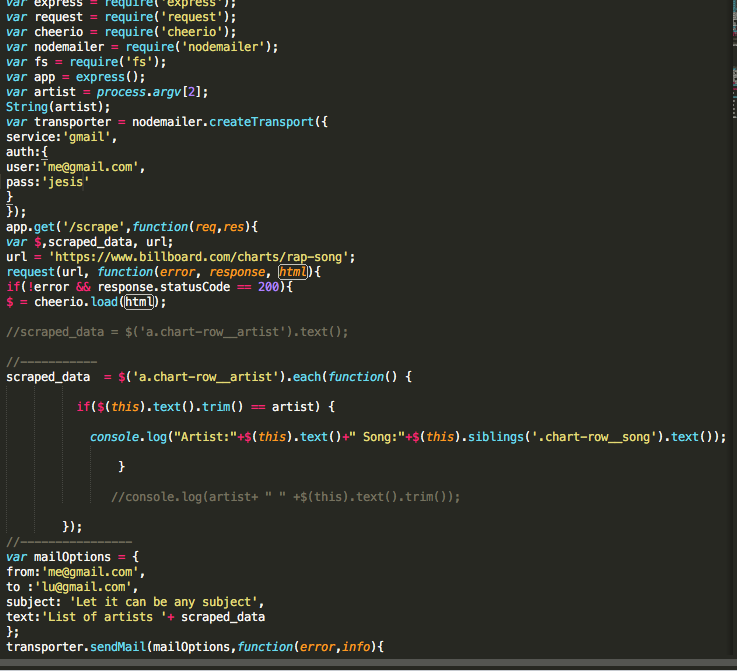
this is my code
part 1
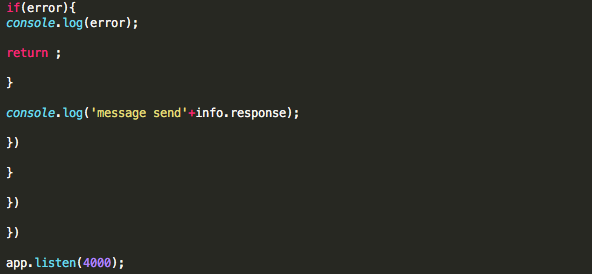
part 2
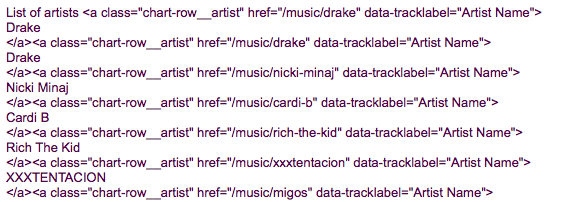
this wat send to email
this is what printout on command , which supposed to send to email
node ag.js Migos
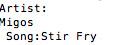
I want to send
Artist:
Migos
Song:Stir Fry
to email when I tyoed node ag.js Migos.
xpress- require express var request = require(' request'); var cheerio require('cheerio'); var nodemailer require('nodemailer); var fs require('fs') var app express var artist - process.argv [2]; String(artist); var transporter nodemailer.createTransport( service: 'gmail', auth: user: 'me@gmail.com' pass: 'jesis' F) app. get (?scrape' , function ( req, res) { var $,scraped_data, url; url- 'https://www.billboard.com/charts/rap-song'; request(url, function(error, response, htm) if(!error&& response.statusCode200) //scraped-data= $('a.chart-row artist').text(); scraped_data('a.chart-row_artist').each(function) if($(this).text ( ) . trin() = artist) { console. log ("Artist:"+$(this) .text () +" Song :"+5(this).siblings('.chart-row-song') . text ()); //console.log(artist+""+$(this).text).trim)) var mailOptions from: me@gmail.com', to 'lu@gmail.com', subject: 'Let it can be any subject' text: 'List of artists scraped_data t; transporter.sendMail(mailOptions, function(error,info)t xpress- require express var request = require(' request'); var cheerio require('cheerio'); var nodemailer require('nodemailer); var fs require('fs') var app express var artist - process.argv [2]; String(artist); var transporter nodemailer.createTransport( service: 'gmail', auth: user: 'me@gmail.com' pass: 'jesis' F) app. get (?scrape' , function ( req, res) { var $,scraped_data, url; url- 'https://www.billboard.com/charts/rap-song'; request(url, function(error, response, htm) if(!error&& response.statusCode200) //scraped-data= $('a.chart-row artist').text(); scraped_data('a.chart-row_artist').each(function) if($(this).text ( ) . trin() = artist) { console. log ("Artist:"+$(this) .text () +" Song :"+5(this).siblings('.chart-row-song') . text ()); //console.log(artist+""+$(this).text).trim)) var mailOptions from: me@gmail.com', to 'lu@gmail.com', subject: 'Let it can be any subject' text: 'List of artists scraped_data t; transporter.sendMail(mailOptions, function(error,info)t
Step by Step Solution
There are 3 Steps involved in it

Get step-by-step solutions from verified subject matter experts
 Study Help