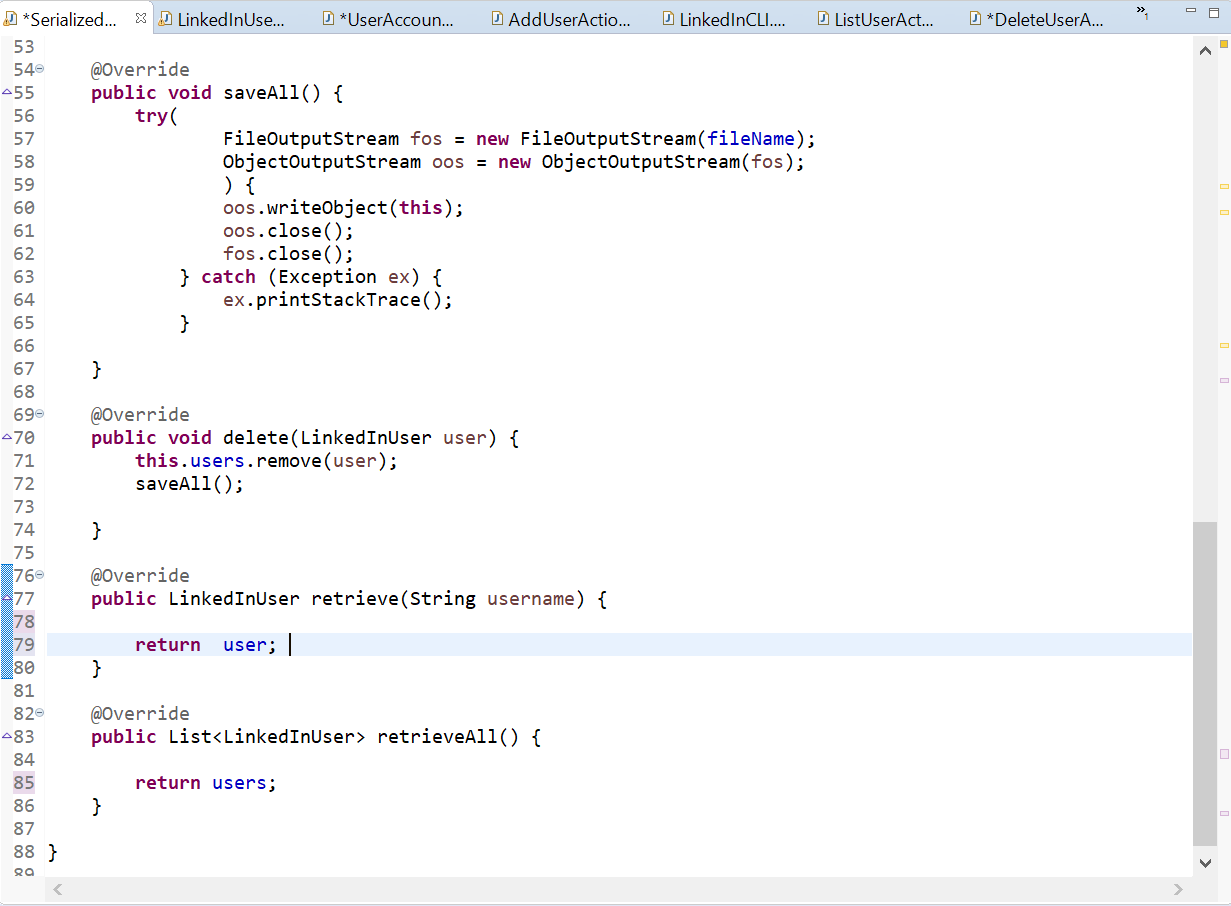
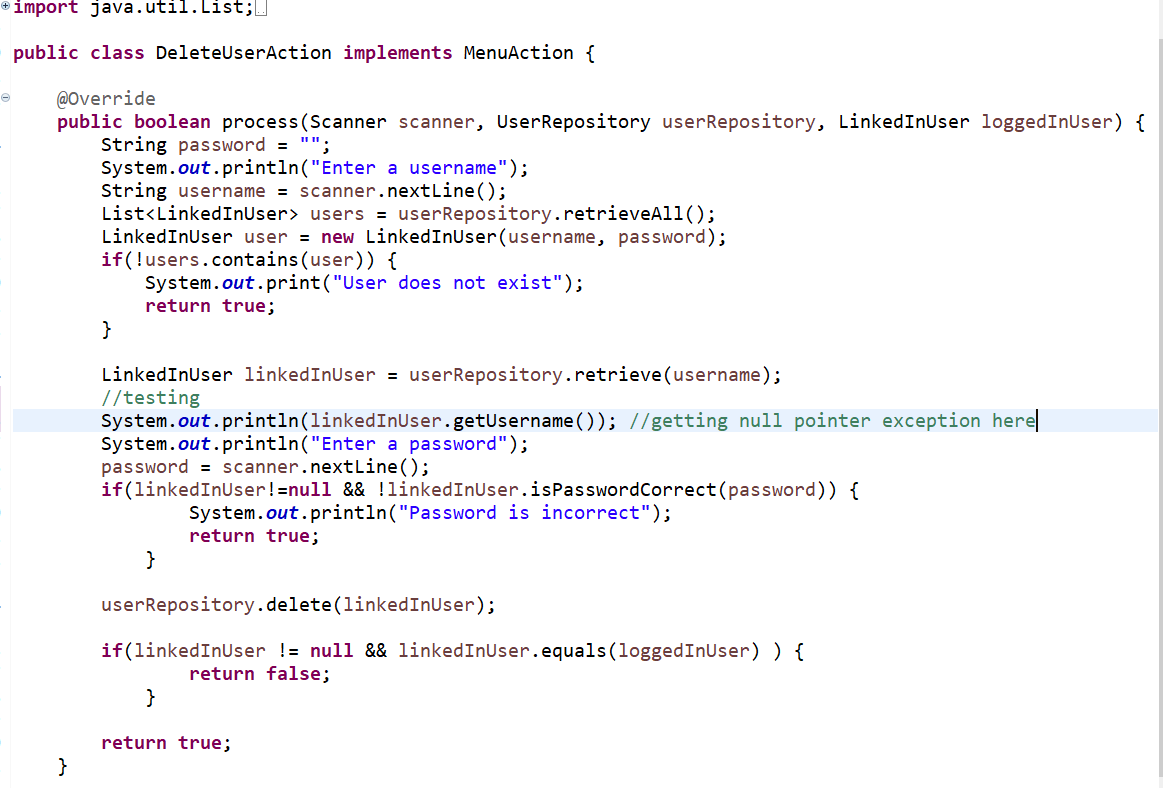
Question: I do not understand how to retrieve this object from the collection using a specified variable. I am trying to retrieve a LinkedInUser with a

I do not understand how to retrieve this object from the collection using a specified variable. I am trying to retrieve a LinkedInUser with a supplied username, but the retrieve method is not working and I have no clue as to why. (I tried using a method from another class called get username to check if there was a username associated with linkedInUser to check if anything was retireved and it just gave a null pointer exception.)I do not understand how to retrieve this object from the collection

using a specified variable. I am trying to retrieve a LinkedInUser witha supplied username, but the retrieve method is not working and I

LinkedInUser retrieve (String username); This method returns the LinkedIn user associated with the supplied user name or null if there is no user associated with the supplied user name. D *DeleteUserA... *Serialized... X LinkedInUse... D *User Accoun... D Add UserActio... LinkedInCLI.... D ListUserAct... 53 540 @Override 455 public void saveAll() { 56 try 57 FileOutputStream fos = new FileOutputStream(fileName); 58 ObjectOutputStream oos = new ObjectOutputStream(fos); 59 ) { 60 oos.writeObject(this); 61 oos.close(); 62 fos.close(); 63 } catch (Exception ex) { 64 ex.printStackTrace(); 65 } 66 67 } 68 69 @Override 470 public void delete(LinkedInUser user) { 71 this.users.remove(user); 72 saveAll(); 73 74 } 75 760 @Override -77 public LinkedInUser retrieve(String username) { 78 79 return user; | 80 } 81 82 @Override 483 public List retrieveAll() { 84 85 return users; 86 } 87 88 } ga import java.util.List;.. public class DeleteUserAction implements MenuAction { @Override public boolean process (Scanner scanner, UserRepository userRepository, LinkedInUser loggedInUser) { String password = ""; System.out.println("Enter a username"); String username = scanner.nextLine(); List users = userRepository.retrieveAll(); LinkedInuser user = new LinkedInUser(username, password); if(!users. contains(user)) { System.out.print("User does not exist"); return true; } LinkedInUser linked Inuser = userRepository.retrieve(username); //testing System.out.println(linkedInUser.getUsername()); //getting null pointer exception here System.out.println("Enter a password"); password = scanner.nextLine(); if(linkedInUser!=null && !linkedInUser.isPasswordCorrect(password)) { System.out.println("Password is incorrect"); return true; } userRepository.delete(linkedInUser); if(linkedInUser != null && linkedInUser.equals(loggedInUser) ) { return false; } return true; } LinkedInUser retrieve (String username); This method returns the LinkedIn user associated with the supplied user name or null if there is no user associated with the supplied user name. D *DeleteUserA... *Serialized... X LinkedInUse... D *User Accoun... D Add UserActio... LinkedInCLI.... D ListUserAct... 53 540 @Override 455 public void saveAll() { 56 try 57 FileOutputStream fos = new FileOutputStream(fileName); 58 ObjectOutputStream oos = new ObjectOutputStream(fos); 59 ) { 60 oos.writeObject(this); 61 oos.close(); 62 fos.close(); 63 } catch (Exception ex) { 64 ex.printStackTrace(); 65 } 66 67 } 68 69 @Override 470 public void delete(LinkedInUser user) { 71 this.users.remove(user); 72 saveAll(); 73 74 } 75 760 @Override -77 public LinkedInUser retrieve(String username) { 78 79 return user; | 80 } 81 82 @Override 483 public List retrieveAll() { 84 85 return users; 86 } 87 88 } ga import java.util.List;.. public class DeleteUserAction implements MenuAction { @Override public boolean process (Scanner scanner, UserRepository userRepository, LinkedInUser loggedInUser) { String password = ""; System.out.println("Enter a username"); String username = scanner.nextLine(); List users = userRepository.retrieveAll(); LinkedInuser user = new LinkedInUser(username, password); if(!users. contains(user)) { System.out.print("User does not exist"); return true; } LinkedInUser linked Inuser = userRepository.retrieve(username); //testing System.out.println(linkedInUser.getUsername()); //getting null pointer exception here System.out.println("Enter a password"); password = scanner.nextLine(); if(linkedInUser!=null && !linkedInUser.isPasswordCorrect(password)) { System.out.println("Password is incorrect"); return true; } userRepository.delete(linkedInUser); if(linkedInUser != null && linkedInUser.equals(loggedInUser) ) { return false; } return true; }

Step by Step Solution

There are 3 Steps involved in it

1 Expert Approved Answer
Step: 1 Unlock blur-text-image
Question Has Been Solved by an Expert!

Get step-by-step solutions from verified subject matter experts

Step: 2 Unlock
Step: 3 Unlock

Students Have Also Explored These Related Databases Questions!