







Question: I don't know how to create the tables in command prompt for the sql server. This assignment counts as one lab in the LAB category
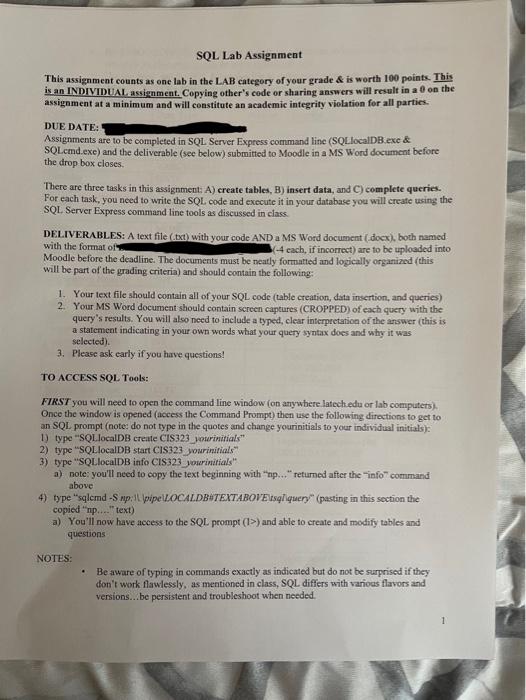
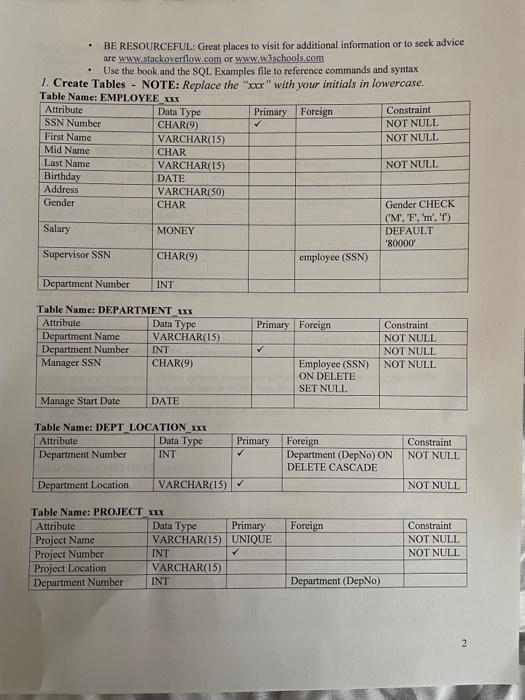
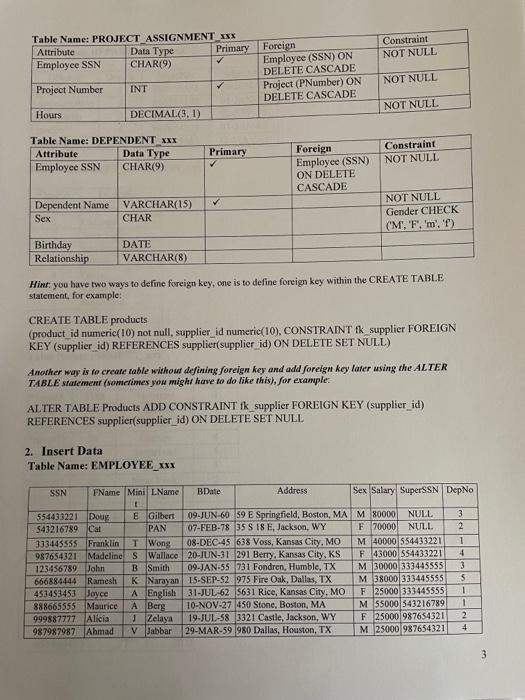
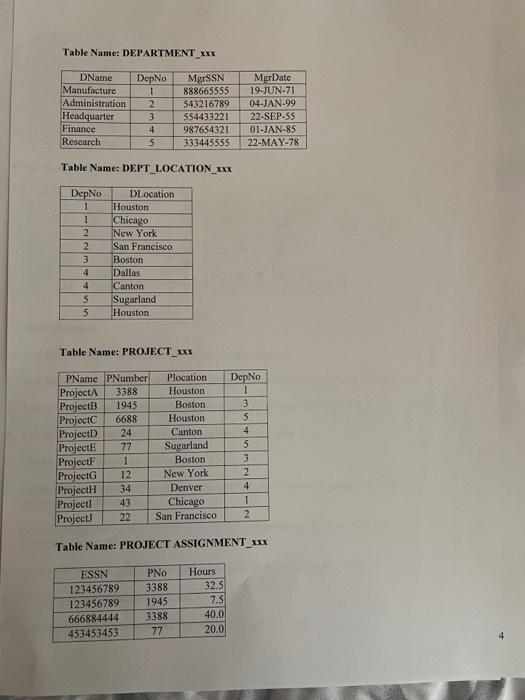
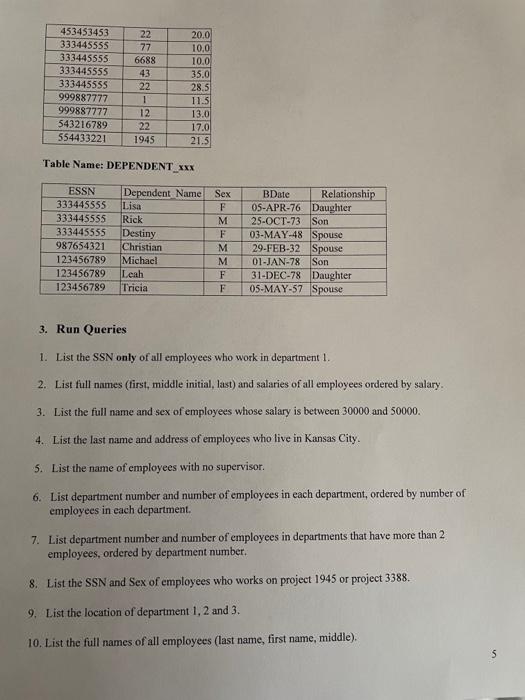
This assignment counts as one lab in the LAB category of your grade & is worth 100 points. This is an INDIVIDUAL, assignment. Copying other's code or sharing answers will result in a 8 on the assignment at a minimum and will constitute an academic integrity violation for all parties. DUE DATE: Assignments are to be completed in SQL Server Express command line (SQLlocalDB.exe \& SQLemd exe) and the deliverable (see below) submitted to Moodle in a MS Word document before the drop box closes. There are three tasks in this assignmenti A) create tables, B) insert data, and C) complete queries. For each task, you need to write the SQL. code and execute it in your database you will create using the SQL Server Express command line tools as discussed in class. DELIVERABLES: A text file (txt) with your code AND a MS Word document (dock), both named: with the format of (4 each, if incorrect) are to be uploaded into Moodle before the deadline. The documents must be neatly formatted and logically organized (this will be part of the grading criteria) and should contain the following: 1. Your text file should contain all of your SQL code (table creation, data insertion, and queries) 2. Your MS Word documeat should contain screen captures (CROPPED) of each query with the query's results. You will also need to include a typed, clear interpretation of the answer (this is a statement indicating in your own words what your query syntax does and why it was selected). 3. Please ask early if you have questions! TO ACCESS SQL Tools: FIKST you will need to open the command line window (on anywhere latechedu or lab computers). Once the window is opened (access the Command Prompt) then use the following directions to get to an SQL prompt (note; do not type in the quotes and change yourinitials to your individual initials): 1) type "SQL. localDB create CIS323 yourintials" 2) type "SQLlocalDB start CIS323 yourinitials" 3) type "SQLlocalDB info CIS323 yourinarials" a) note: you'll need to copy the text beginning with "tp... " returned after the "info" command above 4) type "sqlemd -S np; Il pipeUOCALDBHTEXTABOVEVsqliquery" (pasting in this section the copied "np...." text) a) You'll now have aecess to the SQL prompt (I>) and able to create and modify tables and questions NOIES: - Be aware of typing in commands exactly as indicated but do not be surprised if theydon't work flawlessly, as mentioned in class, SQL differs with vanioas flavors and - BF RESOURCEFUL: Great places to visit for additional information or to seek advice are www stackoverflow,com or www, w3schools.com - Use the book and the SQL Examples file to reference commands and syntax 1. Create Tables - NOTE: Replace the "xax," with your initials in lowercase. Hint: you have two ways to define foreign key, one is to define foreign key within the CREATE TABLE statement, for example: CREATE TABLE products (product id numeric(10) not null, supplier id numeric(10), CONSTRAINT fk supplier FOREIGN KEY (supplier_id) REFERENCES supplier(supplier_id) ON DELETE SET NULL) Another way is to create table without defining foreign key and add forelgn key later wsing the ALTER TABLE statement (sometimes you might have to do like this), for example. ALTER TABLE Products ADD CONSTRAINT fk_supplier FOREIGN KEY (supplier_id) REFERENCES supplier(supplier_id) ON DELETESET NULL 2. Insert Data Table Name: EMPLOYEE_xxx Table Nane: DEPARTMENT_xxx Table Name: DEPT_LOCATION_xxx Table Name: PRO.IECT_xxx Table Name: PROJECT ASSIGNMENT_ xxx 4 Table Name: DEPENDENT_xxx 3. Run Queries 1. List the SSN only of all employees who work in department 1. 2. List full names (first, middle initial, last) and salaries of all employees ordered by salary. 3. List the full name and sex of employees whose salary is between 30000 and 50000. 4. List the last name and address of employees who live in Kansas City. 5. List the name of employees with no supervisor. 6. List department number and number of employees in each department, ordered by number of employees in each department. 7. List department number and number of employees in departments that have more than 2 employees, ordered by department number. 8. List the SSN and Sex of employees who works on project 1945 or project 3388. 9. List the location of department 1,2 and 3. 10. List the full names of all employees (last name, first name, middle)
Step by Step Solution
There are 3 Steps involved in it

Get step-by-step solutions from verified subject matter experts
 Study Help