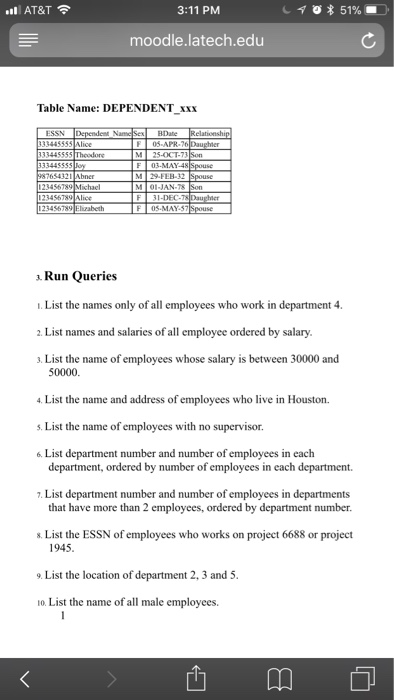
Question: ..il AT&T 8:07 AM moodle.latech.edu SQL Lab Assignment This assignment counts as one lab in the LAB category of your grade & is worth 100
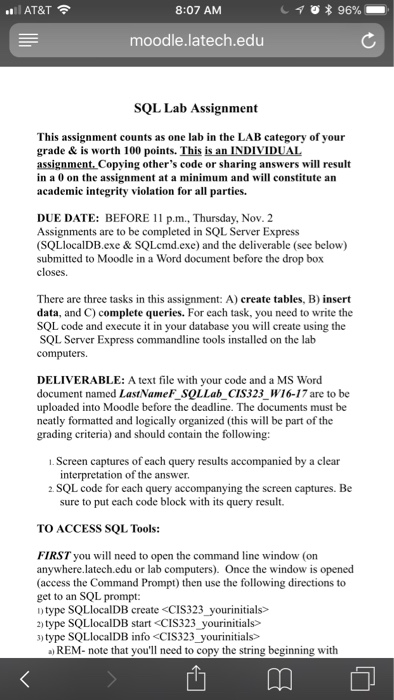
 ..il AT&T 8:07 AM moodle.latech.edu SQL Lab Assignment This assignment counts
as one lab in the LAB category of your grade & is
worth 100 points. This is an INDIVIDUAL assignment Copying other's code or
sharing answers will result in a 0 on the assignment at a
minimum and will constitute an academic integrity violation for all parties. DUE
DATE: BEFORE 1 1 p.m.Thursday, Nov. 2 Assignments are to be completed

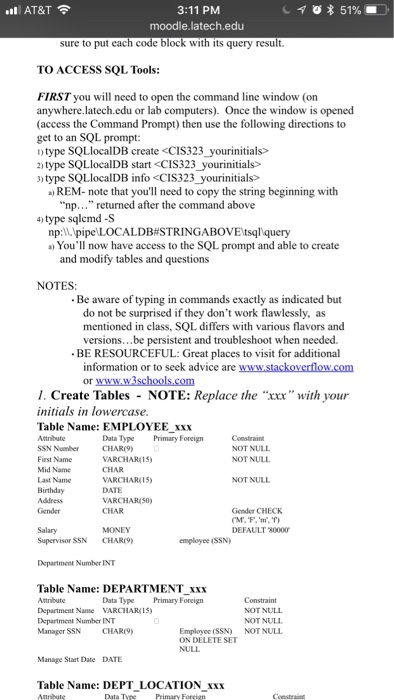
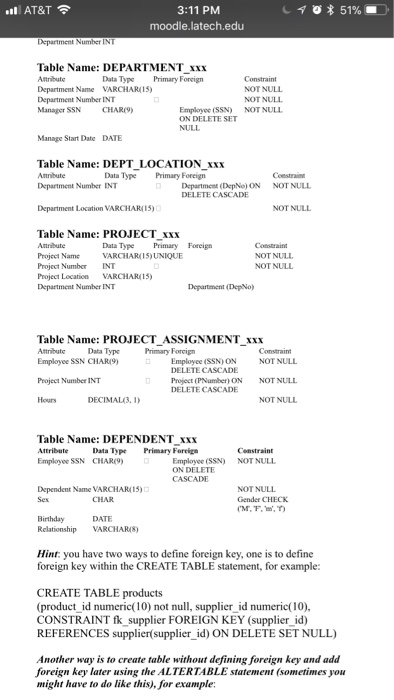
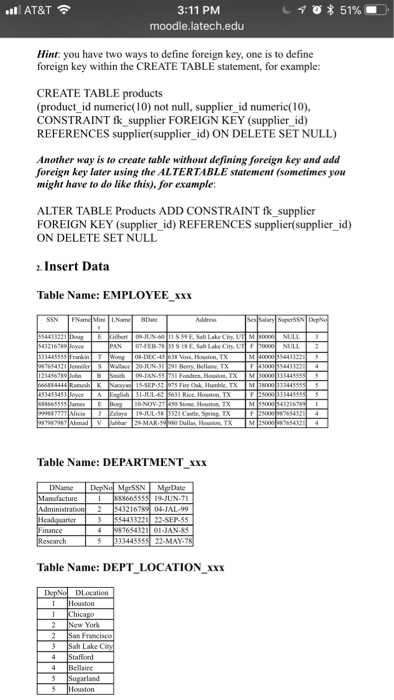
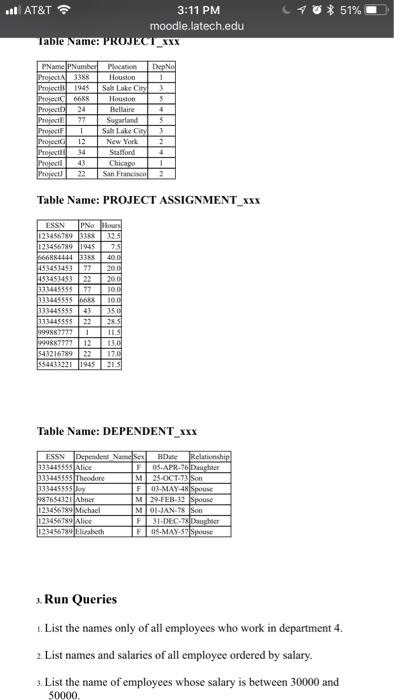
..il AT&T 8:07 AM moodle.latech.edu SQL Lab Assignment This assignment counts as one lab in the LAB category of your grade & is worth 100 points. This is an INDIVIDUAL assignment Copying other's code or sharing answers will result in a 0 on the assignment at a minimum and will constitute an academic integrity violation for all parties. DUE DATE: BEFORE 1 1 p.m.Thursday, Nov. 2 Assignments are to be completed in SQL Server Express SQLlocalDB.exe& SQLcmd.exe) and the deliverable (see below) submitted to Moodle in a Word document before the drop box closes. There are three tasks in this assignment: A) create tables, B) insert data, and C) complete queries. For each task, you need to write the SQL code and execute it in your database you will create using the SQL Server Express commandline tools installed on the lab computers. DELIVERABLE: A text file with your code and a MS Word document named LastNameF SQLLab CIS323_W16-17 are to be uploaded into Moodle before the deadline. The documents must be neatly formatted and logically organized (this will be part of the grading criteria) and should contain the following: . Screen captures of each query results accompanied by a clear interpretation of the answer. 2. SQL code for each query accompanying the screen captures. Be sure to put each code block with its query result. TO ACCESS SQL Tools: FIRST you will need to open the command line window (on anywhere.latech.edu or lab computers). Once the window is opened (access the Command Prompt) then use the following directions to get to an SQL prompt: ntype SQLIocalDB create 2) type SQLlocalDB start 3) type SQLlocalDB info REM-note that you'll need to copy the string beginning with ..il AT&T 8:07 AM moodle.latech.edu SQL Lab Assignment This assignment counts as one lab in the LAB category of your grade & is worth 100 points. This is an INDIVIDUAL assignment Copying other's code or sharing answers will result in a 0 on the assignment at a minimum and will constitute an academic integrity violation for all parties. DUE DATE: BEFORE 1 1 p.m.Thursday, Nov. 2 Assignments are to be completed in SQL Server Express SQLlocalDB.exe& SQLcmd.exe) and the deliverable (see below) submitted to Moodle in a Word document before the drop box closes. There are three tasks in this assignment: A) create tables, B) insert data, and C) complete queries. For each task, you need to write the SQL code and execute it in your database you will create using the SQL Server Express commandline tools installed on the lab computers. DELIVERABLE: A text file with your code and a MS Word document named LastNameF SQLLab CIS323_W16-17 are to be uploaded into Moodle before the deadline. The documents must be neatly formatted and logically organized (this will be part of the grading criteria) and should contain the following: . Screen captures of each query results accompanied by a clear interpretation of the answer. 2. SQL code for each query accompanying the screen captures. Be sure to put each code block with its query result. TO ACCESS SQL Tools: FIRST you will need to open the command line window (on anywhere.latech.edu or lab computers). Once the window is opened (access the Command Prompt) then use the following directions to get to an SQL prompt: ntype SQLIocalDB create 2) type SQLlocalDB start 3) type SQLlocalDB info REM-note that you'll need to copy the string beginning with
Step by Step Solution

There are 3 Steps involved in it

1 Expert Approved Answer
Step: 1 Unlock blur-text-image
Question Has Been Solved by an Expert!

Get step-by-step solutions from verified subject matter experts

Step: 2 Unlock
Step: 3 Unlock

Students Have Also Explored These Related Databases Questions!