



Question: i finished the first part but need help with the formulas in part 2, 3, and 4 Xercise Cycles Company has provided its year ended
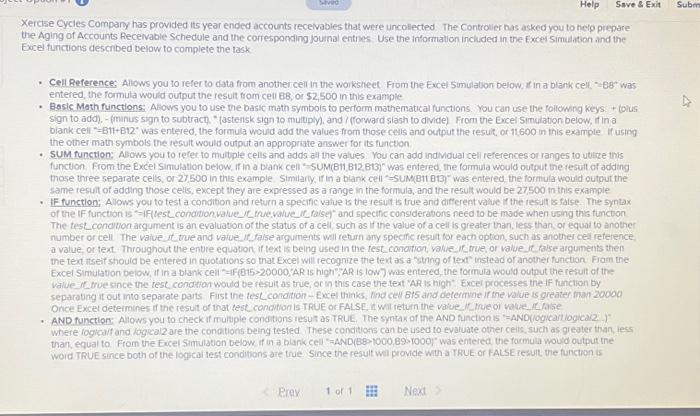
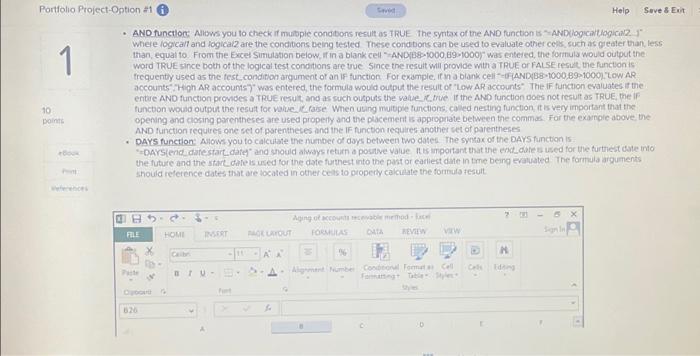
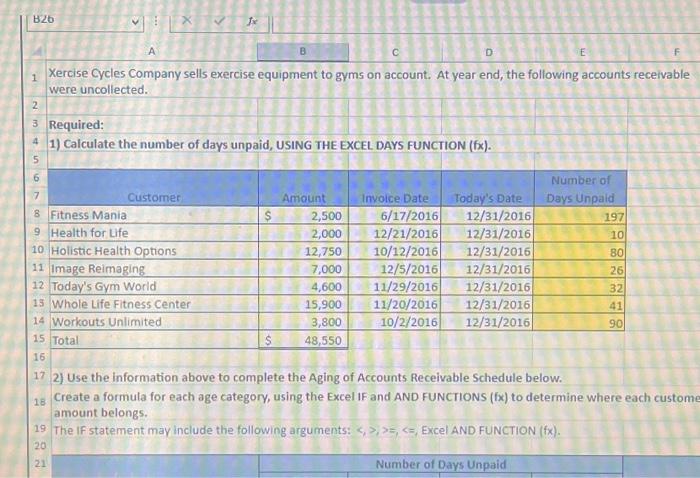
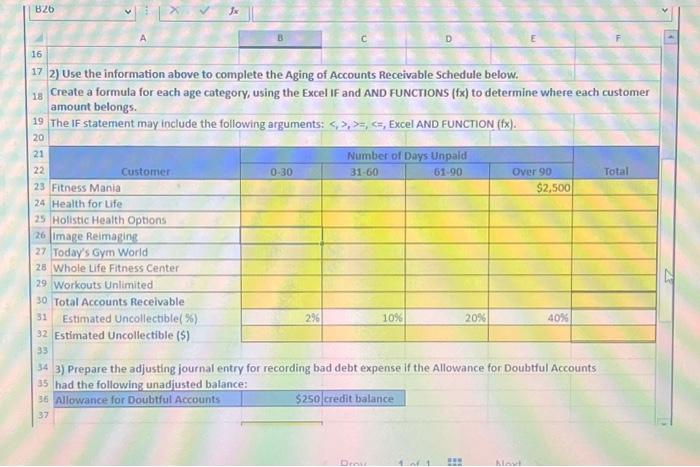
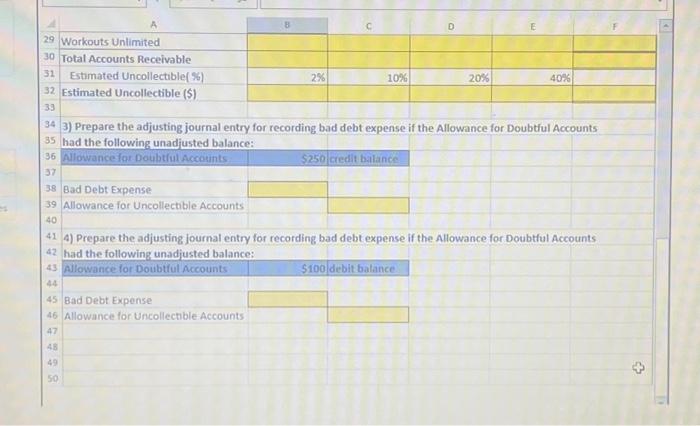
Xercise Cycles Company has provided its year ended accounts receivabies that were uncolected. The Controlier has asked you to help prepare the Aging of Accounts Pecevable Schedule and the correspornding jouinal entives Use the information inclided in the Fxcel Simulation ind the Excel functions described below to complete the task - Cell Beference: Allows you to refer to data from another cell in the workshect From the Excel Similaton below, if in a blank cell, - B8- was entered, the formula would output the resuit from cell B8, or 52,500 in this example - Bosic Math functions: Alows you to use the basic math symbois to perform mathematical functions. You can use the following keys + iolus sign to add). - (minus sign to subtract, " (astensk sign 10 multipin, and / forward slash to divide) From the Excel Simulation below, if in a biank cell =B11+B12" was entered, the formula would add the values from those cells and output the result, or 11600 in this example if using the other math symbols the tesult would output an appropriate answer for its function - SUM function: Alsows you to refer to mutple cells and adds al the values. You can add individual cell references or ranges to utirze this function. From the Excel Simulation below, if in a biank cell "s SUM(B11,B12.B137" was entered, the formula would output the fesult of adding those three separate cells, or 27,500 in this example Similarly, if in a biank ceil =5UM(B11 e13; was entered, the tormula would outout the same result of adding those celis, except they are expressed as a range in the formula, and the rerult would be 27 soo in this example - IF function: Alows you to test a condition and return a specific value is the result is true and different value if the result is false. The syntax The fest_conotion acgument is an evaluation of the status of a cell, such as if the value of a cell is greater than, less than, or equat to anothe number or cell. The vaive it true and vatue if, faise arguments will return any specific result for each option, such as another cel reference a value, or text. Throughout the entire equaton. If text is being used in the fest_conorion, vake, if true, of value it. fise argunents then the text itseif should be entered in quotations so that Excel will recognite the text as a string of text' instead or another function Fiom the Excel Simulation beiow, if in a blank cell "=if(B15>20000, AR is high": AR is lown was entered, the formula would output the result of the - AND function: Alows you to check if rmultple conditions resut as TRUE. The syntax of the AND Rinction 15 "=ANDUlogicantiogical2. )" where logicaif and iogcal2 are the conditions being tested These conditions can be used to evaruate other ceis, such as greater than, less woid TRUE since Doth of the lograil test conditions are true. Since the result wil provide with a TRUE or FALSEresult the function is Where logicall and iogical2 are the conditions being tested These condoons can be used to evaluate other cess, such as greder than, less than, equal to. From the Excel Simulation beiow, if in a blank cell "- ANDb8-1000,69>1000/ was enteried, the formula would output the : word TRUE since both of the logicai test conditions are true. Since the result wil provide with I TRUE or FALSE result the function is accounts" "High AR accounts" " was entered, the formula would output the result of "Low AR accounts". The if function evaluates it the entre AND function provides a TRUE resut, and as such outpuss the vatue, r. bue if the AND function does not result as TRUE, the if functon woud output the resut foe vatue ic fase. When utang muitiple functions, coled nesting function it is very important that the opening and closing parentheses are used properiy and the placement is appropiate between the commas. For the exarnole above, the AND function requires one set of psrentheses and the If function requires another set of parentheses - PAYs function Allows you to calcutate the numbec of doys between two dates the syntor of the DAYs function is: the future and the stave dare is used for the date futhest into the past or earliest diate in tame being evaluated The formula arguments should reference dates that are tocated in other ceas to pioperty calcuate the formuls fesult Xercise Cycles Company sells exercise equipment to gyms on account. At year end, the following accounts receivable were uncollected. Required: 1) Calculate the number of days unpaid, USING THE EXCEL DAYS FUNCTION ( fx ). 2) Use the information above to complete the Aging of Accounts Receivable Schedule below. Create a formula for each age category, using the Excel IF and AND FUNCIIONS ( fx ) to determine where each custom amount belongs. The If statement may include the following arguments: ,=,, Excel AND FUNCTION (fx). 17 2) Use the information above to complete the Aging of Accounts Receivable Schedule below. Create a formula for each age category, using the Excel IF and AND FUNCTIONS ( fx ) to determine where each customer amount belongs. The If statement may include the following arguments: =,, Excel AND FUNCTION (fx). 34 3) Prepare the adjusting journal entry for recording bad debt expense if the Allowance for Doubtful Accounts 35 had the follmwino unadiusted halance: 3) Prepare the adjusting journal entry for recording bad debt expense if the Allowance for Doubtiul Accounts had the following unadiusted balance: 4) Prepare the adjusting journal entry for recording bad debt expense if the Allowance for Doubthil Accounts 2 had the following unadiusted balance
Step by Step Solution
There are 3 Steps involved in it

Get step-by-step solutions from verified subject matter experts