







Question: Please fill all blanks by using IF and AND formula and show formula as well like (=SUM(C4:C10) Xercise Cycles Company has provided its year ended
Please fill all blanks by using IF and AND formula and show formula as well like (=SUM(C4:C10)
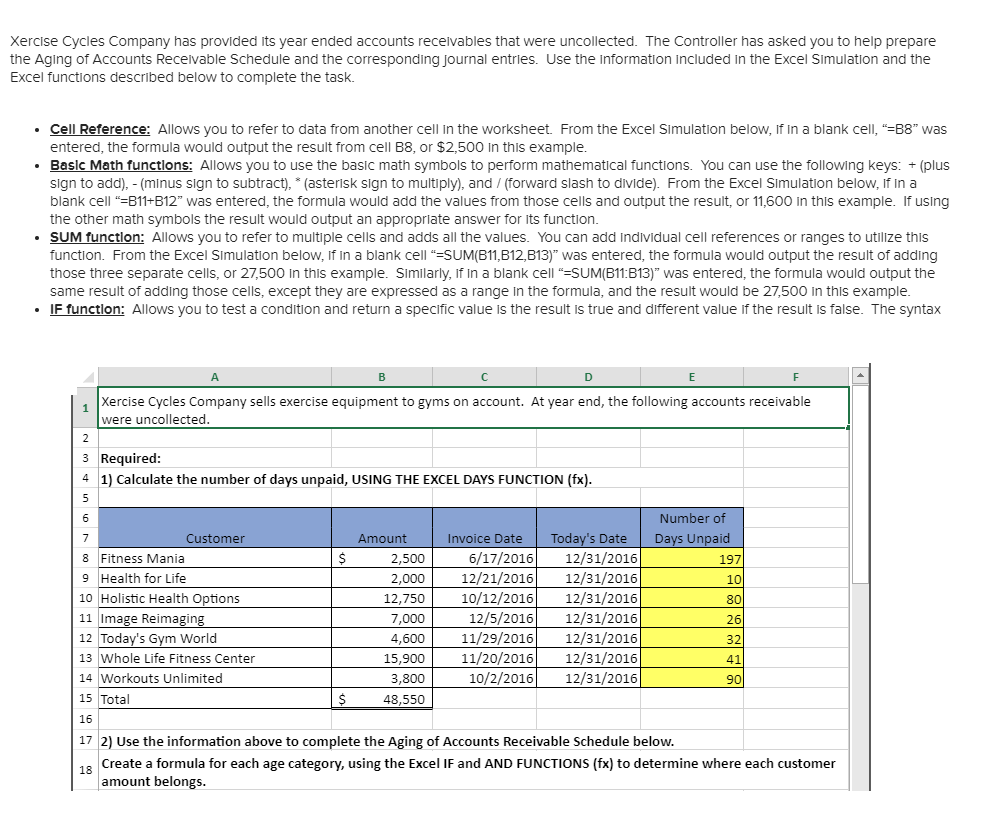
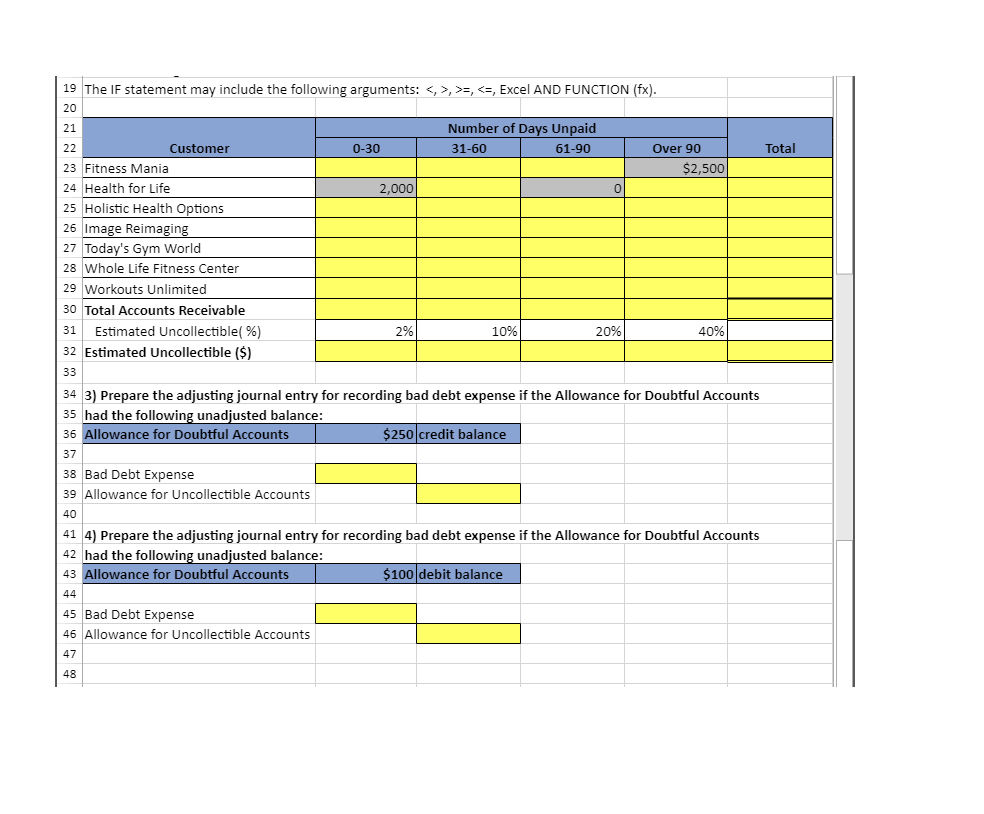
Xercise Cycles Company has provided its year ended accounts receivables that were uncollected. The Controller has asked you to help prepare the Aging of Accounts Recelvable Schedule and the corresponding Journal entries. Use the information included in the Excel Simulation and the Excel functions described below to complete the task. Cell Reference: Allows you to refer to data from another cell In the worksheet. From the Excel Simulation below, If In a blank cel, "-B8" was entered, the formula would output the result from cell B8, or $2,500 In this example Basic Math functions: Allows you to use the basic math symbols to perform mathematical functions. You can use the following keys: + (plus sign to add), (minus sign to subtract), (asterisk sign to multiply), and / (forward slash to divide). From the Excel Simulation below, If In a blank cell -B11+B12" was entered, the formula would add the values from those cells and output the result, or 11,600 In this example. If using the other math symbols the result would output an appropriate answer for its function SUM function: Allows you to refer to multiple cells and adds all the values. You can add Individual cell references or ranges to utilize this function. From the Excel SImulation below, If in a blank cell "-SUM(B11,B12,B13)" was entered, the formula would output the result of adding those three separate cells, or 27,500 in this example. Similarly, If In a blank cell-SUM(B11:B13)" was entered, the formula would output the same result of adding those cells, except they are expressed as a range In the formula, and the result would be 27,500 in this example IF function: Allows you to test a condition and return a specific value is the result is true and different value if the result is false. The syntax Xercise Cycles Company sells exercise equipment to gyms on account. At year end, the following accounts receivable were uncollected 3 Required: 41) Calculate the number of days unpaid, USING THE EXCEL DAYS FUNCTION (fx) Number of Invoice Date Today's Date Days Unpaid Customer Amount 6/17/2016 12/31/2016 2,00012/21/2016 12/31/2016 12,75010/12/201612/31/2016 2/5/2016 12/31/2016 4,60011/29/201612/31/2016 15,90011/20/201612/31/2016 10/2/2016 12/31/2016 2,500 8 Fitness Mania 9 Health for Life 10 Holistic Health Options 11 Image Reimagin 12 Today's Gym World 13 Whole Life Fitness Center 14 Workouts Unlimited 15 Total 16 172) Use the information above to complete the Aging of Accounts Receivable Schedule below. 197 10 80 26 32 41 7,000 3,800 $48,550 Create a formula for each age category, using the Excel IF and AND FUNCTIONS (fx) to determine where each customer amount belongs 18 Xercise Cycles Company has provided its year ended accounts receivables that were uncollected. The Controller has asked you to help prepare the Aging of Accounts Recelvable Schedule and the corresponding Journal entries. Use the information included in the Excel Simulation and the Excel functions described below to complete the task. Cell Reference: Allows you to refer to data from another cell In the worksheet. From the Excel Simulation below, If In a blank cel, "-B8" was entered, the formula would output the result from cell B8, or $2,500 In this example Basic Math functions: Allows you to use the basic math symbols to perform mathematical functions. You can use the following keys: + (plus sign to add), (minus sign to subtract), (asterisk sign to multiply), and / (forward slash to divide). From the Excel Simulation below, If In a blank cell -B11+B12" was entered, the formula would add the values from those cells and output the result, or 11,600 In this example. If using the other math symbols the result would output an appropriate answer for its function SUM function: Allows you to refer to multiple cells and adds all the values. You can add Individual cell references or ranges to utilize this function. From the Excel SImulation below, If in a blank cell "-SUM(B11,B12,B13)" was entered, the formula would output the result of adding those three separate cells, or 27,500 in this example. Similarly, If In a blank cell-SUM(B11:B13)" was entered, the formula would output the same result of adding those cells, except they are expressed as a range In the formula, and the result would be 27,500 in this example IF function: Allows you to test a condition and return a specific value is the result is true and different value if the result is false. The syntax Xercise Cycles Company sells exercise equipment to gyms on account. At year end, the following accounts receivable were uncollected 3 Required: 41) Calculate the number of days unpaid, USING THE EXCEL DAYS FUNCTION (fx) Number of Invoice Date Today's Date Days Unpaid Customer Amount 6/17/2016 12/31/2016 2,00012/21/2016 12/31/2016 12,75010/12/201612/31/2016 2/5/2016 12/31/2016 4,60011/29/201612/31/2016 15,90011/20/201612/31/2016 10/2/2016 12/31/2016 2,500 8 Fitness Mania 9 Health for Life 10 Holistic Health Options 11 Image Reimagin 12 Today's Gym World 13 Whole Life Fitness Center 14 Workouts Unlimited 15 Total 16 172) Use the information above to complete the Aging of Accounts Receivable Schedule below. 197 10 80 26 32 41 7,000 3,800 $48,550 Create a formula for each age category, using the Excel IF and AND FUNCTIONS (fx) to determine where each customer amount belongs 18
Step by Step Solution
There are 3 Steps involved in it

Get step-by-step solutions from verified subject matter experts
 Study Help