







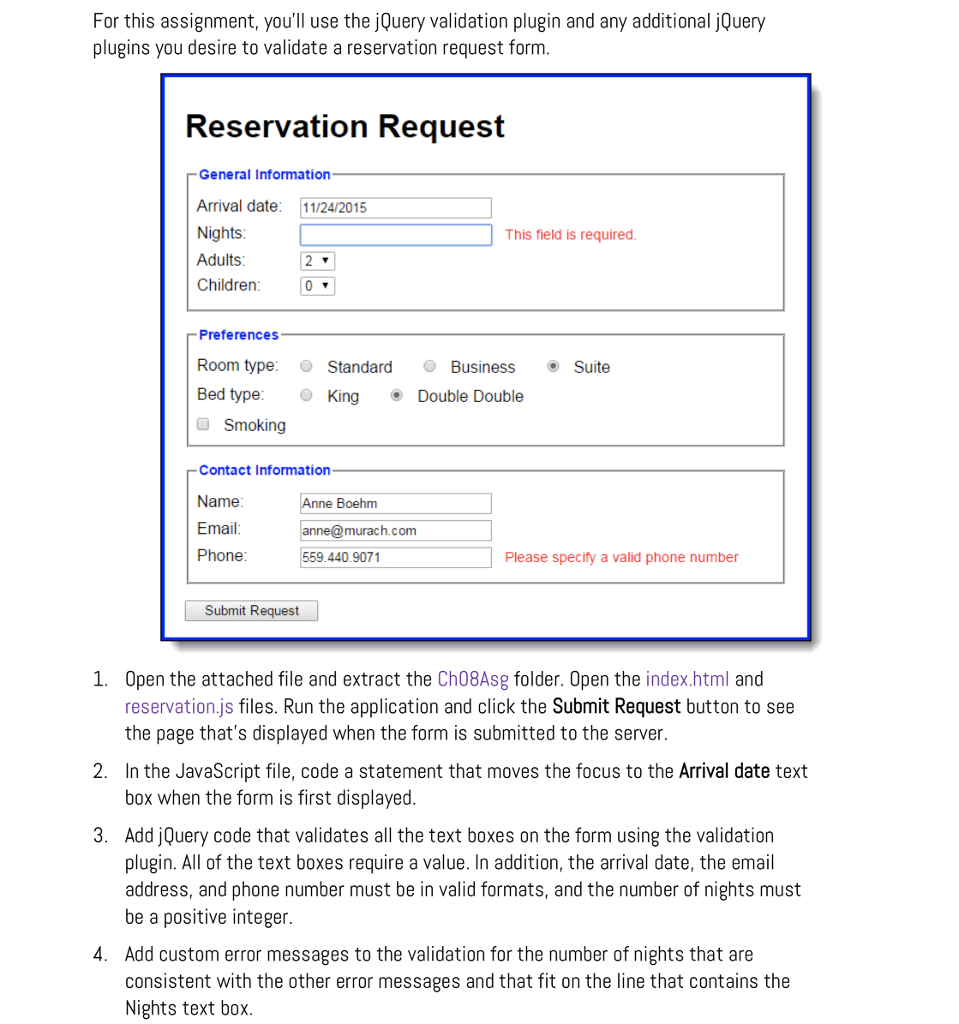
Question: I gave you the code as well. Just need it to look like the image Index.html Reservation request Reservation Request General Information Arrival date: Nights:
I gave you the code as well. Just need it to look like the image
Index.html
Reservation Request
css code
body { font-family: Arial, Helvetica, sans-serif; background-color: white; margin: 0 auto; width: 600px; border: 3px solid blue; padding: 10px 20px; } fieldset { margin-top: 1em; margin-bottom: 1em; padding: .5em; } legend { color: blue; font-weight: bold; font-size: 85%; margin-bottom: .5em; } label { float: left; width: 90px; } input, select { margin-left: 1em; margin-right: 1em; margin-bottom: .5em; } input { width: 14em; } input.left { width: 1em; padding-left: 0; } p { margin-top: 0; margin-bottom: .5em; } input.last { margin-bottom: 1em; } #adults, #children { width: 35px; } #smoking { width: 1em; margin-left: 0; } #submit { margin-left: 0; width: 10em; } label.error { float: none; color: red; font-size: 87.5%; }
For this assignment, you'll use the jQuery validation plugin and any additional jQuery plugins you desire to validate a reservation request form Reservation Request General Information Arrival date: 11/24/2015 Nights Adults Children This field is required Preferences Room type Standard BusinessSuite Bed type: King Double Double Smoking Contact Information Name Email Phone Boehm murach.com 559.440.9071 Please specify a valid phone number Submit Request 1. Open the attached file and extract the Ch08Asg folder. Open the index.html and reservation.js files. Run the application and click the Submit Request button to see the page that's displayed when the form is submitted to the server. In the JavaScript file, code a statement that moves the focus to the Arrival date text box when the form is first displayed Add jQuery code that validates all the text boxes on the form using the validation plugin. All of the text boxes require a value. In addition, the arrival date, the email address, and phone number must be in valid formats, and the number of nights must be a positive integer. Add custom error messages to the validation for the number of nights that are consistent with the other error messages and that fit on the line that contains the Nights text box 2. 3. 4
Step by Step Solution
There are 3 Steps involved in it

Get step-by-step solutions from verified subject matter experts
 Study Help