







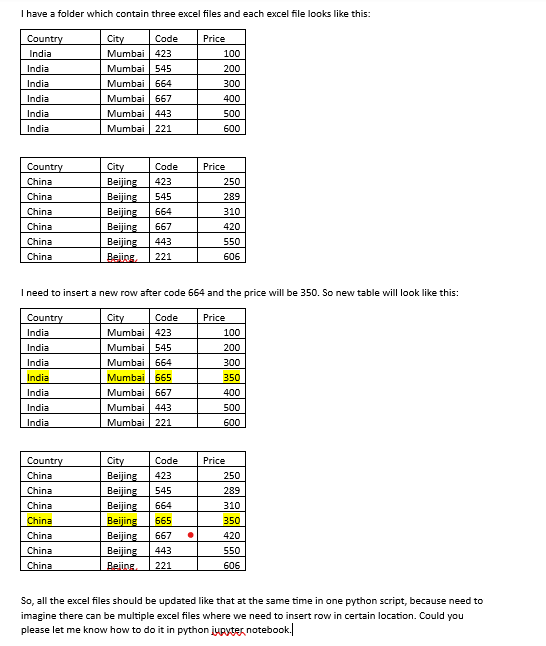
Question: I have a folder which contain three excel files and each excel file looks like this: Country City Code Price India Mumbai 4 2 3
I have a folder which contain three excel files and each excel file looks like this:
Country City Code Price
India Mumbai
India Mumbai
India Mumbai
India Mumbai
India Mumbai
India Mumbai
Country City Code Price
China Beijing
China Beijing
China Beijing
China Beijing
China Beijing
China Bejing
I need to insert a new row after code and the price will be So new table will look like this:
Country City Code Price
India Mumbai
India Mumbai
India Mumbai
India Mumbai
India Mumbai
India Mumbai
India Mumbai
Country City Code Price
China Beijing
China Beijing
China Beijing
China Beijing
China Beijing
China Beijing
China Bejing
So all the excel files should be updated like that at the same time in one python script, because need to imagine there can be multiple excel files where we need to insert row in certain location. Could you please let me know how to do it in python jupyter notebook.I have a folder which contain three excel files and each excel file looks like this:
I need to insert a new row after code and the price will be So new table will look like this:
So all the excel files should be updated like that at the same time in one python script, because need to
imagine there can be multiple excel files where we need to insert row in certain location. Could you
please let me know how to do it in python jypyter notebook.
Step by Step Solution
There are 3 Steps involved in it
1 Expert Approved Answer
Step: 1 Unlock

Question Has Been Solved by an Expert!
Get step-by-step solutions from verified subject matter experts
Step: 2 Unlock
Step: 3 Unlock
 Study Help