







Question: I have a python program that I need to take an input.txt and produce an output.txt file. I try to pass it, however, recieve the
I have a python program that I need to take an input.txt and produce an output.txt file. I try to pass it, however, recieve the error:
Traceback (most recent call last): File "total.py", line 15, in value = float(line) ValueError: could not convert string to float: ' -------- '
Here is the code:
# Prompt the user for the name of the input and output files. inputFileName = input("Input file name: ") outputFileName = input("Output file name: ")
# Open the input and output files. infile = open(inputFileName, "r") outfile = open(outputFileName, "w")
# Read the input and write the output total = 0.0 count = 0
line = infile.readline() while line != "" : value = float(line) outfile.write("%15.2f " % value) total = total + value count = count + 1 line = infile.readline()
# Output the total and average.
outfile.write("Total: %8.2f " % total) outfile.write("%15s " % "--------") avg = total / count outfile.write("Average: %6.2f " % avg)
# Close the files. infile.close() outfile.close()
And here is the input.txt file I need to pass through it:
32.0 54.0 67.5 29.0 35.0 80.25 115.0
Here is what the book states it shoul look like in the end:
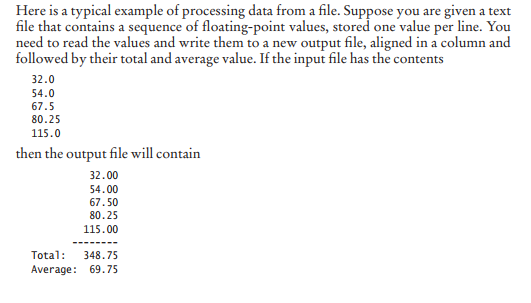
Here is my inputs and the error:

Please tell my if my code is wrong or am I just not going about it correctly.
Here is a typical example of processing data from a file. Suppose you are given a text file that contains a sequence of floating-point values, stored one value per line. You need to read the values and write them to a new output file, aligned in a column and followed by their total and average value. If the input file has the contents 32.0 54.0 67.5 80.25 115.0 then the output file will contain 32.00 54.00 67.50 80.25 115.00 Tota 348.75 Average: 69.75
Step by Step Solution
There are 3 Steps involved in it

Get step-by-step solutions from verified subject matter experts
 Study Help