







Question: I have a SQL database attached to my Java project, I ' m not getting an errors and the table is updating in the console
I have a SQL database attached to my Java project, Im not getting an errors and the table is updating in the console and database but not in GUI
titleCol.setCellValueFactorycellData cellData.getValuetitleProperty;
TableColumn authorCol new TableColumn s: "Author";
authorCol.setCellValueFactorycellData cellData.getValueauthorProperty;
TableColumn statusCol new TableColumn s: "Status";
statusCol.setCellValueFactorycellData cellData.getValuestatusProperty;
Add columns to table
table.setItemsdata;
table.getColumnsaddAllidCol titleCol, authorCol, statusCol;
Create a layout and add table
VBox vbox new VBox;
vbox.getChildrenaddAlltable;
Create scene and add it to stage
Scene scene new Scenevbox;
stage.setScenescene;
stage.setTitleBook Library";
stage.show;
private void loadBooksFromDatabase nousages
BookLibraryCon bookLibraryCon new BookLibraryCon;
bookLibraryCon.getBooksforEachbook data.addbook;
package com.example.sproject;
import java.sqlConnection;
import java.sqlPreparedStatement;
import java.sqlResultSet;
import java.sqlSQLException;
import java.util.ArrayList;
import java.util.List;
public class BookLibraryCon
public List getBooks usage
List books new ArrayList;
String query "SELECT FROM books";
try Connection conn DatabaseConnection.getConnection;
PreparedStatement stmt conn.prepareStatementquery;
ResultSet rs stmtexecuteQuery
while rsnext
Book book new Book
rsgetString columnLabel: id
rsgetString columnLabel: "title"
rsgetString columnLabel: "author"
BookStatus.valueOfrsgetString columnLabel: "status"
;
books.addbook;
catch SQLException e
eprintStackTrace;
return books;
Book.java
BookApp.java
BookLibraryCon.java
shelf
DatabaseConnection.java
BookTracker.java
rows
Tx: Auto
DDL
CSV
cdot WHERE
cdot ORDER BY
begintabularcccccccc
hline & & square Booktitle
abla & & D Author
abla & & D Status
abla &
hline & & Harry Potter and the Order of the Phoniex & & Jk Rowling & & Completed &
hline & & Pucked & & Helena Hunting & & Completed &
hline & & A Long Time Coming & & Meghan Quinn & & Completed &
hline
endtabular
Book Library
ID
Title
Author
Status
No content in table
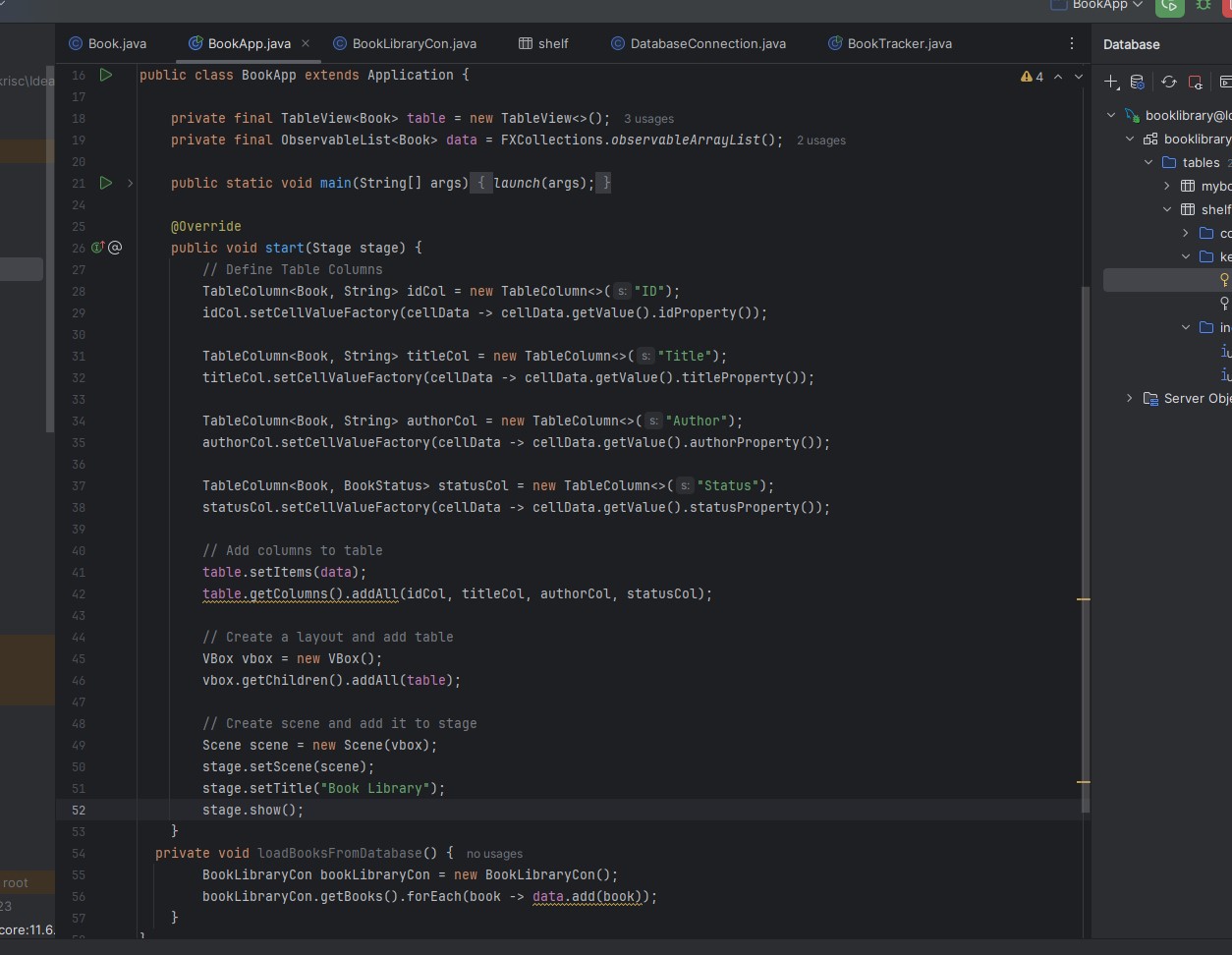
public class BookApp extends Application
private final TableView table new TableView; usages
private final ObservableList data FXCollections.observableArrayList; usages
public static void mainString args launchargs;
@Override
public void startStage stage
Define Table Columns
TableColumn idCol new TableColumn s: ID;
idCol.setCellValueFactorycellData cellData.getValueidProperty;
TableColumn titleCol new TableColumn s: "Title";
titleCol.setCellValueFactorycellData cellData.getValuetitleProperty;
TableColumn authorCol new TableColumn s: "Author";
authorCol.setCellValueFactorycellData cellData.getValueauthorProperty;
TableColumn statusCol new TableColumn s: "Status";
statusCol.setCellValueFactorycellData cellData.getValuestatusProperty;
Add columns to table
table.setItemsdata;
table.getColumnsaddAllidCol titleCol, authorCol, statusCol;
Create a layout and add table
VBox vbox new VBox;
vbox.getChildrenaddAlltable;
Create scene and add it to stage
Scene scene new Scenevbox;
stage.setScenescene;
stage.setTitleBook Library";
stage.show;
private void loadBooksFromDatabase nousages
BookLibraryCon bookLibraryCon new BookLibraryCon;
bookLibraryCon.getBooksforEachbook data.addbook;
Step by Step Solution
There are 3 Steps involved in it
1 Expert Approved Answer
Step: 1 Unlock

Question Has Been Solved by an Expert!
Get step-by-step solutions from verified subject matter experts
Step: 2 Unlock
Step: 3 Unlock
 Study Help