







Question: I have a visual basic code that converts numbers to roman numerals. If I input a decimal, I need the error message to display(I already
I have a visual basic code that converts numbers to roman numerals. If I input a decimal, I need the error message to display(I already have it, i think).
I need to remove the rounding ability from the program. How do I do that? Ex: input is 2.83 ; output should be the error message instead of 2 or 3
I received help doing this. But could someone explain why the letter "b" is used? why couldn't I use the name of the input textbox?
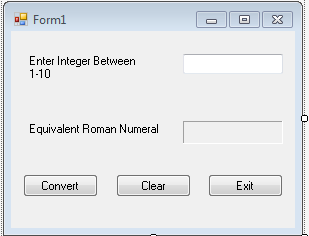
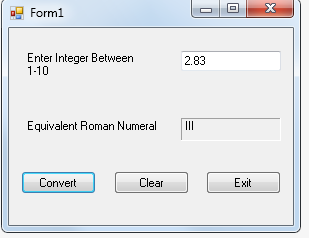
Here is the code written out:
Private Sub Button1_Click(sender As Object, e As EventArgs) Handles Button1.Click
Dim b As Integer
Dim result As String
b = Val(number.Text)
Select Case b
Case 1
result = "I"
Case 2
result = "II"
Case 3
result = "III"
Case 4
result = "IV"
Case 5
result = "V"
Case 6
result = "VI"
Case 7
result = "VII"
Case 8
result = "VIII"
Case 9
result = "IX"
Case 10
result = "X"
Case Else
result = "Not in range 1-10"
End Select
roman.Text = result
End Sub
Private Sub Button2_Click(sender As Object, e As EventArgs) Handles Button2.Click
number.Text = ""
roman.Text = ""
number.Focus()
End Sub
Private Sub Button3_Click(sender As Object, e As EventArgs) Handles Button3.Click
Me.Close()
End Sub
End Class
Form1 Enter Integer Betweern 1-10 Equivalent Roman Numeral Convert Exit Clear
Step by Step Solution
There are 3 Steps involved in it

Get step-by-step solutions from verified subject matter experts
 Study Help