







Question: /* * Project08.java * * A program that converts decimal numbers to Roman numerals. * Used to practice breaking code up into methods. * *
/* * Project08.java * * A program that converts decimal numbers to Roman numerals. * Used to practice breaking code up into methods. * * @author ENTER YOUR NAME HERE * */ package osu.cse1223; import java.util.Scanner; public class Project08 { public static void main(String[] args) { // Fill in the body } // Given a Scanner as input, prompts the user to input a number between 1 and 3999. // Checks to make sure the number is within range, and provides an error message until // the user provides a value within range. Returns the number input by the user to the // calling program. private static int promptUserForNumber(Scanner inScanner) { // Fill in the body } // Given a number as input, converts the number to a String in Roman numeral format, // following the rules in the writeup for Lab 09. Returns the String to the calling // program. NOTE: This method can possibly get long and complex. Use the // convertDigitToNumeral method below to break this up and make it a bit simpler to code. private static String convertNumberToNumeral(int number) { // Fill in the body } // Given a digit and the Roman numerals to use for the "one", "five" and "ten" positions, // returns the appropriate Roman numeral for that digit. For example, if the number to // convert is 49 we would call convertDigitToNumeral twice. The first call would be: // convertDigitToNumeral(9, 'I','V','X') // and would return a value of "IX". The second call would be: // convertDigitToNumeral(4, 'X','L','C') // and would return a value of "XL". Putting those togeter we would see that 49 would be the // Roman numeral XLIX. // Call this method from convertNumberToNumeral above to convert an entire number into a // Roman numeral. private static String convertDigitToNumeral(int digit, char one, char five, char ten) { // Fill in the body } }
![java.util.Scanner; public class Project08 { public static void main(String[] args) { //](https://dsd5zvtm8ll6.cloudfront.net/si.experts.images/questions/2024/09/66f3d72d99525_36566f3d72d0dd4d.jpg)
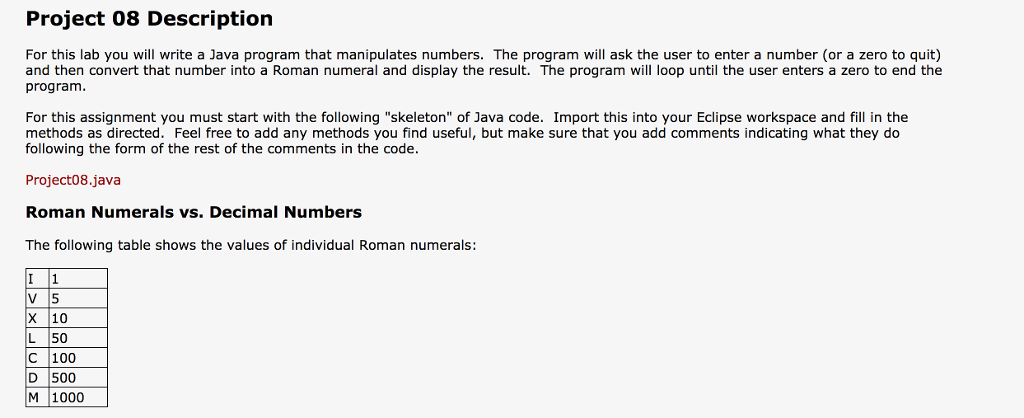
Project 08 Description For this lab you will write a Java program that manipulates numbers. The program will ask the user to enter a number (or a zero to quit) and then convert that number into a Roman numeral and display the result. The program will loop until the user enters a zero to end the program For this assignment you must start with the following "skeleton" of Java code. Import this into your Eclipse workspace and fill in the methods as directed. Feel free to add any methods you find useful, but make sure that you add comments indicating what they do following the form of the rest of the comments in the code. Project08. java Roman Numerals vs. Decimal Numbers The following table shows the values of individual Roman numerals: I 1 V 5 X 10 L 50 C 100 D 500 M 1000
Step by Step Solution
There are 3 Steps involved in it

Get step-by-step solutions from verified subject matter experts
 Study Help