







Question: I have an assignment which is called draft technology paper I will attached you my draft paper and the references can you go through and
I have an assignment which is called draft technology paper I will attached you my draft paper and the references can you go through and answer the following question? 1. Can you please go through Section 1Business Problem,Section 2 Core System Requirement ,and Section 3 Outsourcing Considerations and can you please include in-text citation in the paragraph the references are listed below ? Section 1 Business Problem:Smith, John. "The Impact of Automation on Financial Management." Journal of Financial Technology, vol. 23, no. 2, 2021, ??. 45-60. Brown, Sarah. "Cost Savings through Accounting Automation." Financial Efficiency Quarterly, vol. 12, no. 3, 2022, pp. 15-30. Section 2 (Core System Requirement):Johnson, Robert. "Best Practices in Billing Automation." Accounting Technology Trends, vol. 35, no. 1, 2020, pp. 75-92. 2. White, Emily. "Efficient Collections Management in Accounting Software." Financial Systems Journal, vol. 18, no. 4, 2019, pp. 60-78. Carter, David. "Streamlining Payment Processing with Accounting Software." Payments Today, vol. 28, no. 5, 2021, pp. 40-55. Section 3 (Outsourcing Considerations): Anderson, Lisa. "Outsourcing IT Support: Strategies and Benefits." Information Technology Management, vol. 27, no. 3, 2018, pp. 12-28. Patel, Raj. "Customer Service Outsourcing: Challenges and Opportunities." Customer Experience Quarterly, vol. 14, no. 2, 2020, pp. 55-70. Miller, Jennifer. "Data Entry Outsourcing: Enhancing Efficiency and Data Security." Data Management Journal, vol. 22, no. 4, 2021, ??. 85-100.
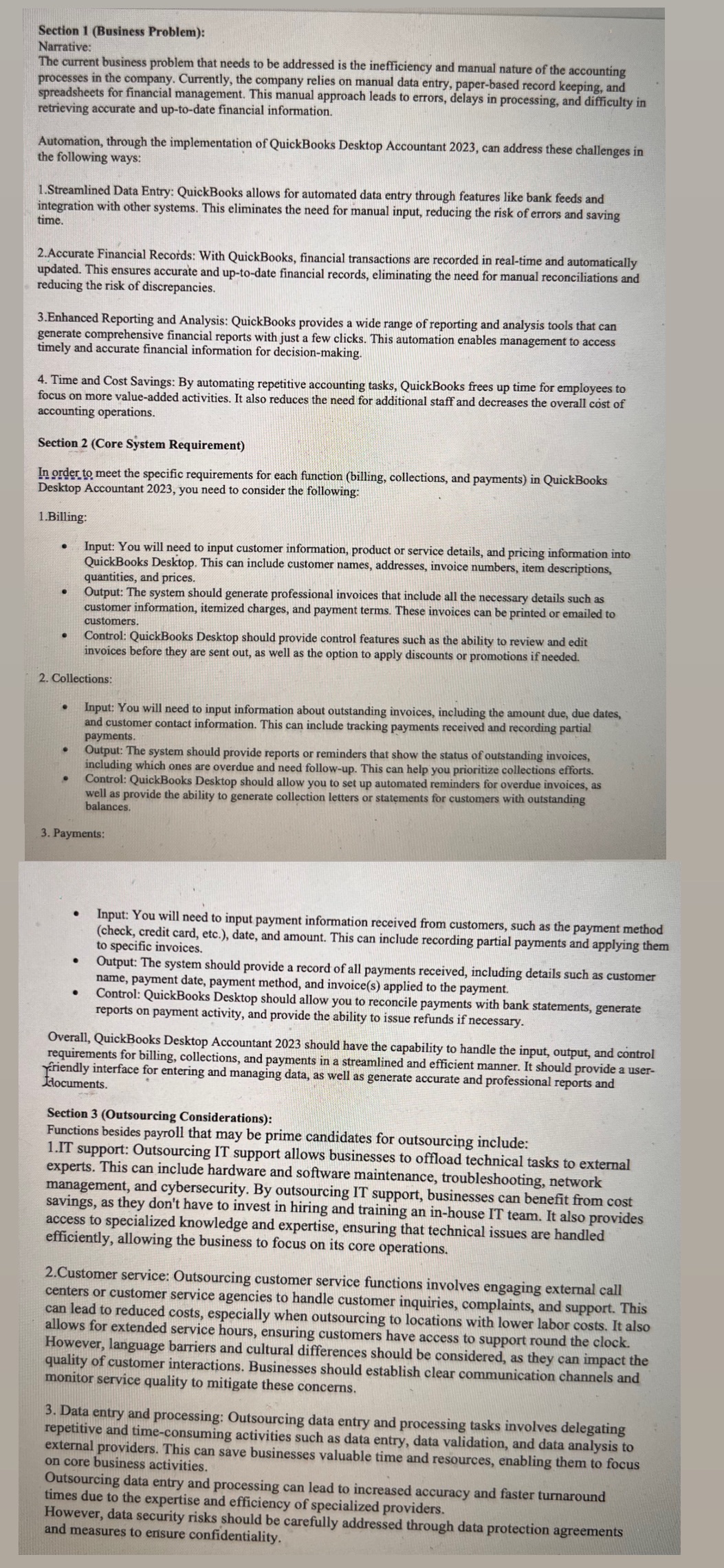
Section 1 (Business Problem): Narrative: The current business problem that needs to be addressed is the inefficiency and manual nature of the accounting processes in the company. Currently, the company relies on manual data entry, paper-based record keeping, and spreadsheets for financial management. This manual approach leads to errors, delays in processing, and difficulty in retrieving accurate and up-to-date financial information. Automation, through the implementation of QuickBooks Desktop Accountant 2023, can address these challenges in the following ways: 1.Streamlined Data Entry: QuickBooks allows for automated data entry through features like bank feeds and integration with other systems. This eliminates the need for manual input, reducing the risk of errors and saving time. 2.Accurate Financial Records: With QuickBooks, financial transactions are recorded in real-time and automatically updated. This ensures accurate and up-to-date financial records, eliminating the need for manual reconciliations and reducing the risk of discrepancies. 3. Enhanced Reporting and Analysis: QuickBooks provides a wide range of reporting and analysis tools that can generate comprehensive financial reports with just a few clicks. This automation enables management to access timely and accurate financial information for decision-making. 4. Time and Cost Savings: By automating repetitive accounting tasks, QuickBooks frees up time for employees to focus on more value-added activities. It also reduces the need for additional staff and decreases the overall cost of accounting operations. Section 2 (Core System Requirement) In order to meet the specific requirements for each function (billing, collections, and payments) in QuickBooks Desktop Accountant 2023, you need to consider the following: 1.Billing: Input: You will need to input customer information, product or service details, and pricing information into QuickBooks Desktop. This can include customer names, addresses, invoice numbers, item descriptions, quantities, and prices. Output: The system should generate professional invoices that include all the necessary details such as customer information, itemized charges, and payment terms. These invoices can be printed or emailed to customers. Control: QuickBooks Desktop should provide control features such as the ability to review and edit invoices before they are sent out, as well as the option to apply discounts or promotions if needed. 2. Collections: Input: You will need to input information about outstanding invoices, including the amount due, due dates, and customer contact information. This can include tracking payments received and recording partial payments. Output: The system should provide reports or reminders that show the status of outstanding invoices, including which ones are overdue and need follow-up. This can help you prioritize collections efforts. Control: QuickBooks Desktop should allow you to set up automated reminders for overdue invoices, as well as provide the ability to generate collection letters or statements for customers with outstanding balances. 3. Payments: Input: You will need to input payment information received from customers, such as the payment method (check, credit card, etc.), date, and amount. This can include recording partial payments and applying them to specific invoices. Output: The system should provide a record of all payments received, including details such as customer name, payment date, payment method, and invoice(s) applied to the payment. Control: QuickBooks Desktop should allow you to reconcile payments with bank statements, generate reports on payment activity, and provide the ability to issue refunds if necessary. Overall, QuickBooks Desktop Accountant 2023 should have the capability to handle the input, output, and control requirements for billing, collections, and payments in a streamlined and efficient manner. It should provide a user- Friendly interface for entering and managing data, as well as generate accurate and professional reports and Ldocuments. Section 3 (Outsourcing Considerations): Functions besides payroll that may be prime candidates for outsourcing include: 1.IT support: Outsourcing IT support allows businesses to offload technical tasks to external experts. This can include hardware and software maintenance, troubleshooting, network management, and cybersecurity. By outsourcing IT support, businesses can benefit from cost savings, as they don't have to invest in hiring and training an in-house IT team. It also provides access to specialized knowledge and expertise, ensuring that technical issues are handled efficiently, allowing the business to focus on its core operations. 2.Customer service: Outsourcing customer service functions involves engaging external call centers or customer service agencies to handle customer inquiries, complaints, and support. This can lead to reduced costs, especially when outsourcing to locations with lower labor costs. It also allows for extended service hours, ensuring customers have access to support round the clock. However, language barriers and cultural differences should be considered, as they can impact the quality of customer interactions. Businesses should establish clear communication channels and monitor service quality to mitigate these concerns. 3. Data entry and processing: Outsourcing data entry and processing tasks involves delegating repetitive and time-consuming activities such as data entry, data validation, and data analysis to external providers. This can save businesses valuable time and resources, enabling them to focus on core business activities. Outsourcing data entry and processing can lead to increased accuracy and faster turnaround times due to the expertise and efficiency of specialized providers. However, data security risks should be carefully addressed through data protection agreements and measures to ensure confidentiality
Step by Step Solution
There are 3 Steps involved in it

Get step-by-step solutions from verified subject matter experts
 Study Help