







Question: I have an ironpython script which opens an xaml file containing 2 tabs . Inside of the first tab there is a listbox and there
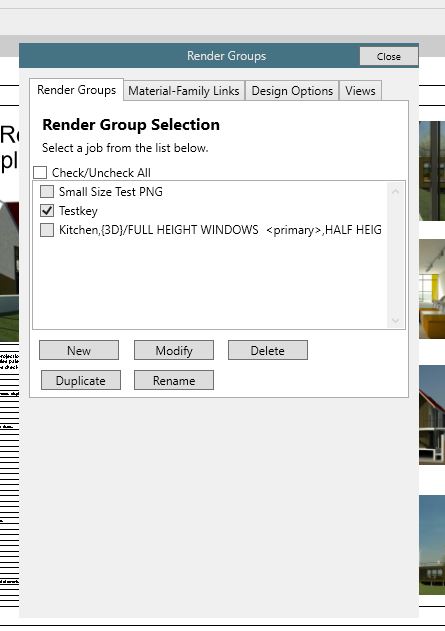
I have an ironpython script which opens an xaml file containing tabs Inside of the first tab there is a listbox and there is a button called "Modify" underneath. How can I make it so that I can open another xaml file which contains some information about the class I selected in the listbox Lets assume it has the class properties: Views, Options, Materials, Objects, Name To give some more context, I will provide some code I made in IronPython to load the xaml file
Basically, just click a button called Modify which also checks the name of the item in a listbox, makes a new window with the title Modifying selected item name here It has tabs I already have the info for those tabs but basically just needs to take some listbox information, DesignOptions list box, Views Listbox, and Render Groups listbox. Please provide information ideally in IronPython and XAML, if cant do IronPython provide in C#
Here is some XAML info
IronPython info
class ViewModelmyWPF:
contextmode 'show'
viewmode 'singular'
countviewstotal
countviewcurrent
def initself:
pathxamlfile xamlpath
wpfLoadComponentself pathxamlfile
self.selectedfamilygroups
self.selectedmaterialgroups
self.selectedviews
self.renderjobslist processedrenderjobs
self.selectedjobs
self.renderviews
self.selectedrendergroups
self.UIListBoxDesignOptions.ItemsSource newdesignoptionnames
self.UIListBoxFamilyGroups.ItemsSource newfamilygroupnames
self.UIListBoxMaterialGroups.ItemsSource mymaterialgroupslist
self.UIListBoxViews.ItemsSource wrappedviews
self.UIListBoxRenderJobs.ItemsSource self.renderjobslist
self.UIListBoxRenderGroups.ItemsSource myrendergroupslist
self.setowneruiapp
def setownerself uiapp:
# Obtain the Revit main window handle
revitwindowhandle uiapp.MainWindowHandle
windowinterophelper WindowInteropHelperself
windowinterophelper.Owner revitwindowhandle
def showwindowself:
self.ShowDialog
if namemain:
x ViewModel
xshowwindow
Step by Step Solution
There are 3 Steps involved in it
1 Expert Approved Answer
Step: 1 Unlock

Question Has Been Solved by an Expert!
Get step-by-step solutions from verified subject matter experts
Step: 2 Unlock
Step: 3 Unlock
 Study Help