







Question: I have never used Excel! Tips on to do this AutoSave Off B QR Spreadsheet Template 23_2ed (1) - File Home Insert Draw Page Layout
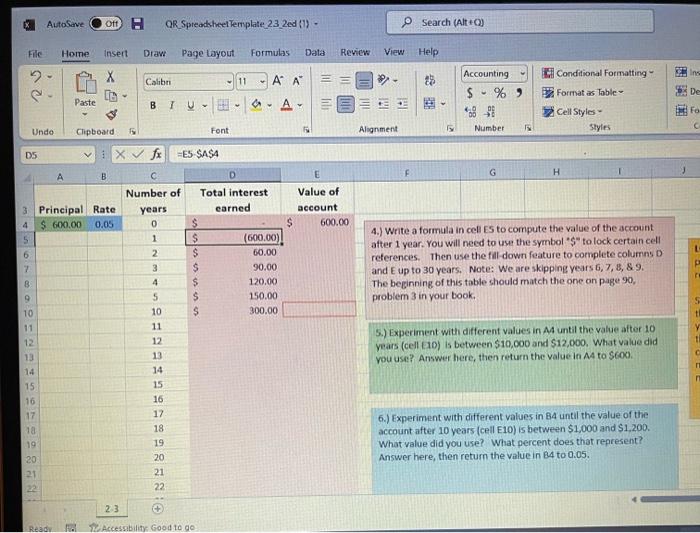
AutoSave Off B QR Spreadsheet Template 23_2ed (1) - File Home Insert Draw Page Layout Formulas Data 2 X Calibr Paste BIU- Clipboard F Font vix fx E5-$A$4 B C Number of Rate 0.05 years 0 RU Undo D5 3 4 5 A Principal $ 600.00 6 7 8 9 10 11 12 13 14 15 16 17 18 193 20 21 22 Ready Ra 0:34855SGESAN 17 21 $ $ is/es is isssss $ $ D Total interest earned $ $ $ 23 Accessibility: Good to go - 11 A A 15 A- (600.00) 60.00 90.00 120.00 150.00 300.00 $ E Review E Value of account 600.00 View Search (Alt+C)) Help E Accounting Conditional Formatting $% 9 Format as Table Cell Styles Alignment 5 Number Styles H 4.) Write a formula in cell ES to compute the value of the account after 1 year. You will need to use the symbol "$" to lock certain cell - references. Then use the fill-down feature to complete columns D and E up to 30 years. Note: We are skipping years 6, 7, 8, & 9. The beginning of this table should match the one on page 90, problem 3 in your book. 5.) Experiment with different values in A4 until the value after 10 years (cell E10) is between $10,000 and $12,000. What value did you use? Answer here, then return the value in A4 to $600. 6.) Experiment with different values in 84 until the value of the account after 10 years (cell E10) is between $1,000 and $1,200. What value did you use? What percent does that represent?? Answer here, then return the value in 84 to 0.05. IN Ins De Fo C L P re S th Y ti C
Step by Step Solution
There are 3 Steps involved in it

Get step-by-step solutions from verified subject matter experts
 Study Help