







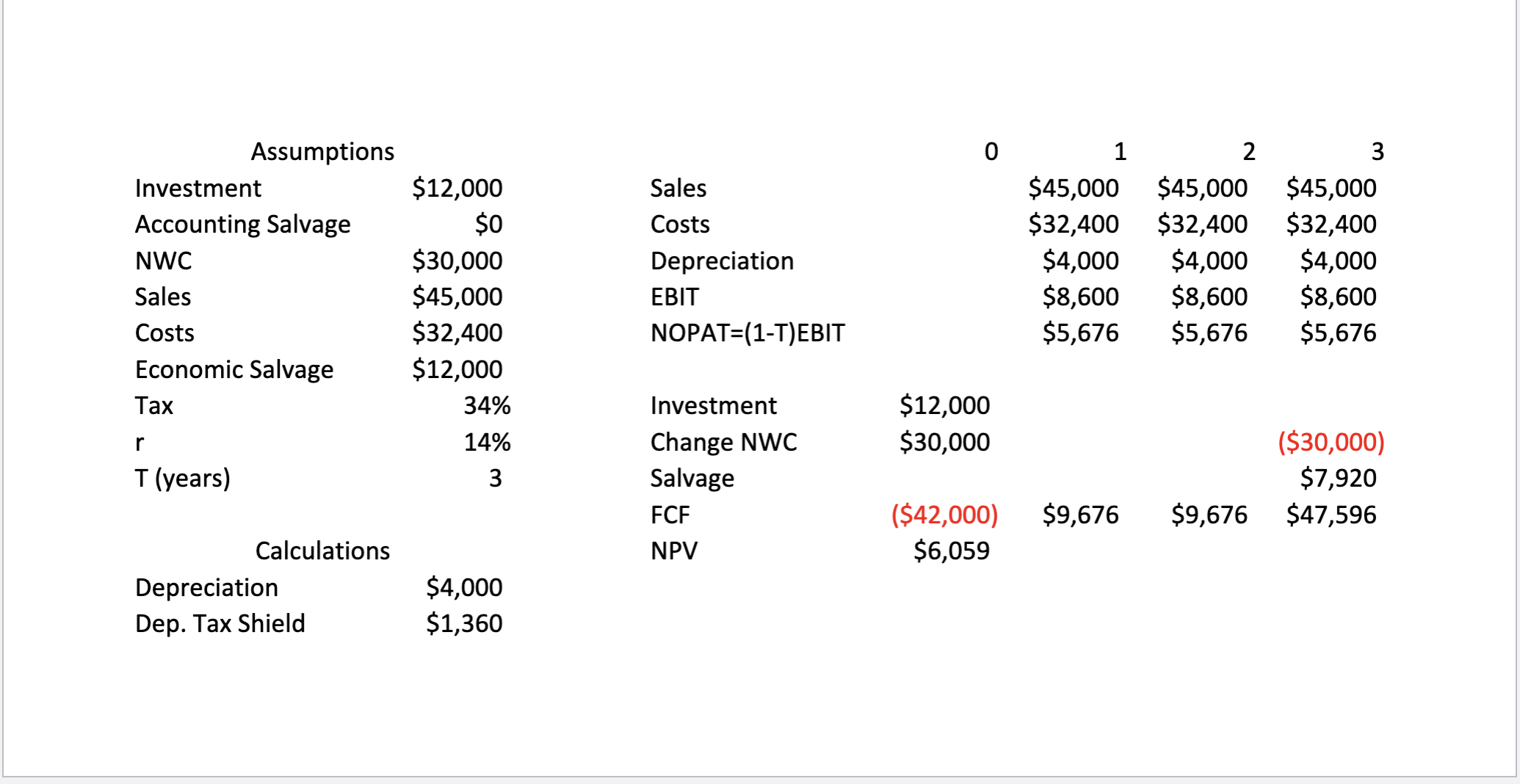
Question: I have provided the two images for DCF Analysis. Please complete step 3 in Excel and upload screenshots, including all Excel equations, so I can
I have provided the two images for DCF Analysis." Please complete step in Excel and upload screenshots, including all Excel equations, so I can follow along:
Use the DCF Analysis images and create a Casio Industries tab. This will be our basis for a Simulation Analysis of this project. The first part below walks you through the creation of a Simulation Analysis. The problem asks you to use this analysis to answer a few questions about the project.
Step :
In the Assumptions Table, change the values for Sales Economic Salvage, and Increase in Sales. Specifically, put VLOOKUPScenario Number, Scenario Table, Value Column where
Scenario Number is a reference to the value of the cell in the Scenario part of the Assumptions Table,
Scenario Table is the table you made in Step including the Scenario column Value column is the number of the column in the Scenario Table that corresponds to the quantity of interest eg If you are doing the Sales value, then the column number should correspond to the column of your table withSales @ one values.
Step by Step Solution
There are 3 Steps involved in it
1 Expert Approved Answer
Step: 1 Unlock

Question Has Been Solved by an Expert!
Get step-by-step solutions from verified subject matter experts
Step: 2 Unlock
Step: 3 Unlock
 Study Help