







Question: I have the below assignment. I attempted to write the javascript code but it's not working. Could someone help me with what was done wrong??
I have the below assignment. I attempted to write the javascript code but it's not working. Could someone help me with what was done wrong??
/* Create Variable */
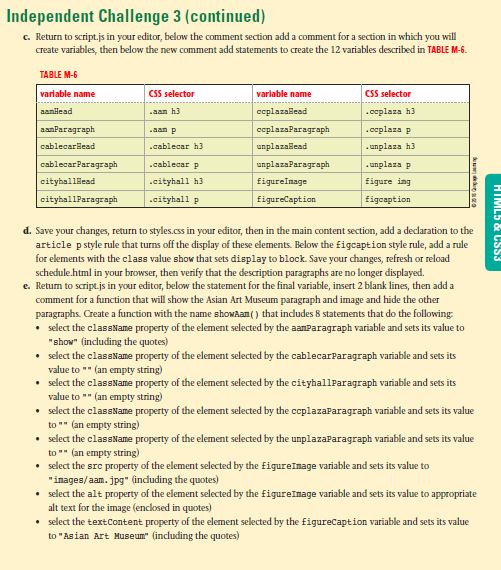
var aamHead = document.querySelector(".aam h3");
var aamParagraph = document.querySelector(".aam p");
var cablecarHead = document.querySelector(".cablecar h3");
var cablecarParagraph = document.querySelector(".cablecar p");
var cityhallHead = document.querySelector(".cityhall h3");
var cityhallParagraph = document.querySelector(".cityhall p");
var ccplazaHead = document.querySelector(".ccplaza h3");
var ccplazaParagraph = document.querySelector(".ccplaza p");
var unplazaHead = document.querySelector(".unplaza h3");
var unplazaParagraph = document.querySelector(".unplaza p");
var figureImage = document.querySelector("figure img");
var figureCaption = document.querySelector("figcaption");
/*Asian Art Museum*/
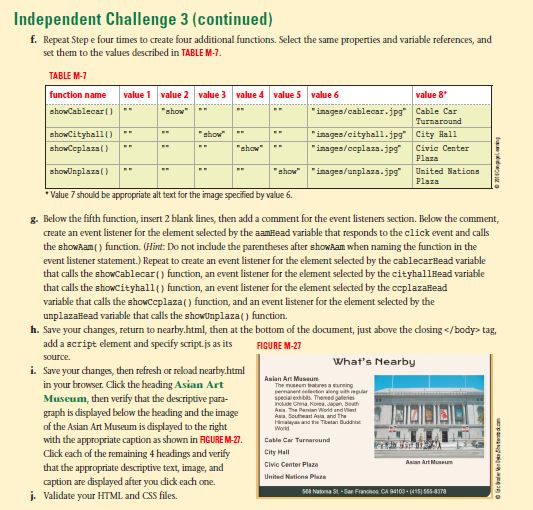
function showaam() {
aamParagraph.ClassName = "aamParagraph show";
cablecarParagraph.ClassName = "";
cityhallParagraph.ClassName = "";
ccplazaParagraph.ClassName = "";
unplazaParagraph.ClassName = "";
figureImage.src = "images/aam.jpg";
figureImage.alt = "asian art museum image";
figureCaption.textContent = "Asian Art Museum";
}
/*Cable Car*/
function showCablecar(){
aamParagraph.ClassName = "";
cablecarParagraph.ClassName = "show";
cityhallParagraph.ClassName = "";
ccplazaParagraph.ClassName = "";
unplazaParagraph.ClassName = "";
figureImage.src = "images/cablecar.jpg";
figureImage.alt = "cablecar";
figureCaption.textContent = "Cable Car Turnaround";
}
/*Show city hall*/
function showCityhall(){
aamParagraph.ClassName = "";
cablecarParagraph.ClassName = "";
cityhallParagraph.ClassName = "show";
ccplazaParagraph.ClassName = "";
unplazaParagraph.ClassName = "";
figureImage.src = "images/cityhall.jpg";
figureImage.alt = "City Hall";
figureCaption.textContent = "City Hall";
}
/*CC Plaza*/
function showCcplaza(){
aamParagraph.ClassName = "";
cablecarParagraph.ClassName = "";
cityhallParagraph.ClassName = "";
ccplazaParagraph.ClassName = "show";
unplazaParagraph.ClassName = "";
figureImage.src = "images/ccplaza.jpg";
figureImage.alt = "Civic Center Plaza";
figureCaption.textContent = "Civic Center Plaza";
}
/*UN Plaza*/
function showUnplaza(){
aamParagraph.ClassName = "";
cablecarParagraph.ClassName = "";
cityhallParagraph.ClassName = "";
ccplazaParagraph.ClassName = "";
unplazaParagraph.ClassName = "show";
figureImage.src = "images/unplaza.jpg";
figureImage.alt = "United Nations Plaza";
figureCaption.textContent = "United Nations Plaza";
}
/*event listener*/
aamHead.addEventListener("change", showaam, false);
cablecarHead.addEventListener("change",showCablecar,false);
cityhallHead.addEventListener("change",showCityhall,false);
ccplazaHead.addEventListener("change",showCcplaza,false);
unplazaHead.addEventListener("change",showUnplaza,false);
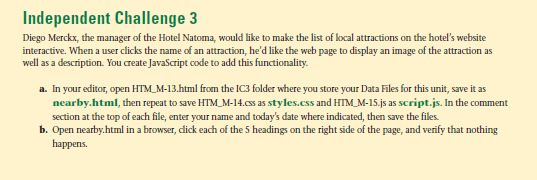
Independent Challenge 3 Diego Merckx, the manager of the Hotel Natoma, would like to make the list of local attractions on the hotel's website interactive. When a user clicks the name of an attraction, he'd like the web page to display an image of the attraction as well as a description. You create JavaScript code to add this functionality a. In your editor, open HTM M-13.html from the IC3 folder where you store your Data Files for this unit, save it as nearby.html, then repeat to save HTM M-14.css as styles.css and HIM M-15.js as script.js. In the comment section at the top of each file, enter your name and today's date where indicated, then save the files b. Open nearby.html in a browser, dick each of the S headings on the right side of the page, and verify that nothing happens. Independent Challenge 3 Diego Merckx, the manager of the Hotel Natoma, would like to make the list of local attractions on the hotel's website interactive. When a user clicks the name of an attraction, he'd like the web page to display an image of the attraction as well as a description. You create JavaScript code to add this functionality a. In your editor, open HTM M-13.html from the IC3 folder where you store your Data Files for this unit, save it as nearby.html, then repeat to save HTM M-14.css as styles.css and HIM M-15.js as script.js. In the comment section at the top of each file, enter your name and today's date where indicated, then save the files b. Open nearby.html in a browser, dick each of the S headings on the right side of the page, and verify that nothing happens
Step by Step Solution
There are 3 Steps involved in it

Get step-by-step solutions from verified subject matter experts
 Study Help