







Question: I have the code for the temperature part but I need help putting it in a table like the example below Objective: Use PHP classes
I have the code for the temperature part but I need help putting it in a table like the example below 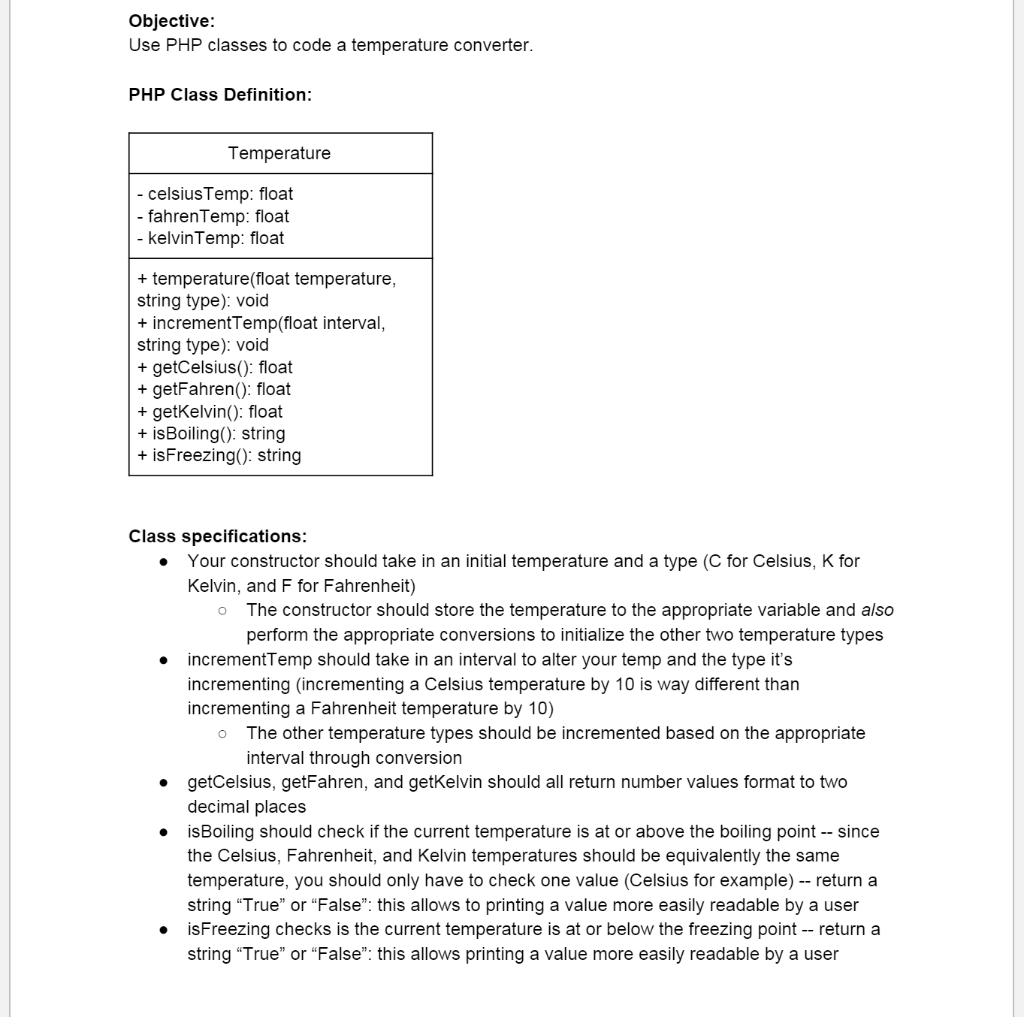
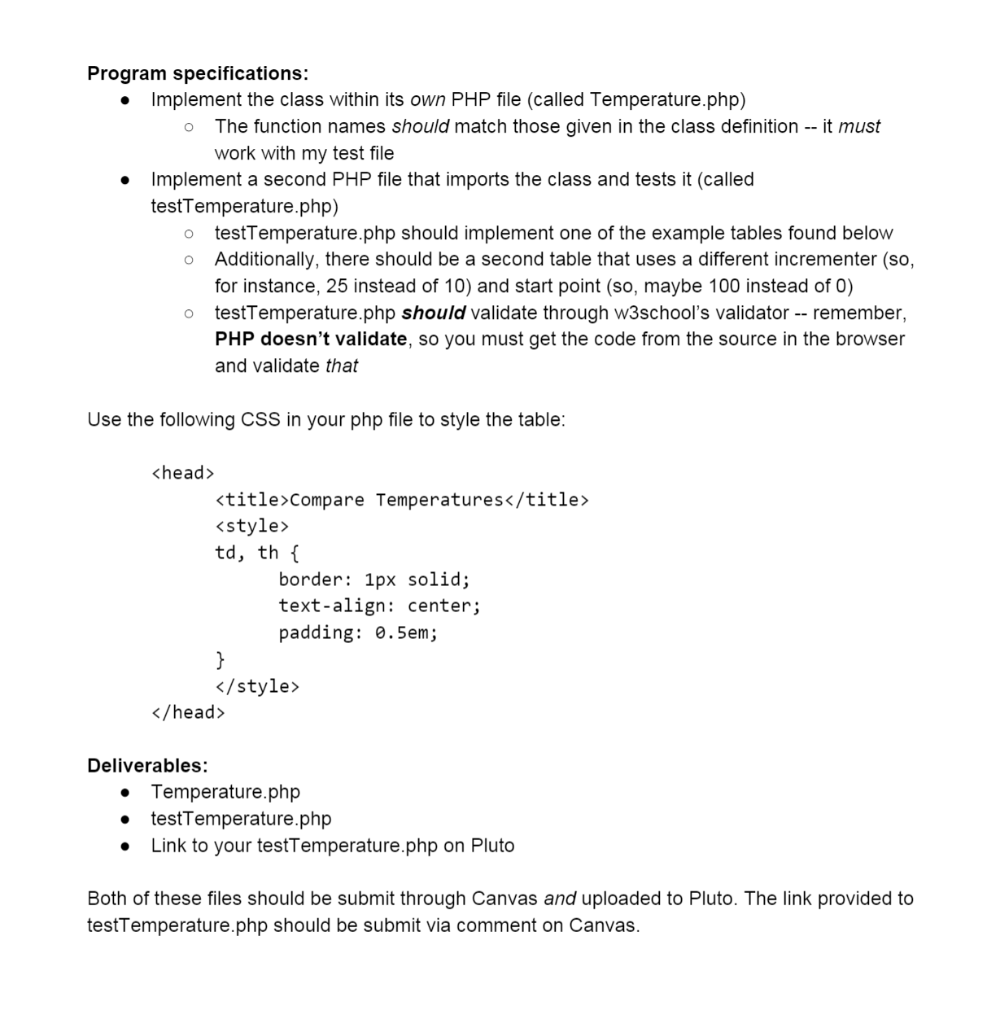
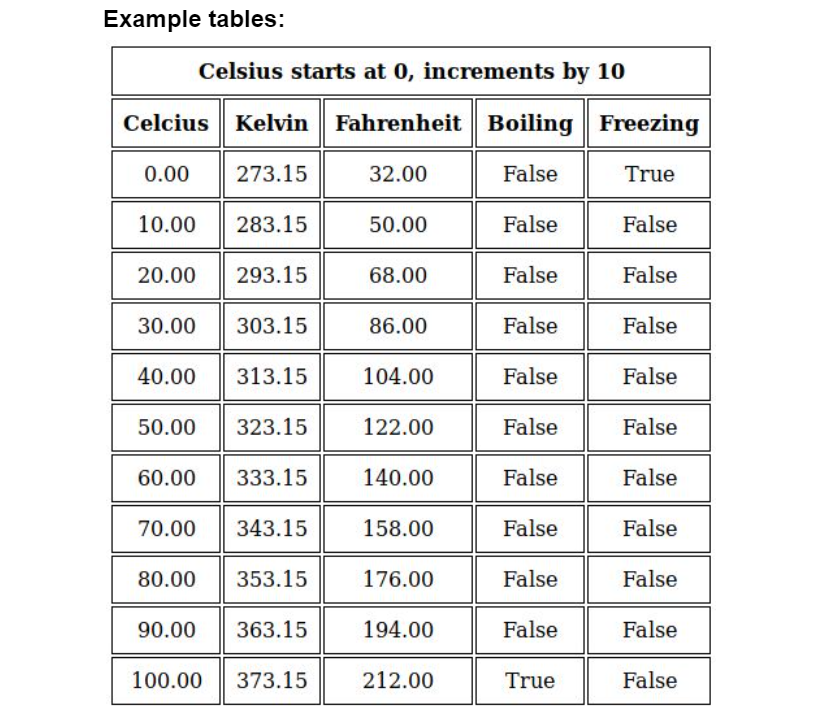
Objective: Use PHP classes to code a temperature converter. PHP Class Definition: Temperature - celsius Temp: float fahren Temp: float - kelvin Temp: float + temperature(float temperature, string type): void + incrementTemp(float interval, string type): void + getCelsius(): float + getFahren(): float + getKelvin(): float + is Boiling(): string + isFreezing(): string O o Class specifications: Your constructor should take in an initial temperature and a type (C for Celsius, K for Kelvin, and F for Fahrenheit) The constructor should store the temperature to the appropriate variable and also perform the appropriate conversions to initialize the other two temperature types incrementTemp should take in an interval to alter your temp and the type it's incrementing (incrementing a Celsius temperature by 10 is way different than incrementing a Fahrenheit temperature by 10) The other temperature types should be incremented based on the appropriate interval through conversion getCelsius, getFahren, and getKelvin should all return number values format to two decimal places isBoiling should check if the current temperature is at or above the boiling point -- since the Celsius, Fahrenheit, and Kelvin temperatures should be equivalently the same temperature, you should only have to check one value (Celsius for example) -- return a string "True" or "False: this allows to printing a value more easily readable by a user isFreezing checks is the current temperature is at or below the freezing point -- return a string "True" or "False: this allows printing a value more easily readable by a user . . o . Program specifications: Implement the class within its own PHP file (called Temperature.php) The function names should match those given in the class definition -- it must work with my test file Implement a second PHP file that imports the class and tests it (called testTemperature.php) testTemperature.php should implement one of the example tables found below Additionally, there should be a second table that uses a different incrementer (so, for instance, 25 instead of 10) and start point (so, maybe 100 instead of 0) o testTemperature.php should validate through w3school's validator -- remember, PHP doesn't validate, so you must get the code from the source in the browser and validate that O O Use the following CSS in your php file to style the table:
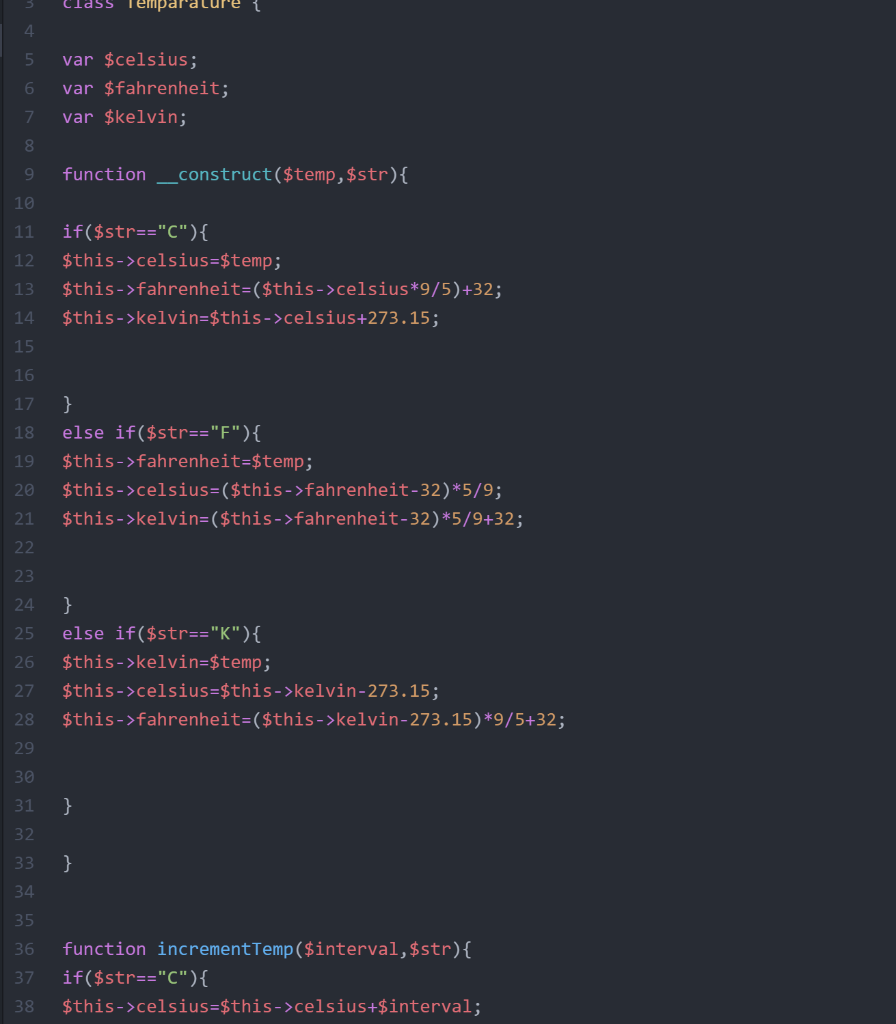
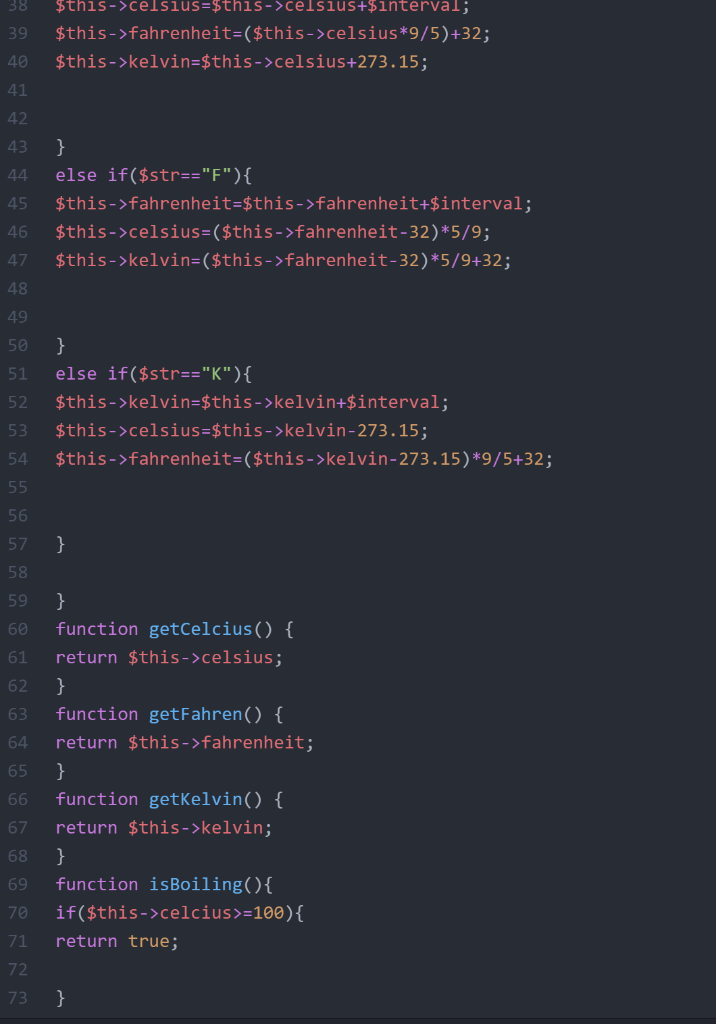
Deliverables: Temperature.php testTemperature.php Link to your testTemperature.php on Pluto . Both of these files should be submit through Canvas and uploaded to Pluto. The link provided to testTemperature.php should be submit via comment on Canvas. Example tables: Celsius starts at 0, increments by 10 Celcius Kelvin Fahrenheit Boiling Freezing 0.00 273.15 32.00 False True 10.00 283.15 50.00 False False 20.00 293.15 68.00 False False 30.00 303.15 86.00 False False 40.00 313.15 104.00 False False 50.00 323.15 122.00 False False 60.00 333.15 140.00 False False 70.00 343.15 158.00 False False 80.00 353.15 176.00 False False 90.00 363.15 194.00 False False 100.00 373.15 212.00 True False Class Temparatu 4 5 6 var $celsius; var $fahrenheit; var $kelvin; 7 8 9 function construct($temp, $str){ 10 11 12 if($str=="C"){ $this->celsius=$temp; $this->fahrenheit=($this->celsius*9/5)+32; $this->kelvin=$this->celsius+273.15; 13 14 15 16 17 18 19 } else if($str=="F"){ $this->fahrenheit=$temp. $this->celsius=($this->fahrenheit-32)*5/9; $this->kelvin=($this->fahrenheit-32)*5/9+32; 20 21 22 23 24 25 26 } else if($str=="K"){ $this->kelvin=$temp; $this->celsius=$this->kelvin-273.15; $this->fahrenheit=($this->kelvin-273.15)*9/5+32; 27 28 29 30 31 } 32 33 } 34 35 36 37 function incrementTemp($interval, $str) { if($str=="C"){ $this->celsius=$this->celsius+$interval; 38 38 39 $this->celsius=$this->celsius+$interval; $this->fahrenheit=($this->celsius*9/5)+32; $this->kelvin=$this->celsius+273.15; 40 41 42 43 44 45 } else if($str=="F"){ $this->fahrenheit=$this->fahrenheit+$interval; $this->celsius=($this->fahrenheit-32)*5/9; $this->kelvin=($this->fahrenheit-32)*5/9+32; 46 47 48 49 50 51 52 53 } else if($str=="K"){ $this->kelvin=$this->kelvin+$interval; $this->celsius=$this->kelvin-273.15; $this->fahrenheit=($this->kelvin-273.15)*9/5+32; 54 55 56 57 } 58 59 60 61 62 63 64 65 } function getCelcius() { return $this->celsius; } function getFahren() { return $this->fahrenheit; } function getkelvin() { return $this->kelvin; } function isBoiling(){ if($this->celcius>=100){ return true; 66 67 68 69 70 71 72 73 }
Step by Step Solution
There are 3 Steps involved in it

Get step-by-step solutions from verified subject matter experts
 Study Help