







Question: I included the program code. I just need the line that creates a line and triangle like a dart in the middle of the target
I included the program code. I just need the line that creates a "line" and "triangle" like a dart in the middle of the target
import graphics
from graphics import *
#main method
def main():
#create a window of width and height as 600x600
win=GraphWin("Archery Target",600,600)
#set grey background
win.setBackground("grey")
#set drawing from center
center=Point(300,300)
#create a c1 object
c1=Circle(center,250)
#set fill color white
c1.setFill("white")
#draw c1 on window
c1.draw(win)
c1=Circle(center,200)
c1.setFill("black")
c1.draw(win)
c1=Circle(center,150)
c1.setFill("blue")
c1.draw(win)
c1=Circle(center,100)
c1.setFill("red")
c1.draw(win)
c1=Circle(center,50)
c1.setFill("gold")
c1.draw(win)
#Get mouse click and close the window
win.getMouse()
#close the drawing window
win.close()
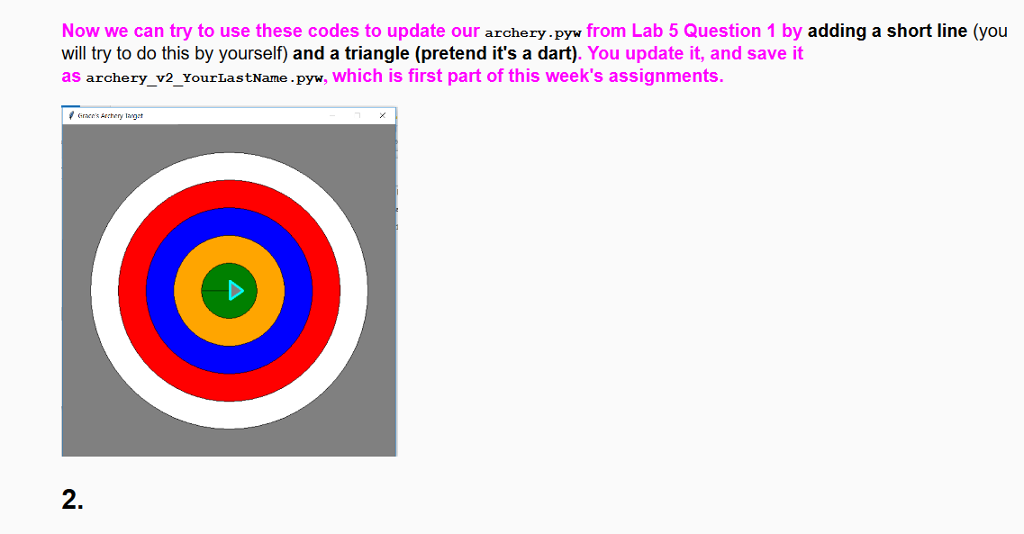
Now we can try to use these codes to update our archery.pyw from Lab 5 Question 1 by adding a short line (you will try to do this by yourself) and a triangle (pretend it's a dart). You update it, and save ift as archery_v2_YourLastName .pyw, which is first part of this week's assignments 2. Now we can try to use these codes to update our archery.pyw from Lab 5 Question 1 by adding a short line (you will try to do this by yourself) and a triangle (pretend it's a dart). You update it, and save ift as archery_v2_YourLastName .pyw, which is first part of this week's assignments 2
Step by Step Solution
There are 3 Steps involved in it

Get step-by-step solutions from verified subject matter experts
 Study Help