



Question: i just need g, 2a-f in the formula format. the last page is the correct answers but i need the formaulas. thank you The Chestnut
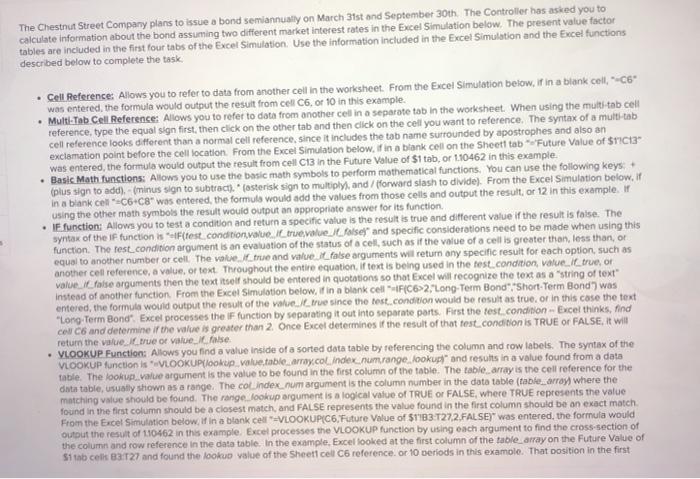
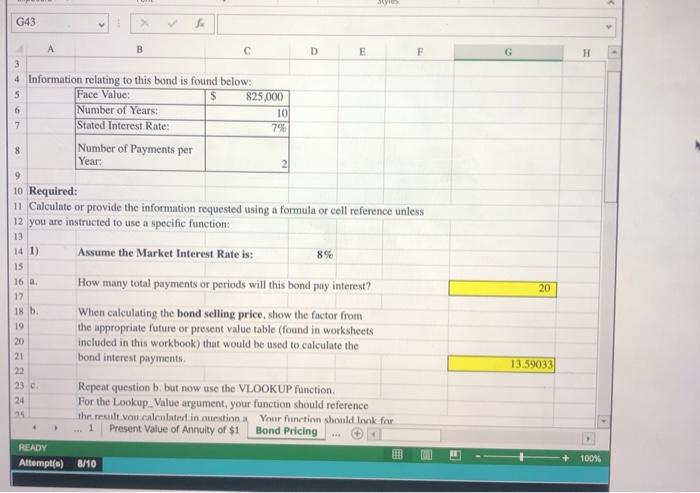
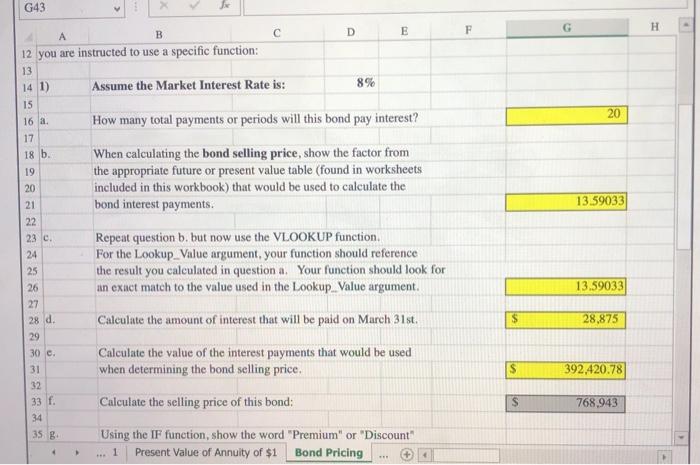
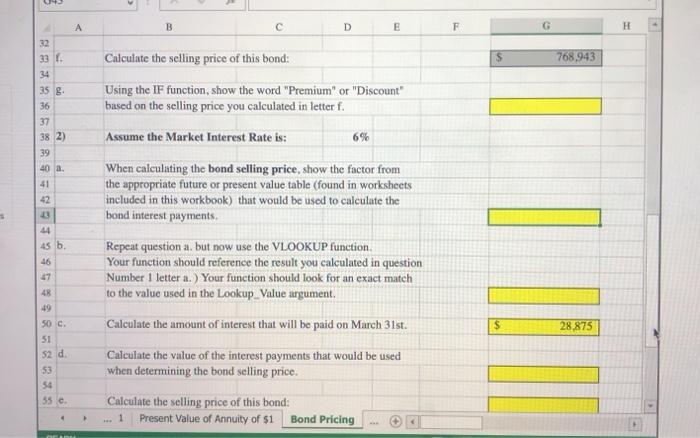
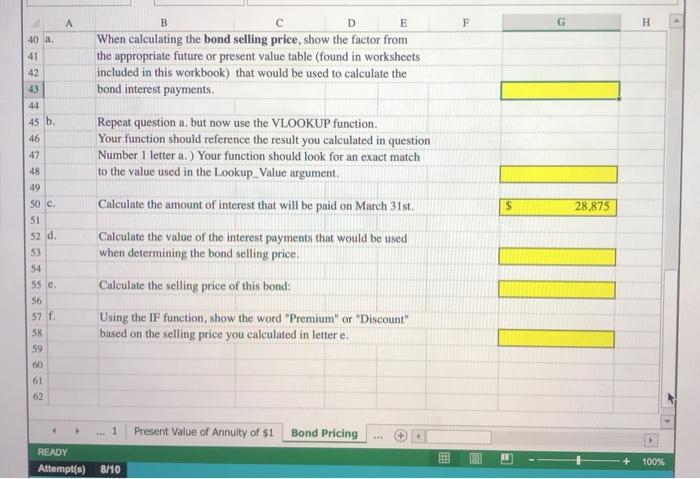
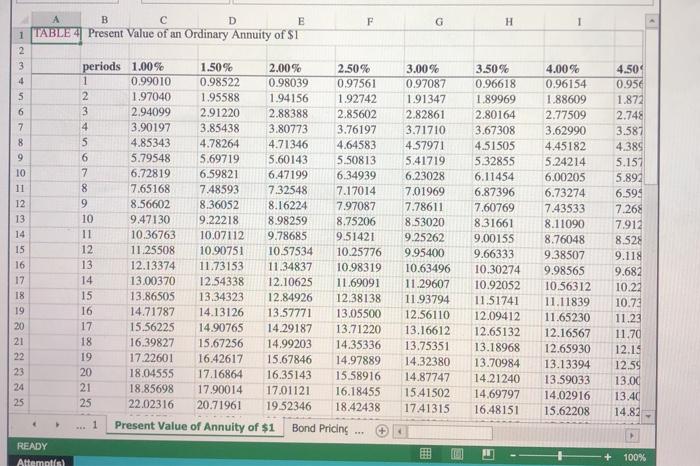
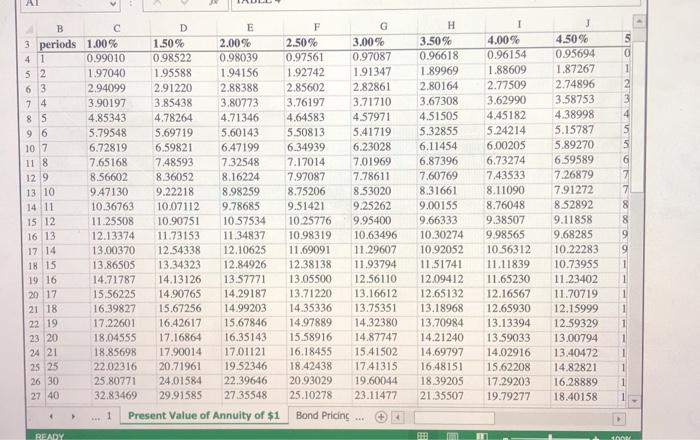
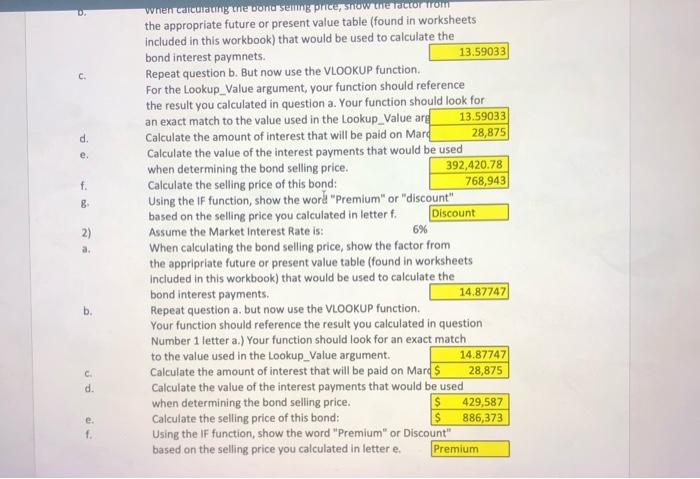
The Chestnut Street Company plans to issue a bond semiannually on March 31st and September 30th. The Controller has asked you to calculate Information about the bond assuming two different market interest rates in the Excel Simulation below. The present value factor tables are included in the first four tabs of the Excel Simulation. Use the information included in the Excel Simulation and the Excel functions described below to complete the task Cell Reference: Allows you to refer to data from another cell in the worksheet. From the Excel Simulation below. If in a blank cell, C6 was entered the formula would output the result from cell C6 or 10 in this example. Multi-Tab Cell Reference: Allows you to refer to data from another cell in a separate tab in the worksheet. When using the multi-tab cell reference, type the equal sign first, then click on the other tab and then click on the cell you want to reference. The syntax of a multi-tab cell reference looks different than a normal cell reference, since it includes the tab name surrounded by apostrophes and also an exclamation point before the cell location. From the Excel Simulation below, if in a blank cell on the Sheet tab "Future Value of $123 was entered, the formula would output the result from cell C13 in the Future Value of $1 tab, or 1.10462 in this example Basic Math functions: Allows you to use the basic math symbols to perform mathematical functions. You can use the following keys (plus sign to add).- (minus sign to subtract). fasterisk sign to multiply and/fforward slash to divide). From the Excel Simulation below. If in a blank cel=C6-C8" was entered the formula would add the values from those cells and output the result, or 12 in this example. If using the other math symbols the result would output an appropriate answer for its function IF function: Allows you to testa condition and return a specific value is the result is true and different value if the result is false. The syntax of the function is (test condition value 1 true value Ilaise and specific considerations need to be made when using this function. The test_condition argument is an evaluation of the status of a cell, such as if the value of a cellis greater than, less than, or equal to another number or cell. The value true and value false arguments will return any specific result for each option, such as another cell reference, a value, or text Throughout the entire equation. If text is being used in the fest.condition, Value. Il true, or value. Ifalse arguments then the text itself should be entered in quotations so that Excel will recognize the text as a string of text Instead of another function. From the Excel Simulation below, if in a blank cell-FC6>2,"Long-Term Bond Short-Term Bond") was entered the formula would output the result of the valuele since the test condition would be result as true or in this case the text "Long Term Bond' Excel processes the IF function by separating it out into separate parts. First the test.condition - Excel thinks, find col ce and determine if the value is greater than 2 Once Excel determines if the result of that test conditionis TRUE OR FALSE, it will return the value true or value false VLOOKUP Function: Allows you find a value inside of a sorted data table by referencing the column and row labels. The syntax of the VLOOKUP function is VLOOKUP(lookup value table array.col. Indexnum range, lookup and results in a value found from a data table. The lookup_value argument is the value to be found in the first column of the table. The table array is the cell reference for the dinta table, usually shown as a range. The colindex_num argument is the column number in the data table (table_array) where the matching value should be found. The range, lookup argument is a logical value of TRUE OR FALSE, where TRUE represents the value found in the first column should be a closest match, and FALSE represents the value found in the first column should be an exact match From the Excel Simulation below. If in a blank cell VLOOKUP(C6, Future Value of $1'|B3 T27.2.FALSE)" was entered the formula would output the result of 110462 in this example Excel processes the VLOOKUP function by using each argument to find the cross-section of the column and row reference in the date table. In the example Excel looked at the first column of the table_array on the Future Value of $1 tab cel B3:27 and found the lookup value of the Sheet cell C6 reference. or 10 periods in this example. That position in the first G43 fo F G . 8 2 B D E 3 4 Information relating to this bond is found below: 5 Face Value: $ 825.000 6 Number of Years: 10 7 Stated Interest Rate: 7% Number of Payments per Year: 9 10 Required: 11 Calculate or provide the information requested using a formula or cell reference unless 12 you are instructed to use a specific function: 13 14 1) Assume the Market Interest Rate is: 8% 15 How many total payments or periods will this bond pay interest? When calculating the bond selling price, show the factor from the appropriate future or present value table (found in worksheets included in this workbook) that would be used to calculate the bond interest payments 23c Repeat question b. but now use the VLOOKUP function, 24 For the Lookup_Value argument, your function should reference 25 the result von calculated in question. Your function should look for Present Value of Annuity of $1 Bond Pricing READY Attempt(s) 8/10 20 16 17 18 h 19 20) 21 22 13.59033 1 + 100% G43 B A F D E H 8% 20 12 you are instructed to use a specific function: 13 14 1) Assume the Market Interest Rate is: 15 How many total payments or periods will this bond pay interest? When calculating the bond selling price, show the factor from the appropriate future or present value table (found in worksheets included in this workbook) that would be used to calculate the bond interest payments. 13.59033 16 a. 17 18 b. 19 20 21 22 23 c. 24 25 26 27 28 d. 29 Repeat question b. but now use the VLOOKUP function, For the Lookup Value argument, your function should reference the result you calculated in question a Your function should look for an exact match to the value used in the Lookup_value argument. 13.59033 Calculate the amount of interest that will be paid on March 31st. $ 28.875 S 392,420.78 30 c. 31 32 33 f. 34 35 g Calculate the value of the interest payments that would be used when determining the bond selling price. Calculate the selling price of this bond: Using the IF function, show the word "Premium" or "Discount Present Value of Annuity of $1 Bond Pricing S 768,943 - 1 B D E F H - 32 33 1. 34 Calculate the selling price of this bond: 768 943 35 8 36 37 38 2) 39 40 a. 41 42 Using the IF function, show the word "Premium" or "Discount" based on the selling price you calculated in letter f. Assume the Market Interest Rate is: 6% 44 45 b. 46 47 When calculating the bond selling price, show the factor from the appropriate future or present value table (found in worksheets included in this workbook) that would be used to calculate the bond interest payments Repeat question a. but now use the VLOOKUP function. Your function should reference the result you calculated in question Number 1 letter a.) Your function should look for an exact match to the value used in the Lookup Value argument. Calculate the amount of interest that will be paid on March 31st. Calculate the value of the interest payments that would be used when determining the bond selling price. 48 -19 S 28.875 50c 51 52 d. 53 54 55 e Calculate the selling price of this bond: Present Value of Annuity of $1 Bond Pricing A B D E F G H 40 a 41 42 43 When calculating the bond selling price, show the factor from the appropriate future or present value table (found in worksheets included in this workbook) that would be used to calculate the bond interest payments. Repeat question a, but now use the VLOOKUP function. Your function should reference the result you calculated in question Number 1 letter a.) Your function should look for an exact match to the value used in the Lookup_Value argument. Calculate the amount of interest that will be paid on March 31st. $ 28.875 Calculate the value of the interest payments that would be used when determining the bond selling price, 49 SO C. 51 52 d. 53 54 55 e 56 57 f. 58 59 60 Calculate the selling price of this bond: Using the IF function, show the word "Premium" or "Discount" based on the selling price you calculated in lettere, 61 62 1 Present Value of Annuity of $1 Bond Pricing READY Attempt(s) 100% 8/10 F G H 1 D E F 1 TABLE4 Present Value of an Ordinary Annuity of $1 2 3 periods 1.00% 1.50% 2.00% 2.50% 4 1 0.99010 0.98522 0.98039 0.97561 5 2 1.97040 1.95588 1.94156 1.92742 6 3 2.94099 2.91220 2.88388 2.85602 7 4 3.90197 3.85438 3.80773 3.76197 8 5 4.85343 4.78264 4.71346 4.64583 9 6 5.79548 5.69719 5.60143 5.50813 10 7 6.72819 6.59821 6.47199 6.34939 11 8 7.65168 7.48593 7.32548 7.17014 12 9 8.56602 8.36052 8.16224 7.97087 13 10 9.47130 9.22218 8.98259 8.75206 14 11 10.36763 10.07112 9.78685 9.51421 15 12 11.25508 10.90751 10.57534 10.25776 16 13 12.13374 11.73153 11.34837 10.98319 17 14 13.00370 12.54338 12.10625 11.69091 18 15 13.86505 13.34323 12.84926 12 38138 19 16 14.71787 14.13126 13.57771 13.05500 20 17 15.56225 14.90765 14.29187 13.71220 21 18 16.39827 15.67256 14.99203 14.35336 22 19 17.22601 16.42617 15.67846 14.97889 23 20 18.04555 17.16864 16.35143 15.58916 24 21 18.85698 17.90014 17.01121 16.18455 25 25 22.02316 20.71961 19.52346 18.42438 1 Present Value of Annuity of $1 Bond Pricing READY Attempts 3.00% 0.97087 1.91347 2.82861 3.71710 4.57971 5.41719 6.23028 7,01969 7.78611 8.53020 9.25262 9.95400 10.63496 11.29607 11.93794 12.56110 13.16612 13.75351 14.32380 14.87747 15.41502 17.41315 3.50% 0.96618 1.89969 2.80164 3.67308 4.51505 5.32855 6.11454 6.87396 7.60769 8.31661 9.00155 9.66333 10.30274 10.92052 11.51741 12.09412 12.65132 13.18968 13.70984 14.21240 14,69797 16.48151 4.00% 0.96154 1.88609 2.77509 3.62990 4.45182 5.24214 6.00205 6.73274 7.43533 8.11090 8.76048 9.38507 9.98565 10.56312 11.11839 11.65230 12.16567 12.65930 13.13394 13.59033 14.02916 15.62208 4.50 0.95 1.872 2.748 3.587 4.389 5.157 5.894 6.594 7.268 7.912 8.528 9.118 9.682 10.22 10.73 11.23 11.70 12.13 12.59 13.00 13.40 14.82 + 100% AL 5 0 1 2 4 5 5 6 H 3.50% 0.96618 1.89969 2.80164 3.67308 4.51505 5.32855 6.11454 6.87396 7.60769 8.31661 9.00155 9.66333 10.30274 10.92052 11.51741 12.09412 12.65132 13.18968 13.70984 14.21240 14.69797 16.48151 18.39205 21.35507 B D E F G 3 periods 1.00% 1.50% 2.00% 2.50% 3.00% 4 1 0.99010 0.98522 0.98039 0.97561 0.97087 52 1.97040 1.95588 1.94156 1.92742 1.91347 63 2.94099 2.91220 2.88388 2.85602 2.82861 74 3.90197 3.85438 3.80773 3.76197 3.71710 8S 4.85343 4.78264 4.71346 4.64583 4.57971 96 5.79548 5.69719 5.60143 5.50813 5.41719 107 6.72819 6.59821 6.47199 6.34939 6.23028 11 8 7.65168 7.48593 7.32548 7.17014 7.01969 129 8.56602 8.36052 8.16224 7.97087 7.78611 13 10 9.47130 9.22218 8.98259 8.75206 8.53020 14 11 10.36763 10.07112 9.78685 9.51421 9.25262 15 12 11.25508 10.90751 10.57534 10.25776 9.95400 16 13 12.13374 11.73153 11.34837 10.98319 10.63496 17 14 13.00370 12.54338 12.10625 11.69091 11.29607 18 15 13.8650S 13.34323 12.84926 12.38138 11.93794 19 16 14.71787 14.13126 13.57771 13.05500 12.56110 2017 15.56225 14.90765 14.29187 13.71220 13.16612 21 18 16.39827 15.67256 14.99203 14.35336 13.75351 22 19 17.22601 16.42617 15.67846 14.97889 14.32380 23 20 18.04555 17.16864 16.35143 15.58916 14.87747 24 21 18.85698 17.90014 17.01121 16.18455 15.41502 22.02316 20.71961 19.52346 18.42438 1741315 26 30 25.80771 24.01584 22.39646 20.93029 19.60044 27 40 32.83469 29.91585 27.35548 25.10278 23.11477 1 Present Value of Annuity of $1 Bond Pricing READY 4.00% 0.96154 1.88609 2.77509 3.62990 4.45182 5.24214 6.00205 6.73274 7.43533 8.11090 8.76048 9.38507 9.98565 10.56312 11.11839 11.65230 12.16567 12.65930 13.13394 13 59033 14.02916 15.62208 17.29203 19.79277 4.50% 0.95694 1.87267 2.74896 3.58753 4.38998 5.15787 5.89270 6.59589 7.26879 7.91272 8.52892 9.11858 9.68285 10.22283 10.73955 11.23402 11.70719 12.15999 12.59329 13.00794 13.40472 14.82821 16.28889 18.40158 8 8 9 25 25 > THE ON c d. e. f. 8 2) a. when calculating unter bon seng price how the corrom the appropriate future or present value table (found in worksheets included in this workbook) that would be used to calculate the bond interest paymnets. 13.59033 Repeat question b. But now use the VLOOKUP function For the Lookup_value argument, your function should reference the result you calculated in question a. Your function should look for an exact match to the value used in the Lookup_value ang 13.59033 Calculate the amount of interest that will be paid on Mard 28,875 Calculate the value of the interest payments that would be used when determining the bond selling price. 392,420.78 Calculate the selling price of this bond: 768,943 Using the IF function, show the word "Premium" or "discount" based on the selling price you calculated in letter f. Discount Assume the Market Interest Rate is: 6% When calculating the bond selling price, show the factor from the appripriate future or present value table (found in worksheets Included in this workbook) that would be used to calculate the bond interest payments. 14.87747 Repeat question a, but now use the VLOOKUP function. Your function should reference the result you calculated in question Number 1 letter a.) Your function should look for an exact match to the value used in the Lookup_value argument. 14.87747 Calculate the amount of interest that will be paid on Mars 28,875 Calculate the value of the interest payments that would be used when determining the bond selling price, $ 429,587 Calculate the selling price of this bond: $ 886,373 Using the IF function, show the word "Premium" or Discount" based on the selling price you calculated in lettere. Premium b. C d. e 1
Step by Step Solution
There are 3 Steps involved in it

Get step-by-step solutions from verified subject matter experts