







Question: i just need help with the cell identifiers for part D and E Resdy R Accessibility Investigate interest rates and oan lengths. Ihis what-if scenario
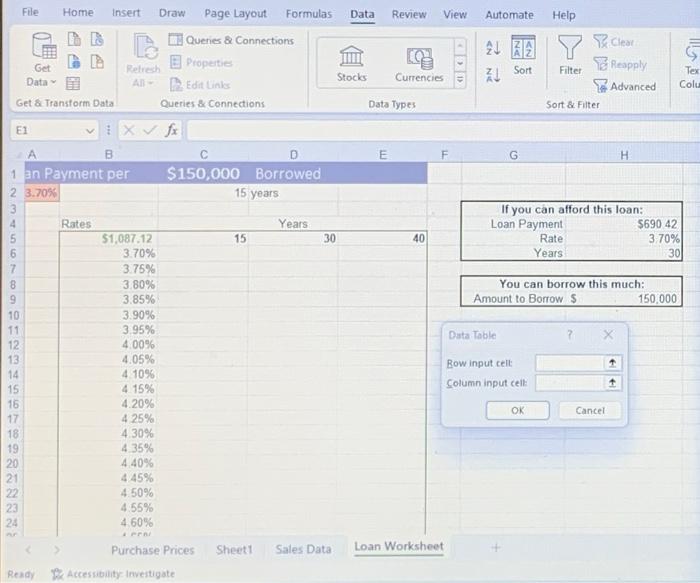
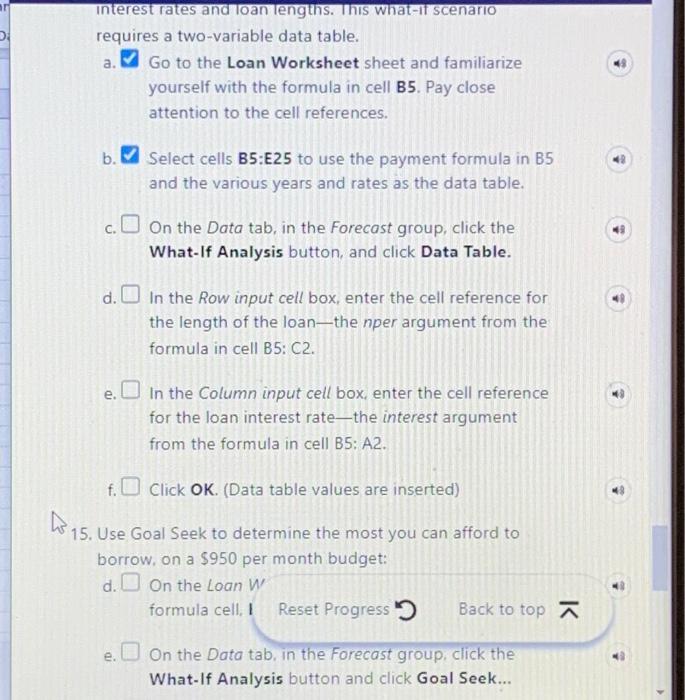
Resdy R Accessibility Investigate interest rates and oan lengths. Ihis what-if scenario requires a two-variable data table. a. Go to the Loan Worksheet sheet and familiarize yourself with the formula in cell B5. Pay close attention to the cell references. b. 7 Select cells B5:E25 to use the payment formula in B5 and the various years and rates as the data table. c. On the Data tab, in the Forecast group, click the What-If Analysis button, and click Data Table. d. In the Row input cell box, enter the cell reference for the length of the loan-the nper argument from the formula in cell B5: C2. e. In the Column input cell box, enter the cell reference for the loan interest rate-the interest argument from the formula in cell B5:A2. f. Click OK. (Data table values are inserted) 15. Use Goal Seek to determine the most you can afford to borrow, on a $950 per month budget: d. On the Loan W' formula cell, I Reset Progress 3 e. On the Data tab, in the Forecast group, click the What-If Analysis button and click Goal Seek
Step by Step Solution
There are 3 Steps involved in it

Get step-by-step solutions from verified subject matter experts
 Study Help