







Question: I just need help with the function for createDungeon and makeMove. Doesn't need to be 100%, just require the concept or idea. Obviously the program
I just need help with the function for createDungeon and makeMove. Doesn't need to be 100%, just require the concept or idea. Obviously the program can't be run as there are a lot of other functions that I can't share here.
Pre-written code in dungeon.cpp
#include "dungeon.hpp"
#include
States gameState;
Block blocks[xGrid][yGrid];
Player player = {1, 1, 60, 10, {16, 287, 92, 130}, {50, 50, 50, 50}};
// fill this function to create dungeon.
void createDungeon(){
// To fill a block, call the setBlock function, the example is given here:
// It Sets a fire block at row=3, and column=4, it reduces life by 4, and increases health by 5
blocks[3][4].src = Fire; // Other possible values for shape are: Rock, Corona, Burger, Well, Fire, Gold
blocks[3][4].life = -4; // -ve values reduces life, +ve values increases
blocks[3][4].health = 5; // -ve values reduces health, +ve values increases
}
// This is a demo implementation of makeMove function
// It doesn't follow the game rules at all
// You have to implement it according to game logic
void makeMove(string direction){
if (direction == "right"){ //When Right Arrow is pressed, other possible directions are: left, up, down
// blocks[i][j] can accessed to see attributes shape, health, life. For example:
cout
cout
player.col++;
gameState = RUNNING; //Other values are LOST, WON
// manipulate the player.life and player.health variable accordingly
}
else if(direction == "left"){
gameState = LOST;
}
else
gameState = WON;
// provide implementation for rest of moves
}
//This function is drawing all the objects. It's complete, don't modify it.
void update(SDL_Renderer* gRenderer, SDL_Texture* assets, string direction ){
SDL_RenderClear( gRenderer );
for(int row=0;row
for (int col = 0; col
{
SDL_Rect mover = {col*yJump, row*xJump, xJump, yJump};
SDL_RenderCopy( gRenderer, assets, &blocks[row][col].src, &mover );
}
}
if(direction!="")//if default argument is used.
makeMove(direction);
player.mover = {player.col*yJump, player.row*xJump, xJump, yJump};
SDL_RenderCopy( gRenderer, assets, &player.src, &player.mover );
// display life
int r=0, c=0;
for(int i=0;i
if(i%10==0){
r=0; c++;
}
SDL_Rect mover = {600 + r++*12, 100 + c*20, 10, 15};
SDL_RenderCopy( gRenderer, assets, &player.src, &mover );
}
for(int i=0 ;i
SDL_Rect mover = {600+i*12, 300, 10, 10};
SDL_Rect src = {175, 461, 102, 90};
SDL_RenderCopy( gRenderer, assets, &src, &mover );
}
SDL_Rect mover, src;
if (gameState == RUNNING){
src = {367, 23, 281, 75};
mover = {600, 400, 100, 50};
SDL_RenderCopy(gRenderer, assets, &src, &mover);
}
else if (gameState == LOST)
{
src = {372, 224, 182, 45};
mover = {600, 400, 100, 50};
SDL_RenderCopy(gRenderer, assets, &src, &mover);
}
else if (gameState == WON)
{
src = {366, 125, 186, 45};
mover = {600, 400, 100, 50};
SDL_RenderCopy(gRenderer, assets, &src, &mover);
}
SDL_RenderPresent( gRenderer );
SDL_Delay(5);
}
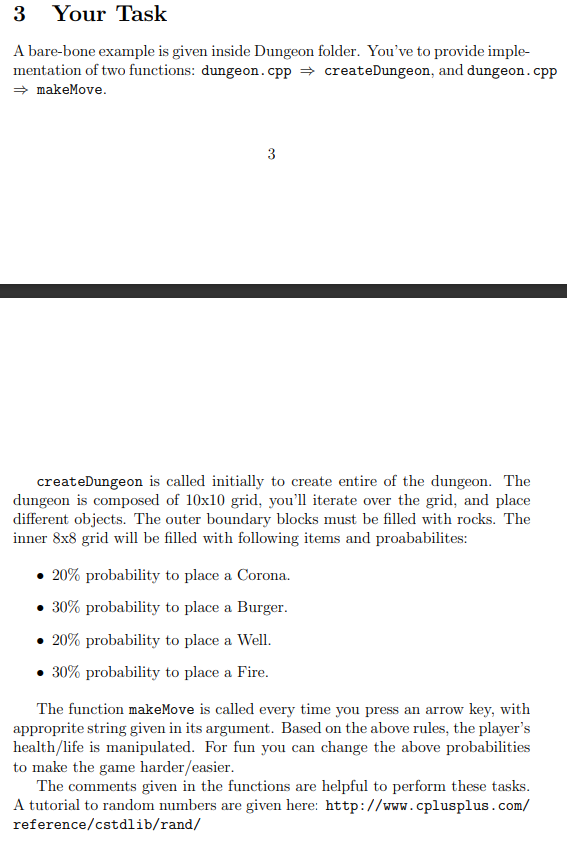
3 Your Task A bare-bone example is given inside Dungeon folder. You've to provide imple- mentation of two functions: dungeon.cpp = createDungeon, and dungeon.cpp makeMove. 3 createDungeon is called initially to create entire of the dungeon. The dungeon is composed of 10x10 grid, you'll iterate over the grid, and place different objects. The outer boundary blocks must be filled with rocks. The inner 8x8 grid will be filled with following items and proababilites: 20% probability to place a Corona. 30% probability to place a Burger. 20% probability to place a Well. 30% probability to place a Fire. The function makeMove is called every time you press an arrow key, with approprite string given in its argument. Based on the above rules, the player's health/life is manipulated. For fun you can change the above probabilities to make the game harder/easier. The comments given in the functions are helpful to perform these tasks. A tutorial to random numbers are given here: http://www.cplusplus.com/ reference/cstdlib/rand/
Step by Step Solution
There are 3 Steps involved in it

Get step-by-step solutions from verified subject matter experts
 Study Help