







Question: I need a Facebook login bassed app. My app should have 3, not necesary, view controllers. 1- welcome screen with a button to conect using
I need a Facebook login bassed app. My app should have 3, not necesary, view controllers. 1- welcome screen with a button to conect using facebook. 2- the facebook button an a button to go back to the main page. 3- the viewcontroller that will shouw up as as the loggin went successful.
How can redirect the user to another window after loggin went ok?
This mis my code in the viewController.swift file
import UIKit
import FBSDKLoginKit //my Code
import FBSDKCoreKit //my Code
class ViewController: UIViewController{
override func viewDidLoad() {
super.viewDidLoad()
let logInButton = FBSDKLoginButton()
view.addSubview(logInButton)
logInButton.center = view.center
if (FBSDKAccessToken.current() != nil) {
// User is already logged in, do work such as go to next view controller.
// I need help here. How to send the user to another window.
}
}
override func didReceiveMemoryWarning() {
super.didReceiveMemoryWarning()
// Dispose of any resources that can be recreated.
}
}
Everything works like it should, I just help redirecting the user to "Show after successful login" after login with Facebook happens Right now it only shows the Facebook logout button and stays in the same page...
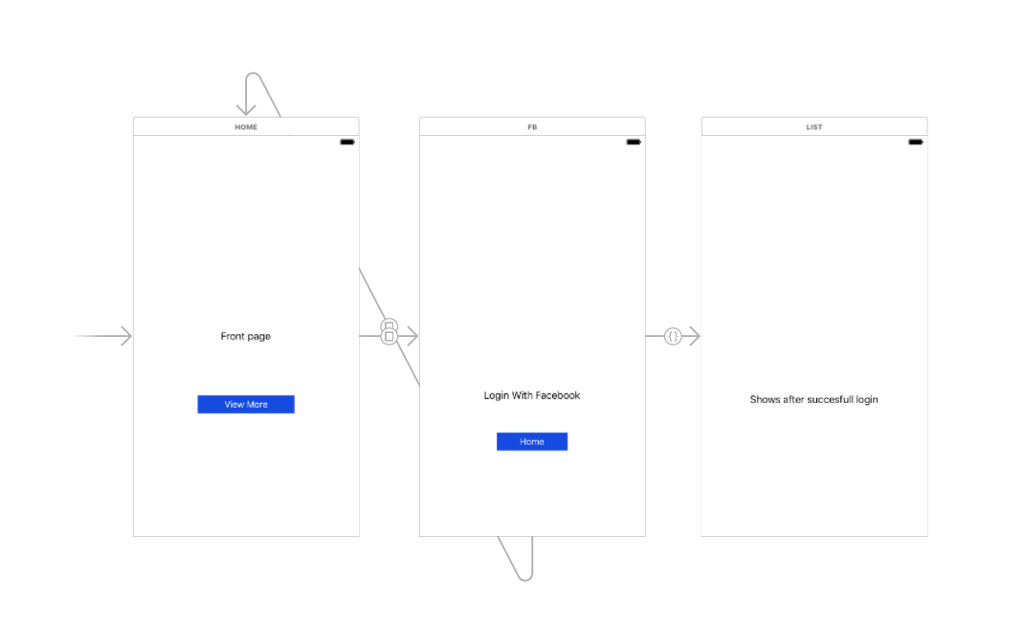
Front page View More Login With Facebook LIST Shows after succesfull login
Step by Step Solution
There are 3 Steps involved in it

Get step-by-step solutions from verified subject matter experts
 Study Help