



Question: i need A, G, H, I, J to solve COURSE LEARNING OBJECTIVE: Students wit use eloctronic worksheets or other producfivity loois to solvo problems and
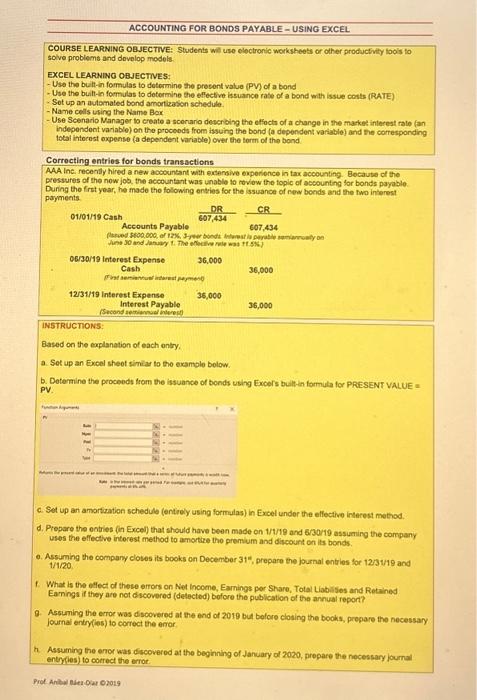
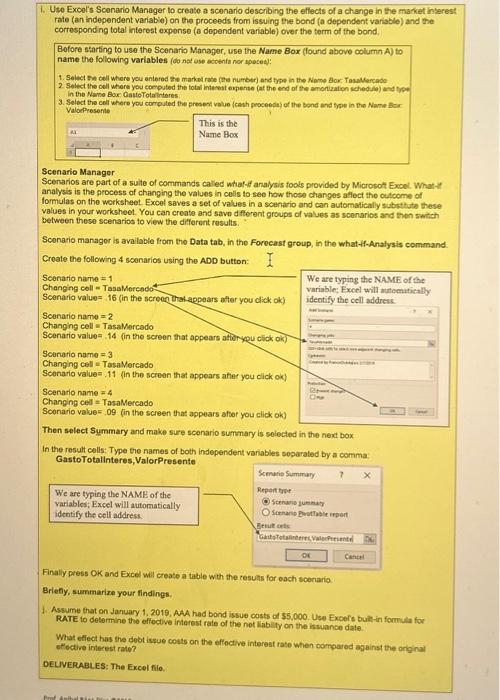
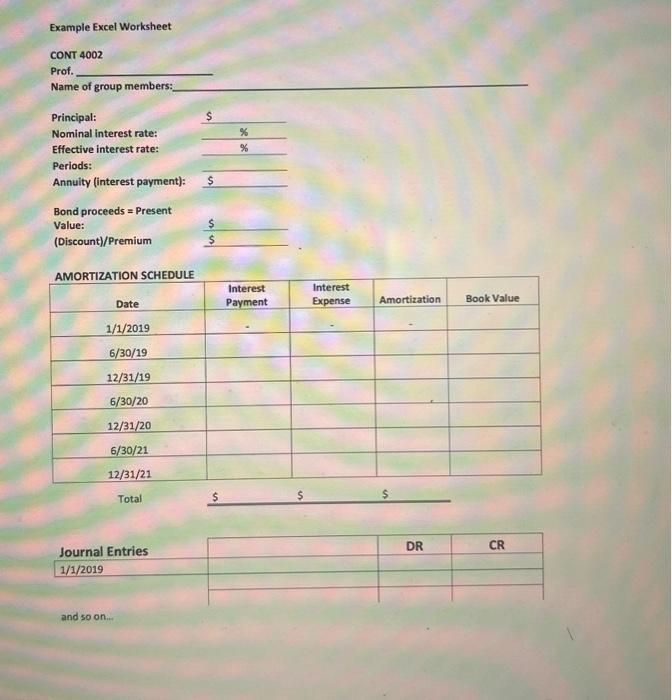
COURSE LEARNING OBJECTIVE: Students wit use eloctronic worksheets or other producfivity loois to solvo problems and dovelop models. EXCEL LEARNINO OBJECTVES: - Use the buitt-in formulas to determine the present value (PV) of a bond - Use the buift-in formulas to determine the effective issuance rate of a bond with issue costs (RATE) - Sot up an automated bond amorticason schedulo. - Name cells using the Name Bor. - Use Scenario Manager to create a scorario describing the effoctn of a change in the masket interest rato fan independent variable) on the proceeds from issuing the bond (a depondent vartable) and the corresponding total intocest expense (a dependent variable) over the torm of the bond Correcting entries for bonds transactions AAA lne. recendy hired a new accocintant with extemive expenience in tax accounting. Becaute of the pressures of the now job, the accountant was unable io roviow the foplc of ascounting for bonds payable. During the frst year, he made the folowing ontries for the issuance of new bonds and the fwo interest payments 01/01/19 Cash Accounts Payable 607,434DRCR 06/30/19 Interest Expense 36,000 Cash 36,000 12/31/19 Interest Expense 35,060 Interest Payable 36,000 Fecond semiencied interest! INSTRUCTIONS: Based on the explanation of each ontry. a. Set up an Excel sheot similar to the examolo bolow. b. Determine the proceeds from the issuance of bonds using Excers bult-in formula for PRESENT VALUE a PV. c. Set up an amortization schedule (entioly using formulas) in Excel under the eflective interest method. d. Prepare the entries (in Excel) that should have been made on 1/1/19 and 6/30/19 assuming the company uses the effective interest method to amortize the premium and discount on its bonds. a. Assuming the company cloves its books on December 31", prepare the journal entries for 1231/19 and 1/1/20 1. What is the ellect of these errors on Net income, Earnings por Share, Total Liablisies and Retained Earnings if they are not dscovered (detected) bofore the publication of the annual report? 9. Assuming the erroe was discovered at the end of 2019 but bolore closing the books, prepare the necessary journal entry(es) to correct the enor h. Assuming the enor was discovered at the beginning of January of 2020 , prepare the necessary journal entryles) to correct the errot. 1. Use Excol's Sconario Manager to create a sconario describing the effects of a change in the market interes rate (an independent variabie) on the proceeds from issuing the bond (a dependent variable) and the corresponding total interest expense (a dependent variable) over the term of the bond. Before starting to use the Scenario Manager, use the Name Box (lound above column A) to name the following variables (do not ase acoentu nor apaces): 2 Select the oell where you computed the fotal intevest expente (at the end of the amortization schedule) and tyct. in the Name Box, CasteTotalintores 3. Select the cell whore you corpuled the present value (canh proceeds) of the bond and tyoe in the Name Bar Valorpresente Scenario Manager Scenarios are part of a sulte of commands called what-if analysis fools provided by Microsot Excel. What-1t analysis is the process of changing the values in cells to see how those changes aflect the outcome of formulas on the worksheet. Excel saves a set of values in a scenario and can automatically substhute these values in your worksheet. You can create and save dfferent groups of values as scenarios and then switch between these scenarios to view the different results. Sconario managor is avalable from the Data tab, in the Forecast group, in the what -f-Analysis command. Create the following 4 scenarios using the ADD button: Scenario name =1 Changing coll = TasaMercodo Scenario value =16 (in the screon that-appears atter you click ok) Scenario name =2 Changing cell = TasaMercado Scenario value =.14 (in the screen that appears aftir yeu click ok) Scenario name =3 Changing call = Tasa Vercado Scenario value =.11 (in the screen that appears afier you cick ok) Scenario name =4 Changing cel = TasaMercado Sconario value =,09 (in the screen that appears after you click ok) Then select Summary and make sure scenario summary is selected in the next box In the result cells: Type the names of both independent variables soparated by a comma. GastoTotallnteres, ValorPresente We are typing the NAME of the variables; Excel will autoratically identify the cell address. Scencio Suminary ? Repart tove Stenarie jumbay Scrinano Bvothale irpent Eenut crits Finally press OK and Excel will create a table wth the results for oach scenario Briefly, summarize your findings. 1. Assume that on January 1, 2010, AMA had bond issue costs of \$5,000. Use Expefis buile-in formula foe RATE to determine the effective interest rate of the not liabity on the iswuance date. What ellect has the dobt issue couts on the effoctive interest rate when corpoarod against the onginal etlective interest rate? DELIVERABLES: The Excel file. Example Excel Worksheet CONT 4002 Prof. Name of group members
Step by Step Solution
There are 3 Steps involved in it

Get step-by-step solutions from verified subject matter experts