







Question: i need a remove button to remove the image from my favourites, however each image needs its own remove button, under the image it removes.
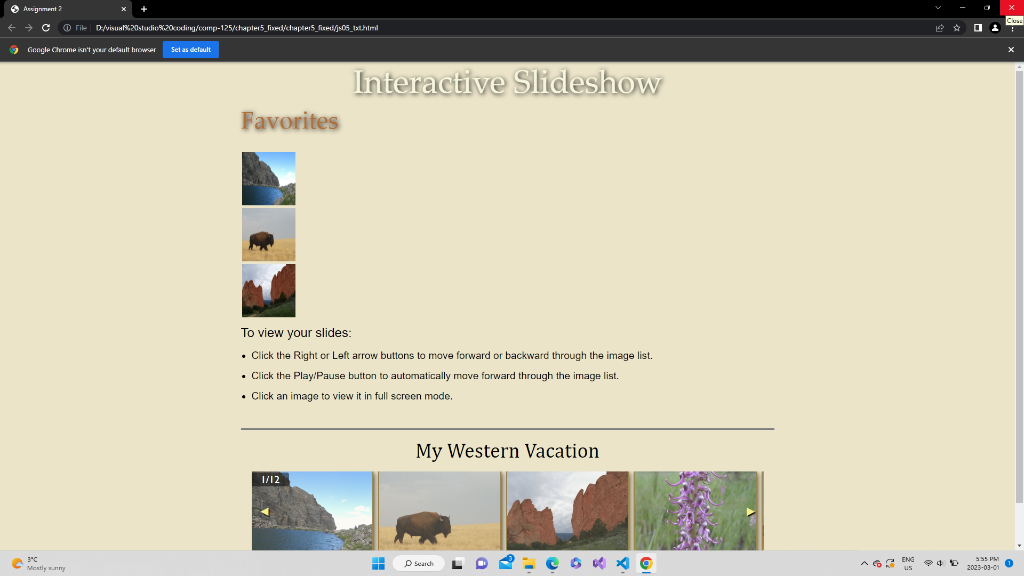
i need a remove button to remove the image from my favourites, however each image needs its own remove button, under the image it removes. right now the remove button doesnt even show up
here is the javascript code I have:
"use strict";
/* JavaScript 7th Edition
Chapter 5
Chapter Case
Application to generate a slide show
Author:
Date:
Filename: js05.js
*/
window.addEventListener("load", setupGallery);
function setupGallery() {
let imageCount = imgFiles.length;
let galleryBox = document.getElementById("lightbox");
let currentSlide = 1;
let runShow = true;
let showRunning;
let galleryTitle = document.createElement("h1");
galleryTitle.id = "galleryTitle";
let slidesTitle = lightboxTitle; // TODO figure out title
galleryTitle.textContent = slidesTitle;
galleryBox.appendChild(galleryTitle);
let slideCounter = document.createElement("div");
slideCounter.id = "slideCounter";
slideCounter.textContent = currentSlide + "/" + imageCount;
galleryBox.appendChild(slideCounter);
let leftBox = document.createElement("div");
leftBox.id = "leftBox";
leftBox.innerHTML = "◀";
leftBox.onclick = moveToLeft;
galleryBox.appendChild(leftBox);
let rightBox = document.createElement("div");
rightBox.id = "rightBox";
rightBox.innerHTML = "▶";
rightBox.onclick = moveToRight;
galleryBox.appendChild(rightBox);
let playPause = document.createElement("div");
playPause.id = "playPause";
playPause.innerHTML = "⏯";
playPause.onclick = startStopShow;
galleryBox.appendChild(playPause);
let slideBox = document.createElement("div");
slideBox.id = "slideBox";
galleryBox.appendChild(slideBox);
for (let i = 0; i
let image = document.createElement("img");
image.src = imgFiles[i];
image.alt = imgCaptions[i];
image.onclick = createModal;
slideBox.appendChild(image);
}
function moveToRight() {
let firstImage = slideBox.firstElementChild.cloneNode("true");
firstImage.onclick = createModal;
slideBox.appendChild(firstImage);
slideBox.removeChild(slideBox.firstElementChild);
currentSlide++;
if (currentSlide > imageCount) {
currentSlide = 1;
}
slideCounter.textContent = currentSlide + " / " + imageCount;
}
function moveToLeft() {
let lastImage = slideBox.lastElementChild.cloneNode("true");
lastImage.onclick = createModal;
slideBox.removeChild(slideBox.lastElementChild);
slideBox.insertBefore(lastImage, slideBox.firstElementChild);
currentSlide--;
if (currentSlide === 0) {
currentSlide = imageCount;
}
slideCounter.textContent = currentSlide + " / " + imageCount;
}
function startStopShow() {
if (runShow) {
showRunning = window.setInterval(moveToRight, 2000);
runShow = false;
} else {
window.clearInterval(showRunning);
runShow = true;
}
}
}
function createModal() {
let modalWindow = document.createElement("div");
modalWindow.id = "lbOverlay";
let figureBox = document.createElement("figure");
modalWindow.appendChild(figureBox);
let modalImage = this.cloneNode("true");
figureBox.appendChild(modalImage);
let figureCaption = document.createElement("figcaption");
figureCaption.textContent = modalImage.alt;
figureBox.appendChild(figureCaption);
let closeBox = document.createElement("div");
closeBox.id = "lbOverlayClose";
closeBox.innerHTML = "×";
closeBox.onclick = function() {
document.body.removeChild(modalWindow);
}
let addButton = document.createElement("button");
addButton.textContent = "Add to favorites";
addButton.onclick = function() { addToFavorites(modalImage); };
modalWindow.appendChild(addButton);
let buttonBox = document.createElement("div"); // create a new div element
buttonBox.appendChild(addButton); // append the addButton to the div
buttonBox.appendChild(closeBox); // append the closeBox to the div
modalWindow.appendChild(buttonBox); // append the div to the modalWindow
function addToFavorites(image) {
let favoritesTable = document.getElementById("favoritesImages");
// check if image is already in favorites
let inFavorites = false;
let favoriteImages = favoritesTable.getElementsByTagName("img");
for (let i = 0; i
if (favoriteImages[i].src === image.src) {
inFavorites = true;
break;
}
}
// add image to favorites if not already there
if (!inFavorites) {
if (favoriteImages.length
let favoriteRow = favoritesTable.insertRow();
let favoriteCell = favoriteRow.insertCell();
let favoriteImage = document.createElement("img");
favoriteImage.src = image.src;
favoriteImage.alt = image.alt;
favoriteCell.appendChild(favoriteImage);
let removeButton = document.createElement("button");
removeButton.textContent = "Remove";
removeButton.onclick = removeFromFavorites;
favoriteCell.appendChild(removeButton);
} else {
alert("You can only have 5 images in your favorites. Please remove at least one image.");
}
}
}
modalWindow.appendChild(closeBox);
document.body.appendChild(modalWindow);
}
Favorites To view your slides: - Click the Right or Left arrow buttons to move forward or backward through the image list. - Click the PlayiPause button to automatically move forward through the image list. - Click an image to view it in full screen mode
Step by Step Solution
There are 3 Steps involved in it

Get step-by-step solutions from verified subject matter experts
 Study Help