







Question: I need a shell script code that output the same as the photo, I am not getting the cpu information idk why? I have put
I need a shell script code that output the same as the photo, I am not getting the cpu information idk why?
I have put these line and didn't work:
echo "CPU information:"
echo "Model:" lscpu | grep "Model name:" | awk -F':' '{print $2}' | tr -d '[:space:]' | tee -a mem_cpu_info.log echo "" echo "Model name:" lscpu | grep "Model name:" | awk -F':' '{print $2}' | tr -d '[:space:]' | tee -a mem_cpu_info.log echo "" echo "Number of cores:" lscpu | grep "CPU(s):" | awk -F':' '{print $2}' | tr -d '[:space:]' | tee -a mem_cpu_info.log echo ""
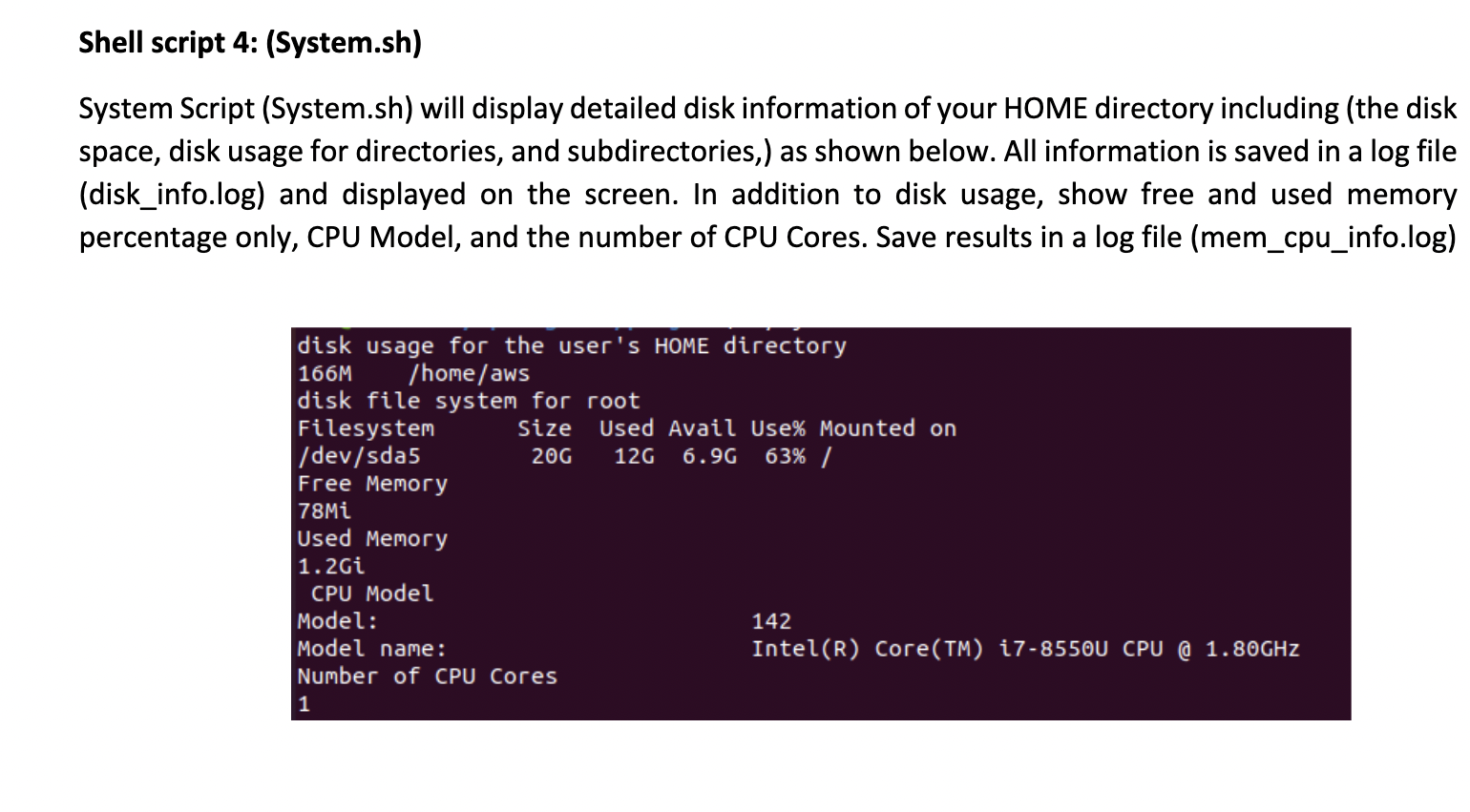
Shell script 4: (System.sh) System Script (System.sh) will display detailed disk information of your HOME directory including (the disk space, disk usage for directories, and subdirectories,) as shown below. All information is saved in a log file (disk_info.log) and displayed on the screen. In addition to disk usage, show free and used memory percentage only, CPU Model, and the number of CPU Cores. Save results in a log file (mem_cpu_info.log)
Step by Step Solution
There are 3 Steps involved in it

Get step-by-step solutions from verified subject matter experts
 Study Help