



Question: I need a step by step instruction on how I would enter task in Excel please: 1. Use AutoFill to fill the range C8:I10 with
I need a step by step instruction on how I would enter task in Excel please:
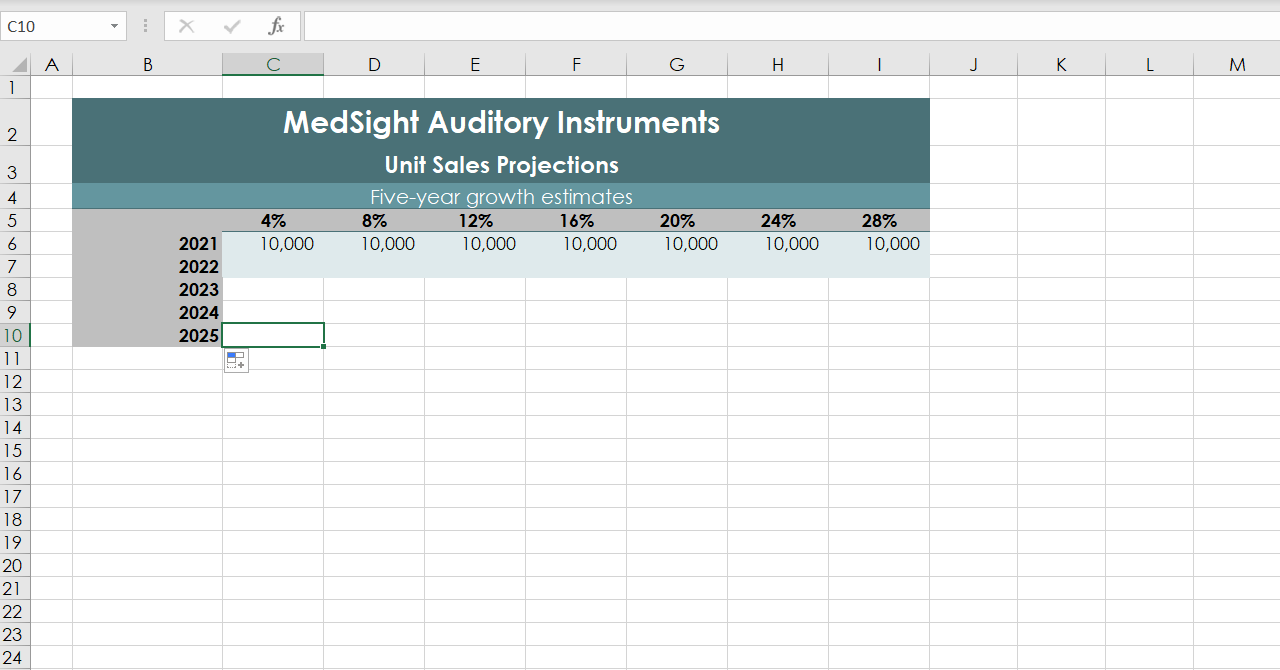
1. Use AutoFill to fill the range C8:I10 with the formatting from the range C6:I7 to apply a consistent format in the projections.
2. Enter formulas as follows to complete the table of projections in the range C6:I10:
a. In cell C7, make a formula without using a function that multiplies the sales projection for the first year (cell C6) by the first growth rate (cell C5), and adds the sales projection for the first year (cell C6) to the result to determine the first estimate for 2022.
b. Use an absolute reference to row 5 in the reference to cell C5.
c. Copy the formula from cell C7 to the range C8:C10, and then copy the formulas from the range C7:C10 to the range D7:I10 to complete the table of projections.
C10 X A B D E F H L M 1 2 3 MedSight Auditory Instruments Unit Sales Projections Five-year growth estimates 4% 8% 12% 16% 20% 10,000 10,000 10,000 10,000 10,000 24% 10,000 28% 10,000 2021 2022 2023 2024 2025 4 5 6 7 8 9 10 11 12 13 14 15 16 17 18 19 20 21 22 23 24
Step by Step Solution
There are 3 Steps involved in it

Get step-by-step solutions from verified subject matter experts