







Question: I need all the steps in the instructions, especially the ones asking for functions 2 Dato Prepiced: 5aturdar, loreiary 14, 2023 I5 - Inventory information
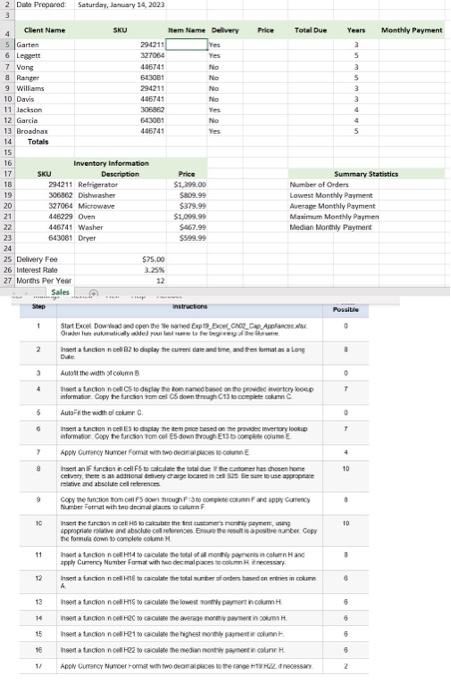
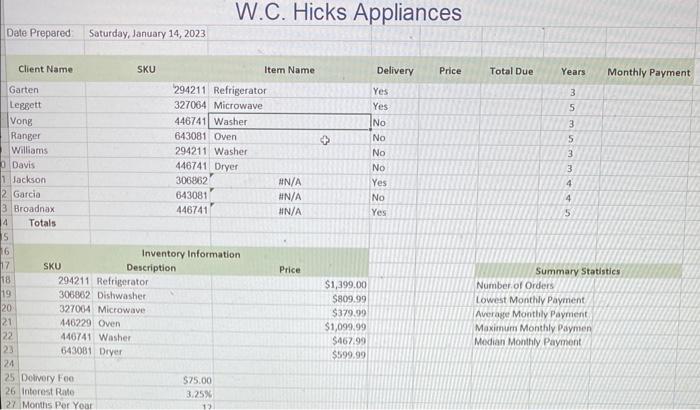
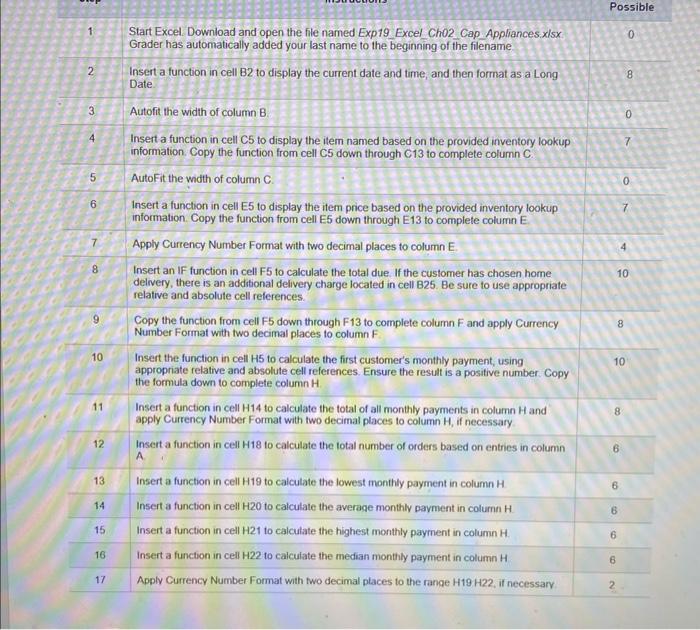
2 Dato Prepiced: 5aturdar, loreiary 14, 2023 I5 - Inventory information W.C. Hicks Appliances Date Prepared Saturday, January 14, 2023 Inventory Information Summary Statistics Number. of Orders Lowest Monthly Payment Average Monthly Payment. Maximum Monthly Paymen Median Monthly Payment Possible 1 Start Excel. Download and open the file named Exp19. Excel Ch02. Cap Appliances. xlsx. Grader has automatically added your last name to the beginning of the filename. 2 Insert a function in cell B2 to display the current date and time, and then format as a Long 0 Date. 3 Autofit the width of column B. 8 4 Insert a function in cell C5 to display the item named based on the provided inventory lookup information. Copy the function from cell C5 down through C13 to complete column C. 5 AutoFit the width of column C. 0 6 Insert a function in cell E5 to display the item price based on the provided inventory lookup information. Copy the function from cell E5 down through E13 to complete column E. 7 Apply Currency Number Format with two decimal places to column E. 8 Insert an IF function in cell F5 to calculate the total due. If the customer has chosen home delvery, there is an additional delivery charge located in cell B25. Be sure to use appropriate relative and absolute cell references. relative and absolute cell references. 9 Copy the function from cell F5 down through F13 to comi Number Format with two decimal places to column F. the formula down to complete column H. \begin{tabular}{|c|l|c|c|} \hline 11 & Insert a function in cell H14 to calculate the total of all monthly payments in column H and apply Currency Number Format with two decimal places to column H, if necessary & 8 \\ \hline 12 & Insert a function in cell H18 to calculate the total number of orders based on entries in column A & 6 \\ \hline 13 & Insert a function in cell H19 to calculate the lowest monthly payment in column H \\ \hline 14 & Insert a function in cell H20 to calculate the average monthly pavment in column H & 6 \\ \hline 15 & Insert a function in cell H21 to calculate the highest monthly payment in column H. \\ \hline 16 & Insert a function in cell H22 to calculate the median monthly payment in column H \\ \hline 17 & Apply Currency Number Format with two decimal places to the range H19H22, if necessary \\ \hline \end{tabular}
Step by Step Solution
There are 3 Steps involved in it

Get step-by-step solutions from verified subject matter experts
 Study Help