







Question: i need an explain and answer for this lab asap please Learning Objectives: - To understand the concept of sniffing. - To familiarized with sniffing
i need an explain and answer for this lab asap please
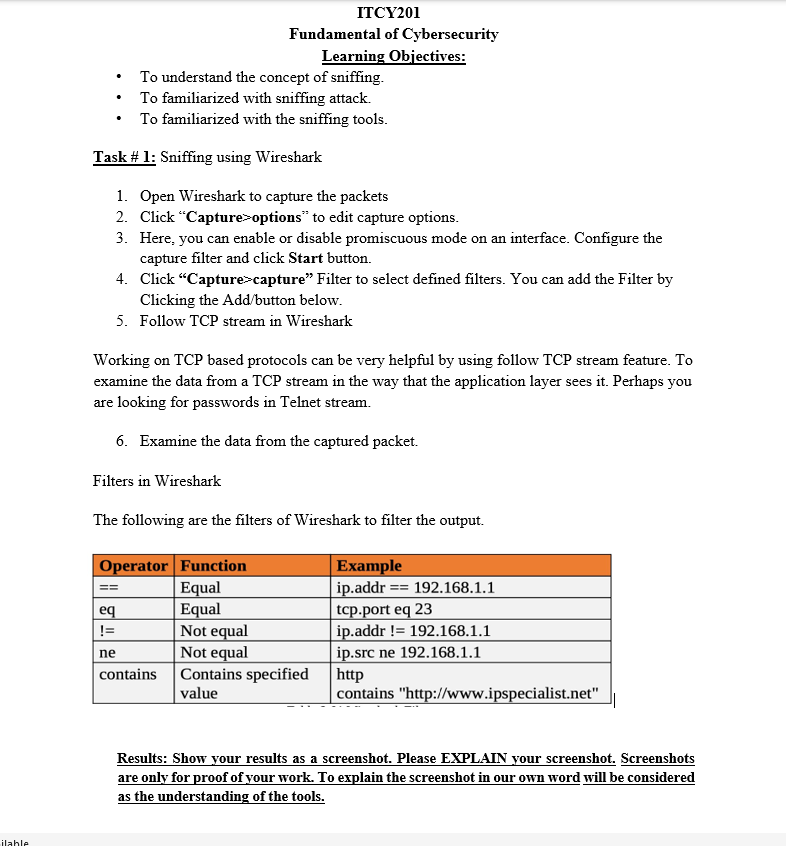
Learning Objectives: - To understand the concept of sniffing. - To familiarized with sniffing attack. - To familiarized with the sniffing tools. Task \# 1: Sniffing using Wireshark 1. Open Wireshark to capture the packets 2. Click "Capture > options" to edit capture options. 3. Here, you can enable or disable promiscuous mode on an interface. Configure the capture filter and click Start button. 4. Click "Capture>capture" Filter to select defined filters. You can add the Filter by Clicking the Add/button below. 5. Follow TCP stream in Wireshark Working on TCP based protocols can be very helpful by using follow TCP stream feature. To examine the data from a TCP stream in the way that the application layer sees it. Perhaps you are looking for passwords in Telnet stream. 6. Examine the data from the captured packet. Filters in Wireshark The following are the filters of Wireshark to filter the output. Results: Show your results as a screenshot. Please EXPLAIN your screenshot. Screenshots are only for proof of your work. To explain the screenshot in our own word will be considered as the understanding of the tools
Step by Step Solution
There are 3 Steps involved in it

Get step-by-step solutions from verified subject matter experts
 Study Help