







Question: I NEED ANSWER FOR EXERCISE 2 ONLY PLEASE. EITHER FULL ANSWER FOR ALL POINTS OR LEAVE IT TO SOMEONE ELSE IF YOU CANNOT FINISH IT
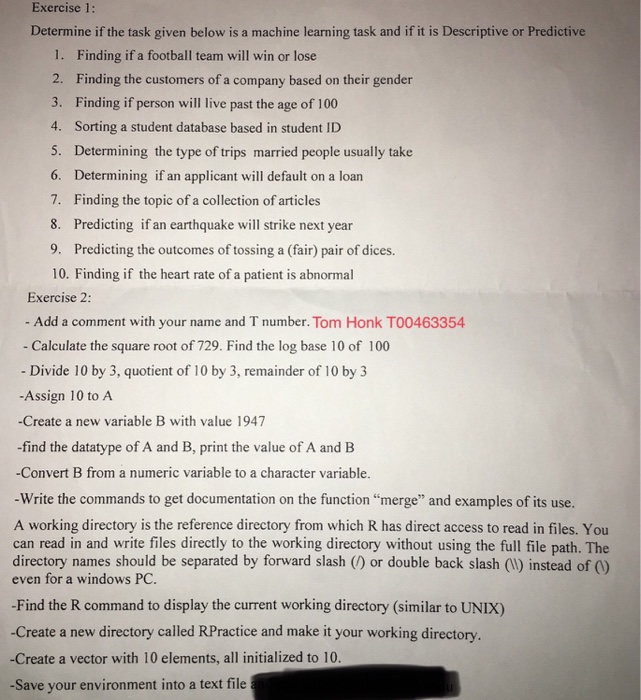
Exercise 1: Determine if the task given below is a machine learning task and if it is Descriptive or Predictive 1. Finding if a football team will win or lose Finding the customers of a company based on their gender 3. 4. 5. Finding if person will live past the age of 100 Sorting a student database based in student ID Determining the type of trips married people usually take 6. Determning if an applicant will default on a loan Finding the topic of a collection of articles 8. Predicting if an earthquake will strike next year 9. Predicting the outcomes of tossing a (fair) pair of dices. 10. Finding if the heart rate of a patient is abnormal Exercise 2: Add a comment with your name and T number. Tom Honk T00463354 Calculate the square root of 729. Find the log base 10 of 100 Divide 10 by 3, quotient of 10 by 3, remainder of 10 by 3 -Assign 10 to A -Create a new variable B with value 1947 -find the datatype of A and B, print the value of A and B -Convert B from a numeric variable to a character variable. -Write the commands to get documentation on the function "merge" and examples of its use. A working directory is the reference directory from which R has direct access to read in files. You can read in and write files directly to the working directory without using the full file path. The directory names should be separated by forward slash ) or double back slash (U) instead of Q) even for a windows PC. -Find the R command to display the curret working directory (similar to UNIX) -Create a new directory called RPractice and make it your working directory. -Create a vector with 10 elements, all initialized to 10 -Save your environment into a text file
Step by Step Solution
There are 3 Steps involved in it

Get step-by-step solutions from verified subject matter experts
 Study Help