Question: I need answer in C# Form1.Designer.CS namespace InvoiceTotal { partial class Form1 { /// /// Required designer variable. /// private System.ComponentModel.IContainer components = null; ///
I need answer in C#
Form1.Designer.CS
namespace InvoiceTotal { partial class Form1 { /// /// Required designer variable. /// private System.ComponentModel.IContainer components = null;
/// /// Clean up any resources being used. /// /// true if managed resources should be disposed; otherwise, false. protected override void Dispose(bool disposing) { if (disposing && (components != null)) { components.Dispose(); } base.Dispose(disposing); }
#region Windows Form Designer generated code
/// /// Required method for Designer support - do not modify /// the contents of this method with the code editor. /// private void InitializeComponent() { this.btnExit = new System.Windows.Forms.Button(); this.btnCalculate = new System.Windows.Forms.Button(); this.txtProductTotal = new System.Windows.Forms.TextBox(); this.label3 = new System.Windows.Forms.Label(); this.label2 = new System.Windows.Forms.Label(); this.label1 = new System.Windows.Forms.Label(); this.txtDiscountAmount = new System.Windows.Forms.TextBox(); this.txtTotal = new System.Windows.Forms.TextBox(); this.label4 = new System.Windows.Forms.Label(); this.txtSubtotal = new System.Windows.Forms.TextBox(); this.label6 = new System.Windows.Forms.Label(); this.txtTax = new System.Windows.Forms.TextBox(); this.SuspendLayout(); // // btnExit // this.btnExit.DialogResult = System.Windows.Forms.DialogResult.Cancel; this.btnExit.Location = new System.Drawing.Point(130, 161); this.btnExit.Name = "btnExit"; this.btnExit.Size = new System.Drawing.Size(75, 23); this.btnExit.TabIndex = 16; this.btnExit.Text = "E&xit"; this.btnExit.Click += new System.EventHandler(this.btnExit_Click); // // btnCalculate // this.btnCalculate.Location = new System.Drawing.Point(36, 161); this.btnCalculate.Name = "btnCalculate"; this.btnCalculate.Size = new System.Drawing.Size(75, 23); this.btnCalculate.TabIndex = 15; this.btnCalculate.Text = "&Calculate"; this.btnCalculate.Click += new System.EventHandler(this.btnCalculate_Click); // // txtProductTotal // this.txtProductTotal.Location = new System.Drawing.Point(121, 16); this.txtProductTotal.Name = "txtProductTotal"; this.txtProductTotal.Size = new System.Drawing.Size(84, 20); this.txtProductTotal.TabIndex = 14; // // label3 // this.label3.Location = new System.Drawing.Point(17, 121); this.label3.Name = "label3"; this.label3.Size = new System.Drawing.Size(94, 20); this.label3.TabIndex = 5; this.label3.Text = "Total:"; this.label3.TextAlign = System.Drawing.ContentAlignment.MiddleLeft; // // label2 // this.label2.Location = new System.Drawing.Point(17, 42); this.label2.Name = "label2"; this.label2.Size = new System.Drawing.Size(94, 20); this.label2.TabIndex = 8; this.label2.Text = "Discount amount:"; this.label2.TextAlign = System.Drawing.ContentAlignment.MiddleLeft; // // label1 // this.label1.Location = new System.Drawing.Point(17, 16); this.label1.Name = "label1"; this.label1.Size = new System.Drawing.Size(94, 20); this.label1.TabIndex = 7; this.label1.Text = "Product total:"; this.label1.TextAlign = System.Drawing.ContentAlignment.MiddleLeft; // // txtDiscountAmount // this.txtDiscountAmount.Location = new System.Drawing.Point(121, 42); this.txtDiscountAmount.Name = "txtDiscountAmount"; this.txtDiscountAmount.ReadOnly = true; this.txtDiscountAmount.Size = new System.Drawing.Size(84, 20); this.txtDiscountAmount.TabIndex = 18; this.txtDiscountAmount.TabStop = false; // // txtTotal // this.txtTotal.Location = new System.Drawing.Point(121, 122); this.txtTotal.Name = "txtTotal"; this.txtTotal.ReadOnly = true; this.txtTotal.Size = new System.Drawing.Size(84, 20); this.txtTotal.TabIndex = 19; this.txtTotal.TabStop = false; // // label4 // this.label4.AutoSize = true; this.label4.Location = new System.Drawing.Point(17, 72); this.label4.Name = "label4"; this.label4.Size = new System.Drawing.Size(49, 13); this.label4.TabIndex = 20; this.label4.Text = "Subtotal:"; // // txtSubtotal // this.txtSubtotal.Location = new System.Drawing.Point(121, 69); this.txtSubtotal.Name = "txtSubtotal"; this.txtSubtotal.ReadOnly = true; this.txtSubtotal.Size = new System.Drawing.Size(84, 20); this.txtSubtotal.TabIndex = 21; this.txtSubtotal.TabStop = false; // // label6 // this.label6.AutoSize = true; this.label6.Location = new System.Drawing.Point(17, 99); this.label6.Name = "label6"; this.label6.Size = new System.Drawing.Size(66, 13); this.label6.TabIndex = 22; this.label6.Text = "Tax (7.75%):"; // // txtTax // this.txtTax.Location = new System.Drawing.Point(121, 96); this.txtTax.Name = "txtTax"; this.txtTax.ReadOnly = true; this.txtTax.Size = new System.Drawing.Size(84, 20); this.txtTax.TabIndex = 23; this.txtTax.TabStop = false; // // Form1 // this.AcceptButton = this.btnCalculate; this.AutoScaleDimensions = new System.Drawing.SizeF(6F, 13F); this.AutoScaleMode = System.Windows.Forms.AutoScaleMode.Font; this.CancelButton = this.btnExit; this.ClientSize = new System.Drawing.Size(228, 202); this.Controls.Add(this.txtTax); this.Controls.Add(this.label6); this.Controls.Add(this.txtSubtotal); this.Controls.Add(this.label4); this.Controls.Add(this.txtTotal); this.Controls.Add(this.txtDiscountAmount); this.Controls.Add(this.btnExit); this.Controls.Add(this.btnCalculate); this.Controls.Add(this.txtProductTotal); this.Controls.Add(this.label3); this.Controls.Add(this.label2); this.Controls.Add(this.label1); this.FormBorderStyle = System.Windows.Forms.FormBorderStyle.FixedSingle; this.Name = "Form1"; this.StartPosition = System.Windows.Forms.FormStartPosition.CenterScreen; this.Text = "Invoice Total"; this.ResumeLayout(false); this.PerformLayout();
}
#endregion
private System.Windows.Forms.Button btnExit; private System.Windows.Forms.Button btnCalculate; private System.Windows.Forms.TextBox txtProductTotal; private System.Windows.Forms.Label label3; private System.Windows.Forms.Label label2; private System.Windows.Forms.Label label1; private System.Windows.Forms.TextBox txtDiscountAmount; private System.Windows.Forms.TextBox txtTotal; private System.Windows.Forms.Label label4; private System.Windows.Forms.TextBox txtSubtotal; private System.Windows.Forms.Label label6; private System.Windows.Forms.TextBox txtTax; } }
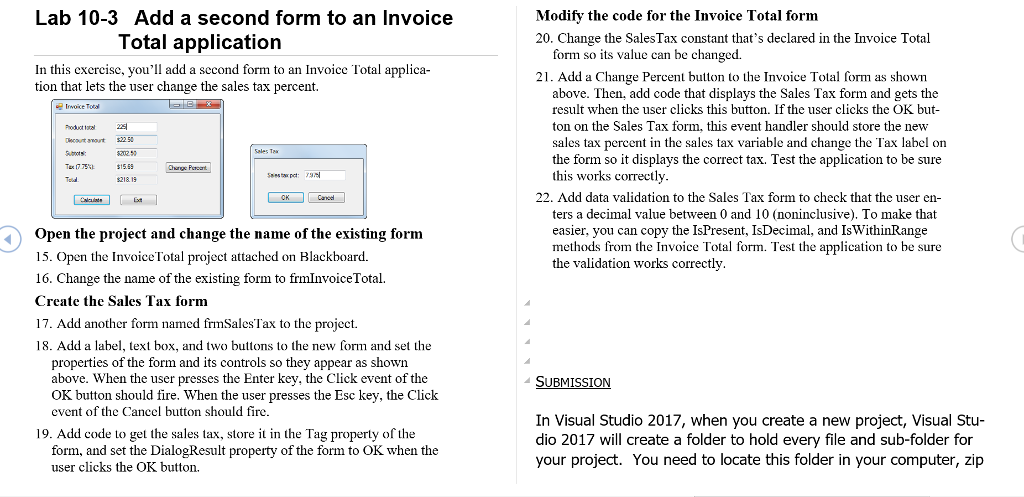
Lab 10-3 Add a second form to an Invoice Modify the code for the Invoice Total form Total application 20. Change the SalesTax constant that's declared in the Invoice Total form so its value can be changed. In this excrcise, you'll add a second form to an Invoice Total applica- tion that lets the user change the sales tax percent. 21. Add a Change Percent button to the Invoice Total form as shown above. Then, add code that displays the Sales Tax form and gets the result when the user clicks this button. If the user clicks the OK but ton on the Sales Tax form, this event handler should store the new sales tax percent in the sales tax variable and change the Tax label on the form so it displays the correct tax. Test the application to be sure this works correctly Irwoice Totsl Decaut not $225 002 22. Add data validation to the Sales Tax form to check that the user en- ters a decimal value between 0 and 10 (noninclusive). To make that easier, you can copy the IsPresent, IsDecimal, and IsWithinRange methods from the Invoice Total form. Test the application to be sure the validation works correctly Open the project and change the name of the existing form 15. Open the Invoice Total project attached on Blackboard. 16. Change the name of the existing form to frmInvoiceTotal. Create the Sales Tax form 17. Add another form named frmSalesTax to the project. 18. Add a label, text box, and two buttons to the new form and set the properties of the form and its controls so they appear as shown above. When the user presses OK button should fire. When the user presses the Esc key, the Click event of the Cancel button should fire the Enter key, the Click event of the In Visual Studio 2017, when you create a new project, Visual Stu- dio 2017 will create a folder to hold every file and sub-folder for your project. You need to locate this folder in your computer, zip 19. Add code to get the sales tax, store it in the Tag property of the form, and set the DialogResult property of the form to OK when the user clicks the OK button




