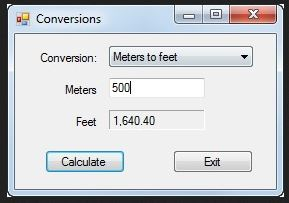
Question: The application should handle the following conversions: From To Conversion Miles Kilometers 1 mile = 1.6093 kilometers Kilometers Miles 1 kilometer = 0.6214 miles Feet

The application should handle the following conversions:

From To Conversion
Miles Kilometers 1 mile = 1.6093 kilometers
Kilometers Miles 1 kilometer = 0.6214 miles
Feet Meters 1 foot = 0.3048 meters
Meters Feet 1 meter = 3.2808 feet
Inches Centimeters 1 inch = 2.54 centimeters
Centimeters Inches 1 centimeter = 0.3937 inches

Open the Chapter10-1LengthConversions project attached to this assignment. Display the code for the form, and notice the rectangular array whose rows contain the value to be displayed in the combo box, the text for the labels that identify the two text boxes, and the multiplier for the conversion as shown in the table above.

Set the DropDownStyle property of the combo box to DropDownList so the user must select an item from the list.

Add code to load the combo box with the first element in each row of the rectangular array when the form is loaded. Add code to display the first item in the combo box by setting the SeletedIndex property of the combo box when the form is loaded.

Add code to change the labels for the 2 text boxes, clear the calculated length, and move the focus to the entry text box when the user selects a different item from the combo box by using the SelectedIndexChanged event handler of the combo box.

Test the application to be sure the conversions are displayed in the combo box, the first conversion is selected by default, and the labels change appropriately when a different conversion is selected.

Add code to calculate and display the converted length when the user clicks the Calculate button. To calculate the length, you can get the index for the selected conversion and then use that index to get the multiplier from the array and convert it to decimal. Then multiply the lengh by the conversion multiplier to get the converted length. Test the application to be sure this works correctly.

Add validation code to check for valid data (IsValidData()) by seeing that that the user enters a value for the length using IsPresen() and that the value entered is a valid decimal value using IsDecimal().

Then, test the application one more time to be sure the validation works correctly.

When you?re done, press the Esc key to end the application.

Conversions Conversion: Meters to feet Meters 500 Feet 1.640.40 Calculate Exit

This is the code:

Program.cs

using System; using System.Collections.Generic; using System.Threading.Tasks; using System.Windows.Forms;

namespace Conversions { ? ? static class Program ? ? { ? ? ? ? ///

? ? ? ? /// The main entry point for the application. ? ? ? ? /// ? ? ? ? [STAThread] ? ? ? ? static void Main() ? ? ? ? { ? ? ? ? ? ? Application.EnableVisualStyles(); ? ? ? ? ? ? Application.SetCompatibleTextRenderingDefault(false); ? ? ? ? ? ? Application.Run(new Form1()); ? ? ? ? } ? ? } }

Form1.cs

using System; using System.Collections.Generic; using System.ComponentModel; using System.Data; using System.Drawing; using System.Linq; using System.Text; using System.Threading.Tasks; using System.Windows.Forms;

namespace Conversions { ? ? public partial class Form1 : Form ? ? { ? ? ? ? public Form1() ? ? ? ? { ? ? ? ? ? ? InitializeComponent(); ? ? ? ? }

? ? ? ? string[,] conversionTable = { ? ? ? ? ? ?{"Miles to kilometers", "Miles", "Kilometers", "1.6093"}, ? ? ? ? ? ?{"Kilometers to miles", "Kilometers", "Miles", "0.6214"}, ? ? ? ? ? ?{"Feet to meters", "Feet", "Meters", "0.3048"}, ? ? ? ? ? ?{"Meters to feet", "Meters", "Feet", "3.2808"}, ? ? ? ? ? ?{"Inches to centimeters", "Inches", "Centimeters", "2.54"}, ? ? ? ? ? ?{"Centimeters to inches", "Centimeters", "Inches", "0.3937"} ? ? ? ?};

? ? ? ? public bool IsPresent(TextBox textBox, string name) ? ? ? ? { ? ? ? ? ? ? if (textBox.Text == "") ? ? ? ? ? ? { ? ? ? ? ? ? ? ? MessageBox.Show(name + " is a required field.", "Entry Error"); ? ? ? ? ? ? ? ? textBox.Focus(); ? ? ? ? ? ? ? ? return false; ? ? ? ? ? ? } ? ? ? ? ? ? return true; ? ? ? ? }

? ? ? ? public bool IsDecimal(TextBox textBox, string name) ? ? ? ? { ? ? ? ? ? ? try ? ? ? ? ? ? { ? ? ? ? ? ? ? ? Convert.ToDecimal(textBox.Text); ? ? ? ? ? ? ? ? return true; ? ? ? ? ? ? } ? ? ? ? ? ? catch (FormatException) ? ? ? ? ? ? { ? ? ? ? ? ? ? ? MessageBox.Show(name + " must be a decimal number.", "Entry Error"); ? ? ? ? ? ? ? ? textBox.Focus(); ? ? ? ? ? ? ? ? return false; ? ? ? ? ? ? } ? ? ? ? }

? ? ? ? private void btnExit_Click(object sender, System.EventArgs e) ? ? ? ? { ? ? ? ? ? ? this.Close(); ? ? ? ? } ? ? } }

Form1.Designer.cs

namespace Conversions { ? ? partial class Form1 ? ? { ? ? ? ? ///

? ? ? ? /// Required designer variable. ? ? ? ? /// ? ? ? ? private System.ComponentModel.IContainer components = null;

? ? ? ? ///

? ? ? ? /// Clean up any resources being used. ? ? ? ? /// ? ? ? ? /// true if managed resources should be disposed; otherwise, false. ? ? ? ? protected override void Dispose(bool disposing) ? ? ? ? { ? ? ? ? ? ? if (disposing && (components != null)) ? ? ? ? ? ? { ? ? ? ? ? ? ? ? components.Dispose(); ? ? ? ? ? ? } ? ? ? ? ? ? base.Dispose(disposing); ? ? ? ? }

? ? ? ? #region Windows Form Designer generated code

? ? ? ? ///

? ? ? ? /// Required method for Designer support - do not modify ? ? ? ? /// the contents of this method with the code editor. ? ? ? ? /// ? ? ? ? private void InitializeComponent() ? ? ? ? { ? ? ? ? ? ? this.lblCalculatedLength = new System.Windows.Forms.Label(); ? ? ? ? ? ? this.txtLength = new System.Windows.Forms.TextBox(); ? ? ? ? ? ? this.lblToLength = new System.Windows.Forms.Label(); ? ? ? ? ? ? this.lblFromLength = new System.Windows.Forms.Label(); ? ? ? ? ? ? this.btnExit = new System.Windows.Forms.Button(); ? ? ? ? ? ? this.btnCalculate = new System.Windows.Forms.Button(); ? ? ? ? ? ? this.cboConversions = new System.Windows.Forms.ComboBox(); ? ? ? ? ? ? this.Label1 = new System.Windows.Forms.Label(); ? ? ? ? ? ? this.SuspendLayout(); ? ? ? ? ? ? // ? ? ? ? ? ? // lblCalculatedLength ? ? ? ? ? ? // ? ? ? ? ? ? this.lblCalculatedLength.BorderStyle = System.Windows.Forms.BorderStyle.Fixed3D; ? ? ? ? ? ? this.lblCalculatedLength.Location = new System.Drawing.Point(94, 76); ? ? ? ? ? ? this.lblCalculatedLength.Name = "lblCalculatedLength"; ? ? ? ? ? ? this.lblCalculatedLength.Size = new System.Drawing.Size(96, 20); ? ? ? ? ? ? this.lblCalculatedLength.TabIndex = 30; ? ? ? ? ? ? this.lblCalculatedLength.TextAlign = System.Drawing.ContentAlignment.MiddleLeft; ? ? ? ? ? ? // ? ? ? ? ? ? // txtLength ? ? ? ? ? ? // ? ? ? ? ? ? this.txtLength.Location = new System.Drawing.Point(94, 44); ? ? ? ? ? ? this.txtLength.Name = "txtLength"; ? ? ? ? ? ? this.txtLength.Size = new System.Drawing.Size(96, 20); ? ? ? ? ? ? this.txtLength.TabIndex = 25; ? ? ? ? ? ? // ? ? ? ? ? ? // lblToLength ? ? ? ? ? ? // ? ? ? ? ? ? this.lblToLength.Location = new System.Drawing.Point(14, 76); ? ? ? ? ? ? this.lblToLength.Name = "lblToLength"; ? ? ? ? ? ? this.lblToLength.Size = new System.Drawing.Size(72, 23); ? ? ? ? ? ? this.lblToLength.TabIndex = 29; ? ? ? ? ? ? this.lblToLength.Text = "Kilometers:"; ? ? ? ? ? ? this.lblToLength.TextAlign = System.Drawing.ContentAlignment.MiddleRight; ? ? ? ? ? ? // ? ? ? ? ? ? // lblFromLength ? ? ? ? ? ? // ? ? ? ? ? ? this.lblFromLength.Location = new System.Drawing.Point(14, 44); ? ? ? ? ? ? this.lblFromLength.Name = "lblFromLength"; ? ? ? ? ? ? this.lblFromLength.Size = new System.Drawing.Size(72, 23); ? ? ? ? ? ? this.lblFromLength.TabIndex = 28; ? ? ? ? ? ? this.lblFromLength.Text = "Miles:"; ? ? ? ? ? ? this.lblFromLength.TextAlign = System.Drawing.ContentAlignment.MiddleRight; ? ? ? ? ? ? // ? ? ? ? ? ? // btnExit ? ? ? ? ? ? // ? ? ? ? ? ? this.btnExit.CausesValidation = false; ? ? ? ? ? ? this.btnExit.DialogResult = System.Windows.Forms.DialogResult.Cancel; ? ? ? ? ? ? this.btnExit.Location = new System.Drawing.Point(158, 116); ? ? ? ? ? ? this.btnExit.Name = "btnExit"; ? ? ? ? ? ? this.btnExit.Size = new System.Drawing.Size(80, 23); ? ? ? ? ? ? this.btnExit.TabIndex = 27; ? ? ? ? ? ? this.btnExit.Text = "E&xit"; ? ? ? ? ? ? this.btnExit.Click += new System.EventHandler(this.btnExit_Click); ? ? ? ? ? ? // ? ? ? ? ? ? // btnCalculate ? ? ? ? ? ? // ? ? ? ? ? ? this.btnCalculate.Location = new System.Drawing.Point(30, 116); ? ? ? ? ? ? this.btnCalculate.Name = "btnCalculate"; ? ? ? ? ? ? this.btnCalculate.Size = new System.Drawing.Size(80, 23); ? ? ? ? ? ? this.btnCalculate.TabIndex = 26; ? ? ? ? ? ? this.btnCalculate.Text = "&Calculate"; ? ? ? ? ? ? // ? ? ? ? ? ? // cboConversions ? ? ? ? ? ? // ? ? ? ? ? ? this.cboConversions.DropDownWidth = 160; ? ? ? ? ? ? this.cboConversions.Location = new System.Drawing.Point(94, 12); ? ? ? ? ? ? this.cboConversions.Name = "cboConversions"; ? ? ? ? ? ? this.cboConversions.Size = new System.Drawing.Size(144, 21); ? ? ? ? ? ? this.cboConversions.TabIndex = 24; ? ? ? ? ? ? // ? ? ? ? ? ? // Label1 ? ? ? ? ? ? // ? ? ? ? ? ? this.Label1.Location = new System.Drawing.Point(14, 12); ? ? ? ? ? ? this.Label1.Name = "Label1"; ? ? ? ? ? ? this.Label1.Size = new System.Drawing.Size(72, 23); ? ? ? ? ? ? this.Label1.TabIndex = 23; ? ? ? ? ? ? this.Label1.Text = "Conversion:"; ? ? ? ? ? ? this.Label1.TextAlign = System.Drawing.ContentAlignment.MiddleRight; ? ? ? ? ? ? // ? ? ? ? ? ? // Form1 ? ? ? ? ? ? // ? ? ? ? ? ? this.AcceptButton = this.btnCalculate; ? ? ? ? ? ? this.AutoScaleDimensions = new System.Drawing.SizeF(6F, 13F); ? ? ? ? ? ? this.AutoScaleMode = System.Windows.Forms.AutoScaleMode.Font; ? ? ? ? ? ? this.CancelButton = this.btnExit; ? ? ? ? ? ? this.ClientSize = new System.Drawing.Size(261, 155); ? ? ? ? ? ? this.Controls.Add(this.lblCalculatedLength); ? ? ? ? ? ? this.Controls.Add(this.txtLength); ? ? ? ? ? ? this.Controls.Add(this.lblToLength); ? ? ? ? ? ? this.Controls.Add(this.lblFromLength); ? ? ? ? ? ? this.Controls.Add(this.btnExit); ? ? ? ? ? ? this.Controls.Add(this.btnCalculate); ? ? ? ? ? ? this.Controls.Add(this.cboConversions); ? ? ? ? ? ? this.Controls.Add(this.Label1); ? ? ? ? ? ? this.FormBorderStyle = System.Windows.Forms.FormBorderStyle.FixedSingle; ? ? ? ? ? ? this.Name = "Form1"; ? ? ? ? ? ? this.StartPosition = System.Windows.Forms.FormStartPosition.CenterScreen; ? ? ? ? ? ? this.Text = "Conversions"; ? ? ? ? ? ? this.ResumeLayout(false); ? ? ? ? ? ? this.PerformLayout();

? ? ? ? }

? ? ? ? #endregion

? ? ? ? internal System.Windows.Forms.Label lblCalculatedLength; ? ? ? ? internal System.Windows.Forms.TextBox txtLength; ? ? ? ? internal System.Windows.Forms.Label lblToLength; ? ? ? ? internal System.Windows.Forms.Label lblFromLength; ? ? ? ? internal System.Windows.Forms.Button btnExit; ? ? ? ? internal System.Windows.Forms.Button btnCalculate; ? ? ? ? internal System.Windows.Forms.ComboBox cboConversions; ? ? ? ? internal System.Windows.Forms.Label Label1; ? ? } }

Conversions Conversion: Meters to feet Meters 500 Feet 1.640.40 Calculate 0 Exit x

Step by Step Solution

3.51 Rating (151 Votes )

There are 3 Steps involved in it

1 Expert Approved Answer
Step: 1 Unlock

To complete this application you need to add functionality for loading combo box items changing labels based on selection performing conversions and v... View full answer

blur-text-image
Question Has Been Solved by an Expert!

Get step-by-step solutions from verified subject matter experts

Step: 2 Unlock
Step: 3 Unlock

Students Have Also Explored These Related Programming Questions!