







Question: I need answer Q6!!! Exercise- Absolute Cell References Fu... P 1. Open a new workbook and save the file with the name Exercise. 2. Rename
I need answer Q6!!!
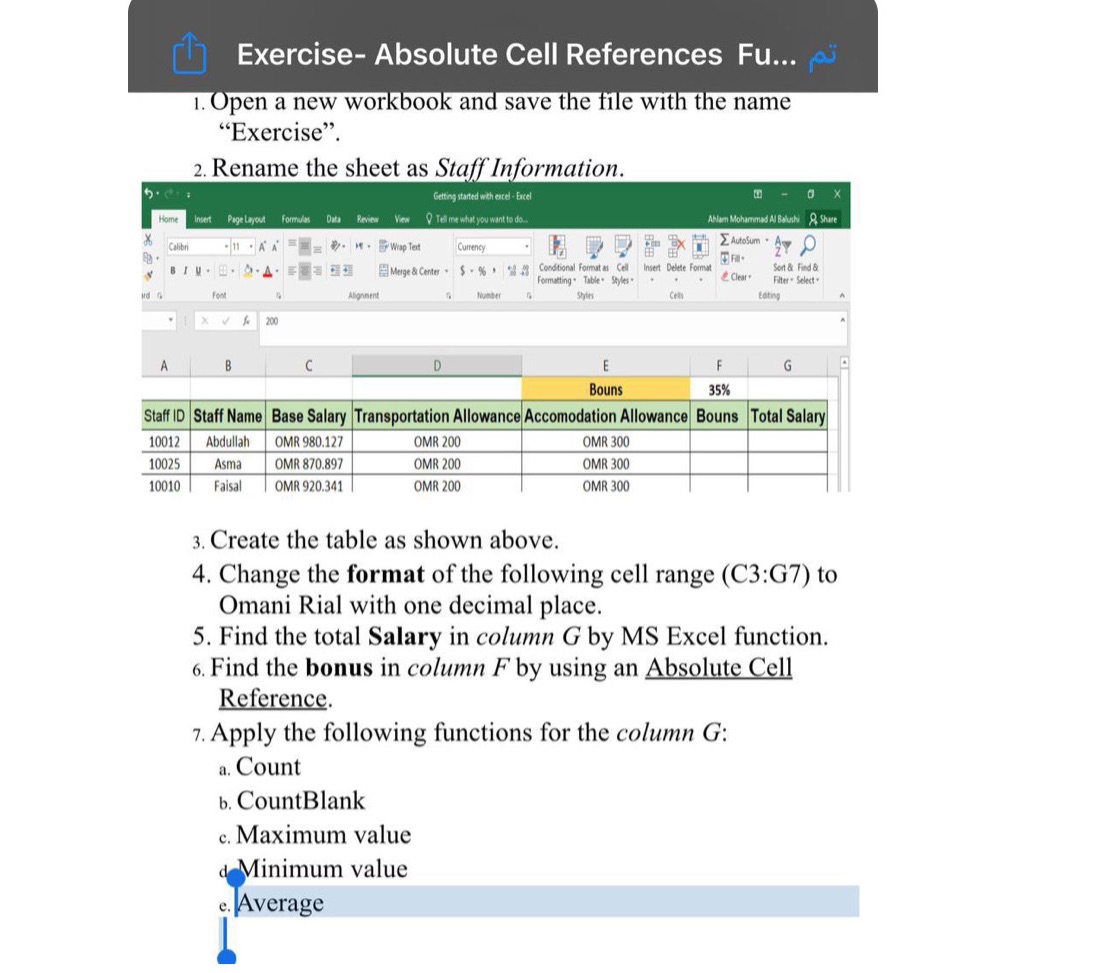
Exercise- Absolute Cell References Fu... P 1. Open a new workbook and save the file with the name "Exercise". 2. Rename the sheet as Staff Information. tarted with excel - Excel CO - O X Home Insert Page Layout Formulas Data Review View Q Tel me what you want to do. Atlar Mohammad Al Balushi A Share Calibri - 11 . A A = . M . Wrap Text Currency BIN . B . D . A . Merge & Center . $ - % . " Conditional Format as Cell Insert Delete Format Sort & Find & Formatting. Table. Styles . Clear. Filter * Select . Font Alignment Number Styles Eating 1 X V 6 200 A D Bouns 35% Staff ID Staff Name Base Salary Transportation Allowance Accomodation Allowance Bouns Total Salary 10012 Abdullah OMR 980.127 OMR 200 OMR 300 10025 Asma OMR 870.897 OMR 200 OMR 300 10010 Faisal OMR 920.341 OMR 200 OMR 300 3. Create the table as shown above. 4. Change the format of the following cell range (C3:G7) to Omani Rial with one decimal place. 5. Find the total Salary in column G by MS Excel function. 6. Find the bonus in column F by using an Absolute Cell Reference. 7. Apply the following functions for the column G: a. Count b. CountBlank c. Maximum value Minimum value e. Average
Step by Step Solution
There are 3 Steps involved in it

Get step-by-step solutions from verified subject matter experts
 Study Help