







Question: I need assistance writing the code for this C++ lab LAB 4.7 - Complete Program Step 1: Remove switch . cpp from the project and
I need assistance writing the code for this C++ lab
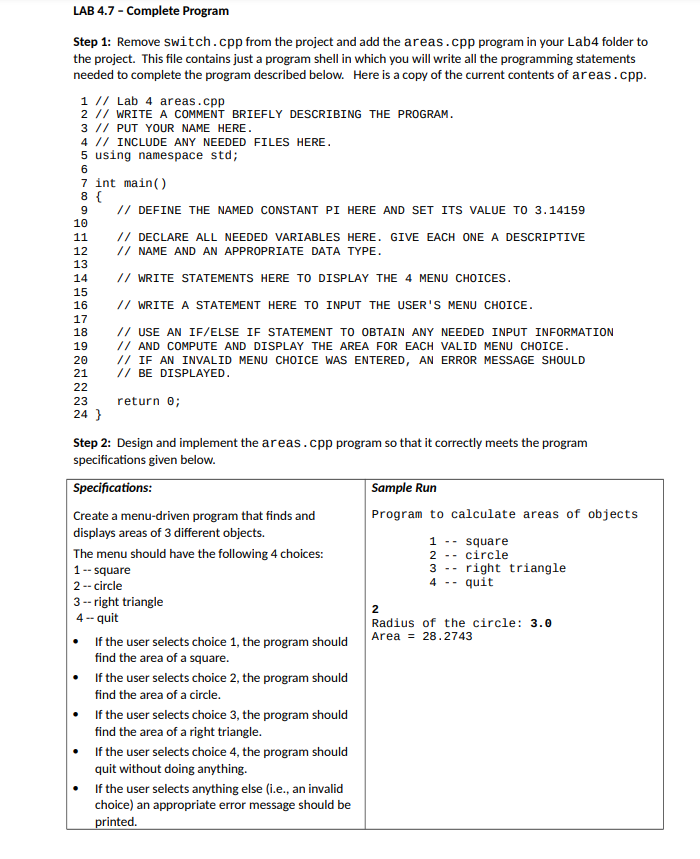
LAB 4.7 - Complete Program Step 1: Remove switch . cpp from the project and add the areas . cpp program in your Lab4 folder to the project. This file contains just a program shell in which you will write all the programming statements needed to complete the program described below. Here is a copy of the current contents of areas . cpp. 1 // Lab 4 areas . cpp 2 / / WRITE A COMMENT BRIEFLY DESCRIBING THE PROGRAM. 3 / / PUT YOUR NAME HERE. 4 // INCLUDE ANY NEEDED FILES HERE. 5 using namespace std; 6 7 int main( ) 9 // DEFINE THE NAMED CONSTANT PI HERE AND SET ITS VALUE TO 3. 14159 10 11 // DECLARE ALL NEEDED VARIABLES HERE. GIVE EACH ONE A DESCRIPTIVE 12 // NAME AND AN APPROPRIATE DATA TYPE. 13 14 // WRITE STATEMENTS HERE TO DISPLAY THE 4 MENU CHOICES. 15 16 // WRITE A STATEMENT HERE TO INPUT THE USER'S MENU CHOICE. 17 18 // USE AN IF/ELSE IF STATEMENT TO OBTAIN ANY NEEDED INPUT INFORMATION 19 // AND COMPUTE AND DISPLAY THE AREA FOR EACH VALID MENU CHOICE. 20 // IF AN INVALID MENU CHOICE WAS ENTERED, AN ERROR MESSAGE SHOULD 21 // BE DISPLAYED. 22 23 return 0; 24 } Step 2: Design and implement the areas . cpp program so that it correctly meets the program specifications given below. Specifications: Sample Run Create a menu-driven program that finds and Program to calculate areas of objects displays areas of 3 different objects. - - square The menu should have the following 4 choices: - - circle 1 -- square - - right triangle 2 -- circle - - quit 3 -- right triangle 2 4 - quit Radius of the circle: 3.0 If the user selects choice 1, the program should Area = 28.2743 find the area of a square. If the user selects choice 2, the program should find the area of a circle. If the user selects choice 3, the program should find the area of a right triangle. If the user selects choice 4, the program should quit without doing anything. If the user selects anything else (i.e., an invalid choice) an appropriate error message should be printed
Step by Step Solution
There are 3 Steps involved in it

Get step-by-step solutions from verified subject matter experts
 Study Help