







Question: i need code in java Carefolly read the shared client.java and server.java files along with the comments placed per command. Run the server project first,
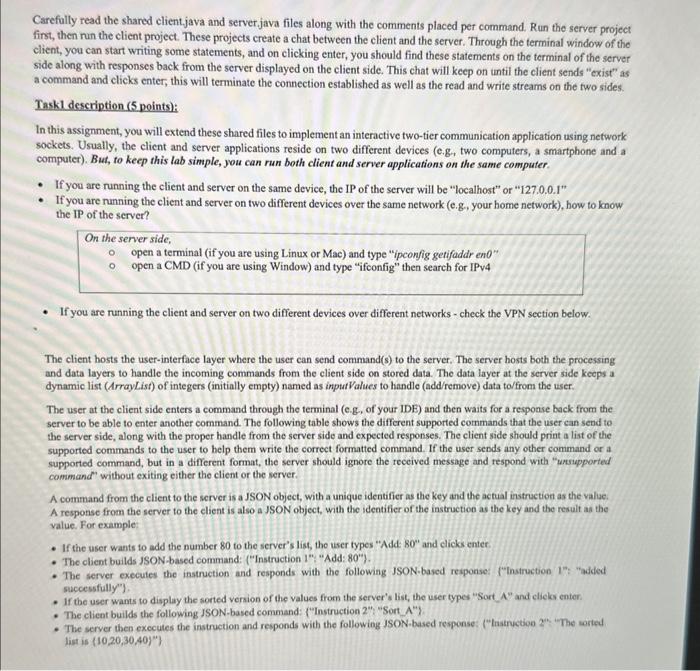
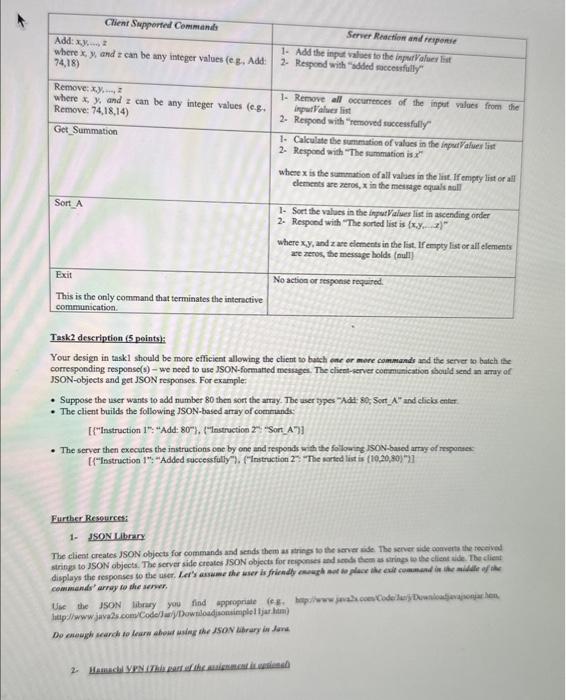
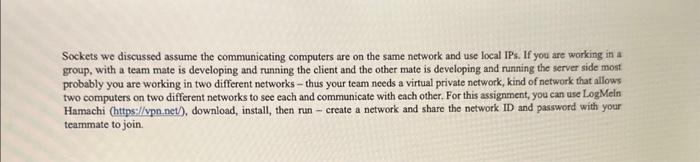
Carefolly read the shared client.java and server.java files along with the comments placed per command. Run the server project first, then run the client project. These projects create a chat between the client and the server. Through the terminal window of the elient, you can start writing some statements, and on clicking enter, you should find these statements on the terminal of the server side along with responses back from the server displayed on the client side. This chat will keep on until the client sends "exist" as a command and clicks enter, this will terminate the connection established as well as the read and write streams on the two sides. Taskl description ( 5 points): In this assignment, you will extend these shared files to implement an interactive two-tier communication application using network sockets. Usually, the client and server applications reside on two different devices (e.g, two computers, a smartphone and a computet). But, to keep this lab simple, you can run both client and server applications on the same computer. - If you are running the client and server on the same device, the IP of the server will be "localhost" or "127.0.0.1" - If you are nunning the client and server on two different devices over the same network (e.g., your home network), how to know. the IP of the server? On the server side, open a terminal (if you are using Linux or Mac) and type "ipconfig getifaddr en0" - open a CMD (if you are using Window) and type "ifconfig" then search for IPv4 - If you are running the client and server on two different devices over different networks - check the VPN section below. The client hosts the user-interface layer where the user can send command(s) to the server. The server hosts both the processing and data layers to handle the incoming commands from the client side on stored data. The data layer at the server side keeps a dynamic list (ArrayList) of integers (initially empty) named as inputValues to handlo (add/remove) data to/from the user. The user at the client side enters a command through the terminal (e.g. of your IDE) and then waits for a response back from the server to be able to enter another command. The following table shows the different supported commands that the user can send to the server side, along with the proper handle from the server side and expected responses. The client side should print a list of the supported commands to the user to belp them write the correct formatted command. If the user sends any other command or a supported command, but in a different format, the server should ignore the received message and respond with "unsupported" cammand " without exiting either the client or the server. A command from the client to the server is a JSON object, with a unique identifier as the key and the actual instruetion as the value. A response from the server to the elient is also a JSON object, with the identifier of the instruction as the key and the result as the value. For example: - If the user wants to add the number 80 to the server's list, the tser types "Add 80 " and clicks enter. - The client builds JSON-based command: ("Instruction 1 ", "Add: 80 ). - The server executes the instruction and responds with the following JSON-based reiponsef ("instruction 1": "added successfully" - If the user wants to display the sorted version of the values from the server's list, the user types "Sort A" and clieks enter. - The server then execules the instruction and responds with the following ISON-based response: ("lnsencebion 2n. "The wried list is (10,20,30,40)) Task 2 deseription (5 peints): Your design in taskl should be more efficient allowing the client to butch one er more commands and the server so bateh the corresponding response(s) - we need to use 1SON-foematied messages. The clicet-server conmunication should seed an aray of JSON-objects and get JSON responses. For example: - Suppose the user wants to add number 80 then sort the arnay. The user types -Adt 80 , Sort Aand clicks enter - The client builds the following ISON-based array of comrunds: - The server then executes the instructions one by one and responds with the folloaning ISoN-baied arrwy of rrsonses: [f"linstruction 1; "Added suceessfully" /. FInstruction 2 ": "The iarted list is (10,20,80)/2] Furtber Resourcet: 1. 150N. Library The client creates JSON objects for commands and senids them as prings to the server aide. The sener side qumeets the toeeived cominiends' array to she senver. Sockets we discussed assume the communicating computers are on the same network and use local IPs. If you are working in a group, with a team mate is developing and running the client and the other mate is developing and nunning the server side most probably you are working in two different networks - thus your team needs a virtual private network, kind of network that allows two computers on two different networks to see each and communicate with each other. For this assignment, you can use LogMeln Hamachi (https://vpn net), download, install, then nun - create a network and share the network ID and password with your teammate to join
Step by Step Solution
There are 3 Steps involved in it

Get step-by-step solutions from verified subject matter experts
 Study Help