







Question: i need code in java with output Carefully read the shanod client.java and server,java files along with the comments placed per command Ran the server
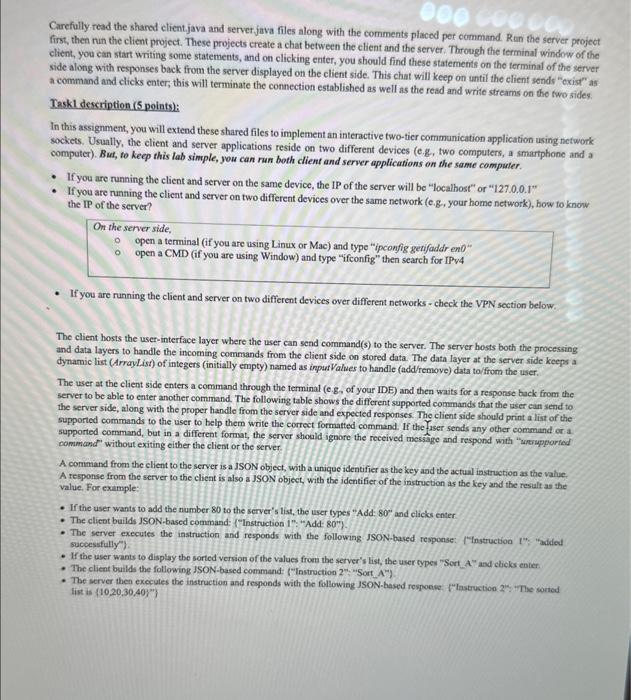
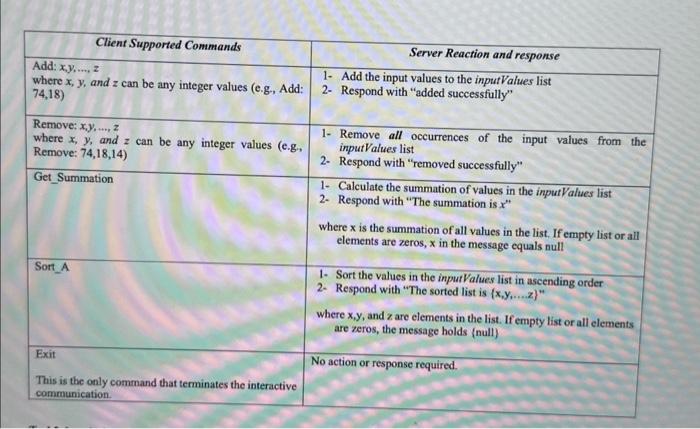
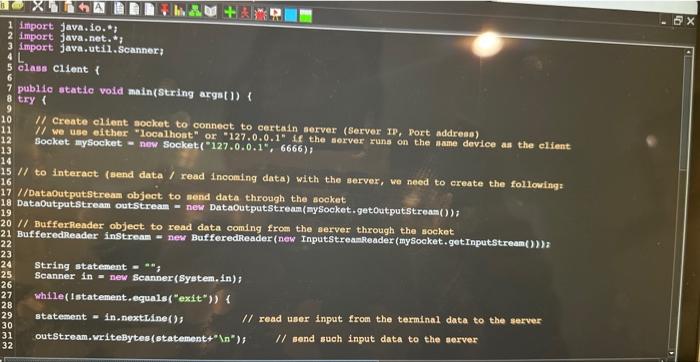
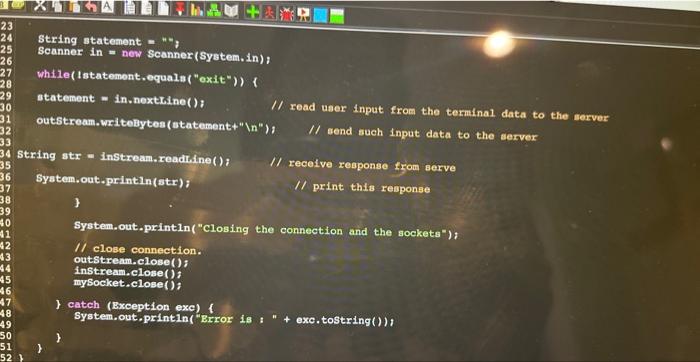
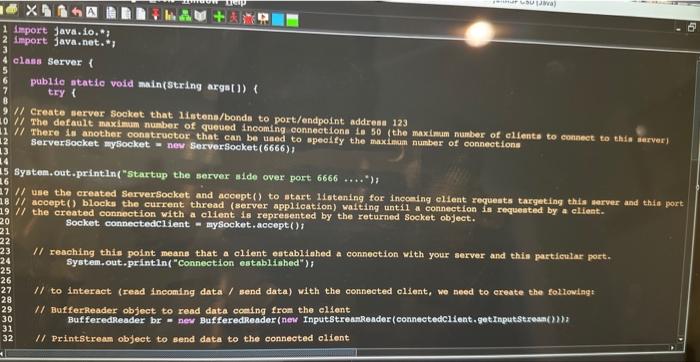
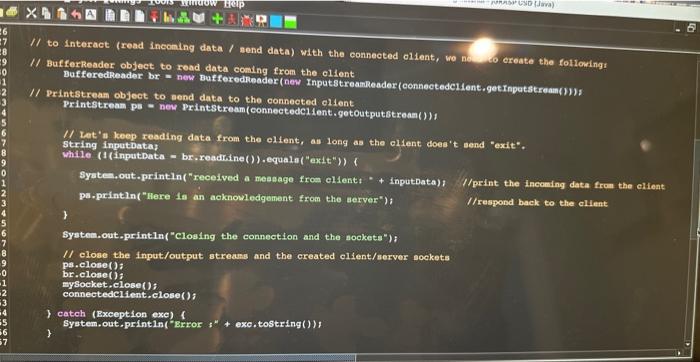
Carefully read the shanod client.java and server,java files along with the comments placed per command Ran the server project first, then nun the client project. These projects create a chat between the elient and the server. Through fhe terminal window of the client, you can start writing some statements, and on clicking enter, you should find these statements on the terminal of the server side along with responses back from the server displayed on the client side. This chat will keep on until the elient sends "exist" as a command and clicks enter, this will terminate the connection established as well as the read and write streams on the two sides. Task1 description ( 5 points): In this assignment, you will extend these shared files to implement an interactive two-tier communication application using network sockets. Usually, the elient and server applications reside on two different devices (e.g, two computers, a imartphone and a computer). But, to keep this lab simple, you can run both client and server applications on the same compuler. - If you are running the client and server on the same device, the IP of the server will be "localhost" or "127.0.0.1" - If you are runaing the elient and server on two different devices over the same network (e.g, your home network), how to know the IP of the server? On the senver side, open a terminal (if you are using Linux or Mac) and type "ipconfig genifaddr en0" open a CMD (if you are using. Window) and type "ifconfig" then search for IPv4 - If you are running the client and server on two different devices over different networks - check the VPN section below. The client bosts the user-interface layer where the user can send command(s) to the server. The server hosts both the processing and data layers to handle the incoming commands from the client side on stored data. The data layer at the server side keeps a dynamic list (ArrayList) of integers (initially empty) named as inpurValies to handle (add/remove) data to/from the user. The user at the client side enters a command through the terminal (e.g7, of your IDE) and then waits for a response back from the server to be able to enter another command. The following table shows the different supported commands that the user can send to the server side, along with the proper handle from the server side and expected responses. The client side should print a list of the supported commands to the user to belp them write the correct formatted command. If the fiser sends any other command or a. supported command, but in a different format, the server shoald ignore the received message and respond with "umespporied A command from the elient to the server is a ISON object, with a unique identifier as the key aad the actual instruction as the value. A response from the server to the client is also a JSON object, with the identifier of the instruction as the key and the resilt as the value. For example: - If the user wants to add the number 80 to the server's list, the user types "Add. 80 and clicks enter - The client builds JSON-based command ("Instruction i": "Add 80 ). - The server executes the instruction and responds with the following JSON-based response: ("lnstruction t"; "adied. sucoessitlly 0 ). - If the user wants to display the sorted version of the values from the server's list, the user types "Sort A" and clicks enter. - The client builds the following ISON-based command ("Instroction 22 " "Sort, A"). - The server then excecules the instruction and reponds with the following JSON-based respoeve. P"Instruction. 2": "The soried list is {10,20,30,40}} String statement = Scanner in = new Scanner (System. in ); while(tstatement.equala( "exit")) 1 statement = in.nexthine() /1 read user input from the terminal data to the server outstream.writeBytes (statement+" "), // send auch input data to the server String str = inStrean. readrine (); // receive response from serve Syatem.out.println(str); // print this reoponse 3 System.out.println("Closing the connection and the sockets"); If close connection. outstream. close(); instream, close(); mySocket.close(); I catch (Exception exe) 1 System,out.printin("Error is : " exc.tostring()), 3 Import java.10,*? import java.net.*1 class server 1 publie atatic void main(string argat]) t try t (f Create server socket that 11 stena/bonds to port/endpolnt addrea 123 If The default maximum nubber of queued Incoming connections in 50 (the maximeum number of eliente to connect to thin ierver) /l There di another oonatructor that can be uaed to ppeod fy the maxinam number of connections Berversocket mysocket = ney serveriocket (6666) i System, out,println("startup the server aide over port 6666)1 If use the ereated Serversocket and accept() to atart 11 otening for incouing olieat requests targeting this merver and thin port /f accept() block the current thread (server application) walting until a connection la requested by a clifent. /l the created connection with a client Is represented by the returned socket object. Socket connectedcitent = mysocket, accept()f Il reaching thin point means that a olient eatabliahed a connection with your server and ehin partileular port. system,out, printin( "Connection established"); If to interact (read Incoming data / send data) with the connected olient, we need to create the followingt If Bufferkeader object to read data coaing fron the elient Buf feredreader br = nes Bafferedineador (nes InputstreanReader(connectedclient. getinputstreant)Il), /l. Printstrean object to send data to the connected elient I/ to interact (read incoming data / mend data) with the connected olient, wo nol to ereate the followings I/ Bufferkeader object to read data coming from the ollent BufferedReader br = new Bufferedieader (new InputstreamReader (connectede1ent, get Inpetstrean(1)), I/ Printstream object to aend data to the connected ollent Printstream pe = new Printstream (connectedc1ient.getoutputstream())1 If Let' a keep reading data from the elient, au long as the elient does't send "exit". String inputbatay vhile (1 (inputiata = br. readrine()) ,equala ("exit") ) Systes, out.println("received a measage from elient. " + Inputpata)/ //print the incoming data from the elient pa-println("Here is an acknowledgenent from the aerver"); //respond back to the ellent 3 Syatea.out.print1n( "closing the connection and the sockets"); If close the input/output streass and the created olient/server sockets pa. elose (); br.close (); mysocket,close (); connectedclient. elose(); 3 catch (Exception exe) f System.out.println("grror " + exe,tostring()), Carefully read the shanod client.java and server,java files along with the comments placed per command Ran the server project first, then nun the client project. These projects create a chat between the elient and the server. Through fhe terminal window of the client, you can start writing some statements, and on clicking enter, you should find these statements on the terminal of the server side along with responses back from the server displayed on the client side. This chat will keep on until the elient sends "exist" as a command and clicks enter, this will terminate the connection established as well as the read and write streams on the two sides. Task1 description ( 5 points): In this assignment, you will extend these shared files to implement an interactive two-tier communication application using network sockets. Usually, the elient and server applications reside on two different devices (e.g, two computers, a imartphone and a computer). But, to keep this lab simple, you can run both client and server applications on the same compuler. - If you are running the client and server on the same device, the IP of the server will be "localhost" or "127.0.0.1" - If you are runaing the elient and server on two different devices over the same network (e.g, your home network), how to know the IP of the server? On the senver side, open a terminal (if you are using Linux or Mac) and type "ipconfig genifaddr en0" open a CMD (if you are using. Window) and type "ifconfig" then search for IPv4 - If you are running the client and server on two different devices over different networks - check the VPN section below. The client bosts the user-interface layer where the user can send command(s) to the server. The server hosts both the processing and data layers to handle the incoming commands from the client side on stored data. The data layer at the server side keeps a dynamic list (ArrayList) of integers (initially empty) named as inpurValies to handle (add/remove) data to/from the user. The user at the client side enters a command through the terminal (e.g7, of your IDE) and then waits for a response back from the server to be able to enter another command. The following table shows the different supported commands that the user can send to the server side, along with the proper handle from the server side and expected responses. The client side should print a list of the supported commands to the user to belp them write the correct formatted command. If the fiser sends any other command or a. supported command, but in a different format, the server shoald ignore the received message and respond with "umespporied A command from the elient to the server is a ISON object, with a unique identifier as the key aad the actual instruction as the value. A response from the server to the client is also a JSON object, with the identifier of the instruction as the key and the resilt as the value. For example: - If the user wants to add the number 80 to the server's list, the user types "Add. 80 and clicks enter - The client builds JSON-based command ("Instruction i": "Add 80 ). - The server executes the instruction and responds with the following JSON-based response: ("lnstruction t"; "adied. sucoessitlly 0 ). - If the user wants to display the sorted version of the values from the server's list, the user types "Sort A" and clicks enter. - The client builds the following ISON-based command ("Instroction 22 " "Sort, A"). - The server then excecules the instruction and reponds with the following JSON-based respoeve. P"Instruction. 2": "The soried list is {10,20,30,40}} String statement = Scanner in = new Scanner (System. in ); while(tstatement.equala( "exit")) 1 statement = in.nexthine() /1 read user input from the terminal data to the server outstream.writeBytes (statement+" "), // send auch input data to the server String str = inStrean. readrine (); // receive response from serve Syatem.out.println(str); // print this reoponse 3 System.out.println("Closing the connection and the sockets"); If close connection. outstream. close(); instream, close(); mySocket.close(); I catch (Exception exe) 1 System,out.printin("Error is : " exc.tostring()), 3 Import java.10,*? import java.net.*1 class server 1 publie atatic void main(string argat]) t try t (f Create server socket that 11 stena/bonds to port/endpolnt addrea 123 If The default maximum nubber of queued Incoming connections in 50 (the maximeum number of eliente to connect to thin ierver) /l There di another oonatructor that can be uaed to ppeod fy the maxinam number of connections Berversocket mysocket = ney serveriocket (6666) i System, out,println("startup the server aide over port 6666)1 If use the ereated Serversocket and accept() to atart 11 otening for incouing olieat requests targeting this merver and thin port /f accept() block the current thread (server application) walting until a connection la requested by a clifent. /l the created connection with a client Is represented by the returned socket object. Socket connectedcitent = mysocket, accept()f Il reaching thin point means that a olient eatabliahed a connection with your server and ehin partileular port. system,out, printin( "Connection established"); If to interact (read Incoming data / send data) with the connected olient, we need to create the followingt If Bufferkeader object to read data coaing fron the elient Buf feredreader br = nes Bafferedineador (nes InputstreanReader(connectedclient. getinputstreant)Il), /l. Printstrean object to send data to the connected elient I/ to interact (read incoming data / mend data) with the connected olient, wo nol to ereate the followings I/ Bufferkeader object to read data coming from the ollent BufferedReader br = new Bufferedieader (new InputstreamReader (connectede1ent, get Inpetstrean(1)), I/ Printstream object to aend data to the connected ollent Printstream pe = new Printstream (connectedc1ient.getoutputstream())1 If Let' a keep reading data from the elient, au long as the elient does't send "exit". String inputbatay vhile (1 (inputiata = br. readrine()) ,equala ("exit") ) Systes, out.println("received a measage from elient. " + Inputpata)/ //print the incoming data from the elient pa-println("Here is an acknowledgenent from the aerver"); //respond back to the ellent 3 Syatea.out.print1n( "closing the connection and the sockets"); If close the input/output streass and the created olient/server sockets pa. elose (); br.close (); mysocket,close (); connectedclient. elose(); 3 catch (Exception exe) f System.out.println("grror " + exe,tostring())
Step by Step Solution
There are 3 Steps involved in it

Get step-by-step solutions from verified subject matter experts
 Study Help