







Question: I NEED CODING HELP IN JAVA. HERE ARE THE INSTRUCTIONS. PLEASE BE SPECIFIC WHEN CODING. EXAMPLE INPUT: public class WorkLoadDescription extends VisualizationObject { private static
I NEED CODING HELP IN JAVA. HERE ARE THE INSTRUCTIONS. PLEASE BE SPECIFIC WHEN CODING.
EXAMPLE INPUT:
public class WorkLoadDescription extends VisualizationObject {
private static final String EMPTY = "";
private static final String INPUT_FILE_SUFFIX = ".wld";
private Description description;
private String inputGraphString;
private FileManager fm;
private String inputFileName;
private String graphName;
private List
WorkLoadDescription(String inputFileName) {
super(new FileManager(), EMPTY, INPUT_FILE_SUFFIX); // VisualizationObject constructor
this.fm = this.getFileManager();
initialize(inputFileName);
}
@Override
public Description visualization() {
return description;
}
@Override
public Description fileVisualization() {
return description;
}
// @Override
// public Description displayVisualization() {
// return description;
// }
@Override
public String toString() {
return inputGraphString;
}
public String getInputFileName() {
return inputFileName;
}
private void initialize(String inputFile) {
// Get the input graph file name and read its contents
InputGraphFile gf = new InputGraphFile(fm);
inputGraphString = gf.readGraphFile(inputFile);
this.inputFileName = gf.getGraphFileName();
description = new Description(inputGraphString);
}
public static void main(String[] args) {
WorkLoadDescription workload = new WorkLoadDescription("stressTest.txt");
abstract class VisualizationObject {
private FileManager fm;
private String suffix;
private String nameExtension;
private static final String NOT_IMPLEMENTED = "This visualization has not been implemented.";
protected String[][] visualizationData;
VisualizationObject(FileManager fm, WorkLoad workLoad, String suffix) {
this.fm = fm;
this.nameExtension = String.format("-%sM-%sE2E",
String.valueOf(workLoad.getMinPacketReceptionRate()), String.valueOf(workLoad.getE2e()));
this.suffix = suffix;
visualizationData = null;
}
VisualizationObject(FileManager fm, SystemAttributes warp, String suffix) {
this.fm = fm;
if (warp.getNumFaults() > 0) {
this.nameExtension = nameExtension(warp.getSchedulerName(), warp.getNumFaults());
} else {
this.nameExtension =
nameExtension(warp.getSchedulerName(), warp.getMinPacketReceptionRate(), warp.getE2e());
}
this.suffix = suffix;
visualizationData = null;
}
VisualizationObject(FileManager fm, SystemAttributes warp, String nameExtension, String suffix) {
this.fm = fm;
if (warp.getNumFaults() > 0) {
this.nameExtension =
nameExtension(warp.getSchedulerName(), warp.getNumFaults()) + nameExtension;
} else {
this.nameExtension =
nameExtension(warp.getSchedulerName(), warp.getMinPacketReceptionRate(), warp.getE2e())
+ nameExtension;
}
this.suffix = suffix;
visualizationData = null;
}
VisualizationObject(FileManager fm, String nameExtension, String suffix) {
this.fm = fm;
this.nameExtension = nameExtension;
this.suffix = suffix;
visualizationData = null;
}
private String nameExtension(String schName, Double m, double e2e) {
String extension =
String.format("%s-%sM-%sE2E", schName, String.valueOf(m), String.valueOf(e2e));
return extension;
}
private String nameExtension(String schName, Integer numFaults) {
String extension = String.format("%s-%sFaults", schName, String.valueOf(numFaults));
return extension;
}
/**
* @return the fm
*/
public FileManager getFileManager() {
return fm;
}
public Description visualization() {
Description content = new Description();
var data = createVisualizationData();
if (data != null) {
String nodeString = String.join("\t", createColumnHeader()) + " ";
content.add(nodeString);
for (int rowIndex = 0; rowIndex
var row = data[rowIndex];
String rowString = String.join("\t", row) + " ";
content.add(rowString);
}
} else {
content.add(NOT_IMPLEMENTED);
}
return content;
}
public String createFile(String fileNameTemplate) {
return fm.createFile(fileNameTemplate, nameExtension, suffix);
}
public Description fileVisualization() {
Description fileContent = createHeader();
fileContent.addAll(visualization());
fileContent.addAll(createFooter());
return fileContent;
}
public GuiVisualization displayVisualization() {
return null; // not implemented
}
protected Description createHeader() {
Description header = new Description();
return header;
}
protected Description createFooter() {
Description footer = new Description();
return footer;
}
protected String[] createColumnHeader() {
return new String[] {NOT_IMPLEMENTED};
}
protected String[][] createVisualizationData() {
return visualizationData; // not implemented--returns null
}
}
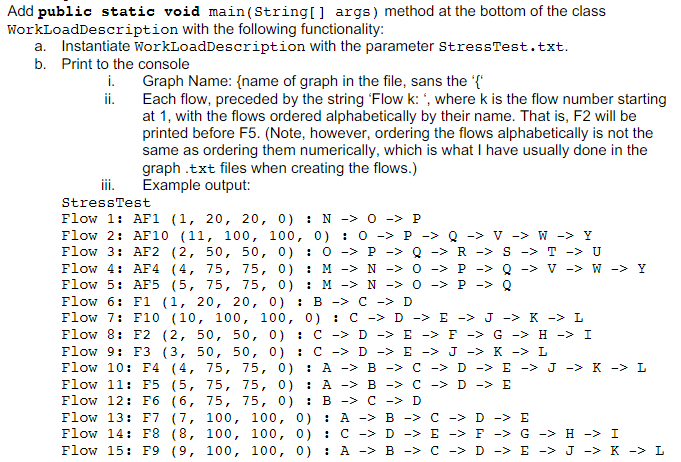
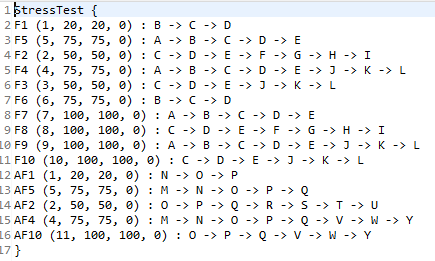
dpublic static void main(String[] args) method at the bottom of the class rkLoadDescription with the following functionality: a. Instantiate WorkLoadDescription with the parameter stressTest.txt. b. Print to the console i. Graph Name: \{name of graph in the file, sans the ' { ' ii. Each flow, preceded by the string 'Flow k: ', where k is the flow number starting at 1 , with the flows ordered alphabetically by their name. That is, F2 will be printed before F5. (Note, however, ordering the flows alphabetically is not the same as ordering them numerically, which is what I have usually done in the graph .txt files when creating the flows.) iii. Example output: StressTest Flow 1: AF1 (1,20,20,0):N0P Flow 2: AF10(11,100,100,0):0PQVWY Flow 3: AF2 (2,50,50,0):0PQRSTU Flow 4: AF4 (4,75,75,0):MNOPQV Flow 5: AF5 (5,75,75,0):MN0PQ Flow 6: F1(1,20,20,0):BCD Flow 7: F10(10,100,100,0):CDEJKL Flow 8: F2 (2,50,50,0):CDEFGHI Flow 9: F3 (3,50,50,0):CDEJKL Flow 10: F4 (4,75,75,0):ABCDEJKL Flow 11: F5 (5,75,75,0):ABCDE Flow 12: F6(6,75,75,0):BCD Flow 13: F7 (7,100,100,0):ABCDE Flow 14: F8 (8,100,100,0):CDEFGHI Flow 15: F9 F9,100,100,0):ABCDEJKL
Step by Step Solution
There are 3 Steps involved in it

Get step-by-step solutions from verified subject matter experts
 Study Help