



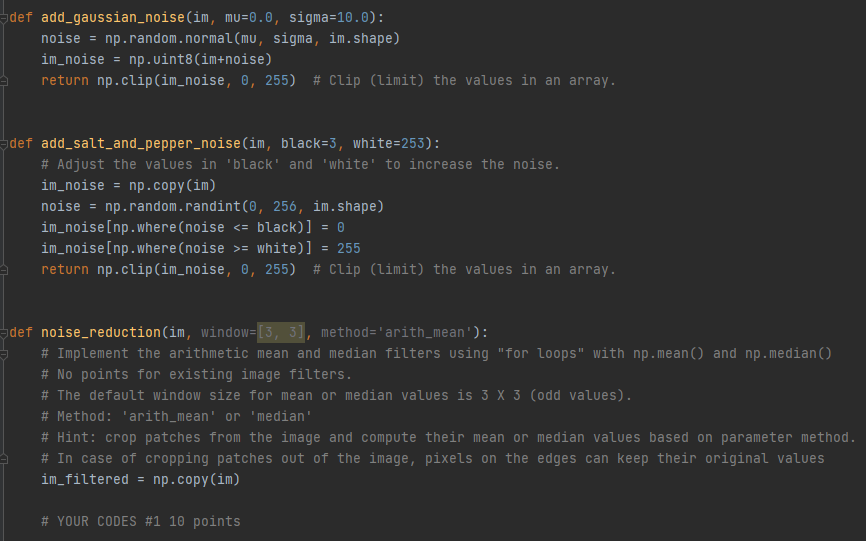
Question: I need help coding, completing def noise_reduction def add_gaussian_noise(im, mu=0.0, sigma-10.0): noise = np.random.normal(mu, sigma, im.shape) im_noise = np.uint8(im-noise) return np.clip(im_noise, o, 255) # Clip
I need help coding, completing def noise_reduction
def add_gaussian_noise(im, mu=0.0, sigma-10.0): noise = np.random.normal(mu, sigma, im.shape) im_noise = np.uint8(im-noise) return np.clip(im_noise, o, 255) # Clip (limit) the values in an array. def add_salt_and_pepper_noise(im, black=3, white=253): # Adjust the values in 'black' and 'white' to increase the noise. im_noise = np.copy(im) noise np.random.randint(0, 256, im.shape) im_noise(np.where(noise = white)] = 255 return np.clip(im_noise, o, 255) # Clip (limit) the values in an array. def noise_reduction(im, window=(3, 3), method='arith_mean'): # Implement the arithmetic mean and median filters using "for loops" with np.mean() and np.median() # No points for existing image filters. # The default window size for mean or median values is 3 X 3 (odd values). # Method: 'arith_mean' or 'median' # Hint: crop patches from the image and compute their mean or median values based on parameter method. # In case of cropping patches out of the image, pixels on the edges can keep their original values im_filtered = np.copy(im) # YOUR CODES #1 10 points
Step by Step Solution
There are 3 Steps involved in it

Get step-by-step solutions from verified subject matter experts