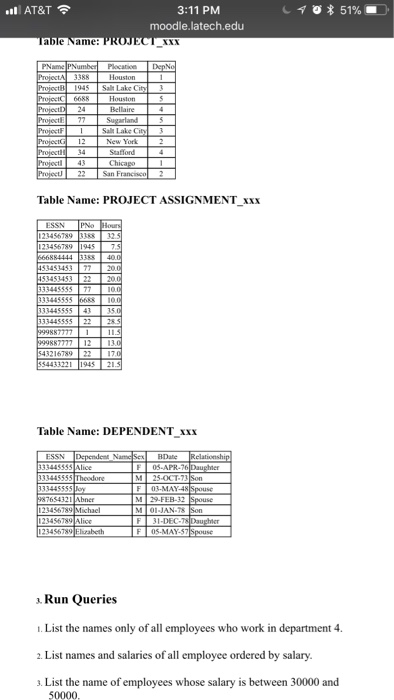
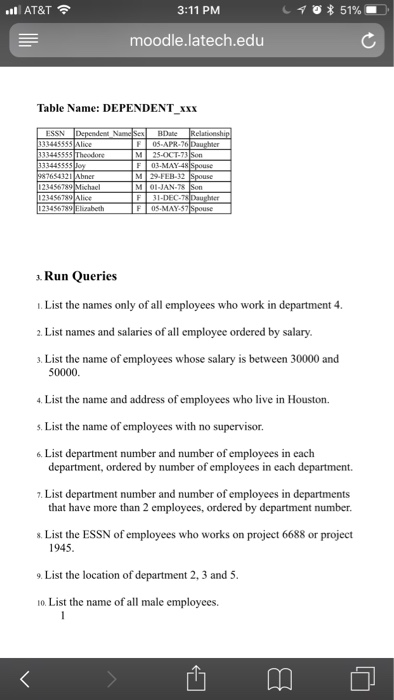
Question: I need help creating a database in command prompt using sql 3:11 PM moodle.latech.edu AT&T sure to put each code block with its query result.
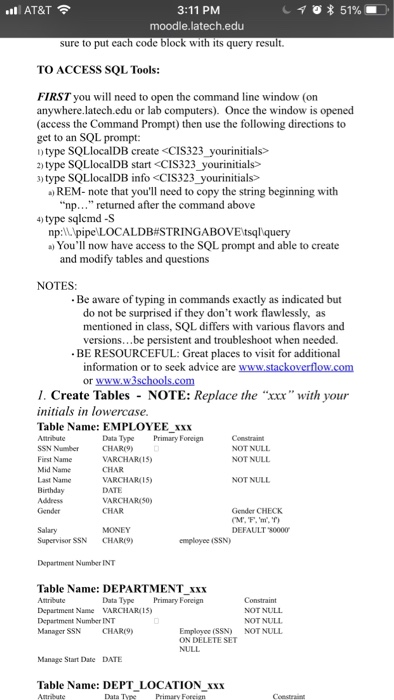
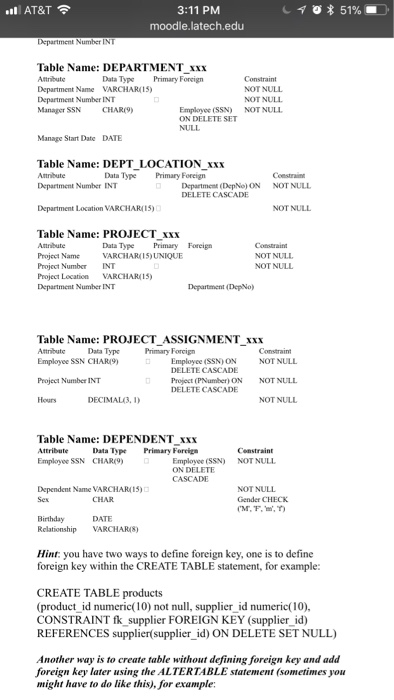
I need help creating a database in command prompt using sql  I need help creating a database in command prompt using sql
3:11 PM moodle.latech.edu AT&T sure to put each code block with its
query result. TO ACCESS SQL Tools: FIRST you will need to open
the command line window (on anywhere.latech.edu or lab computers). Once the window
is opened (access the Command Prompt) then use the following directions to
get to an SQL prompt: ntype SQLlocalDB create type SQLlocalDB start )

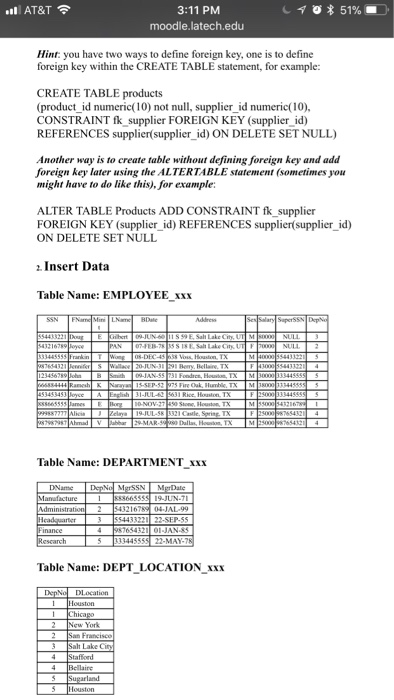
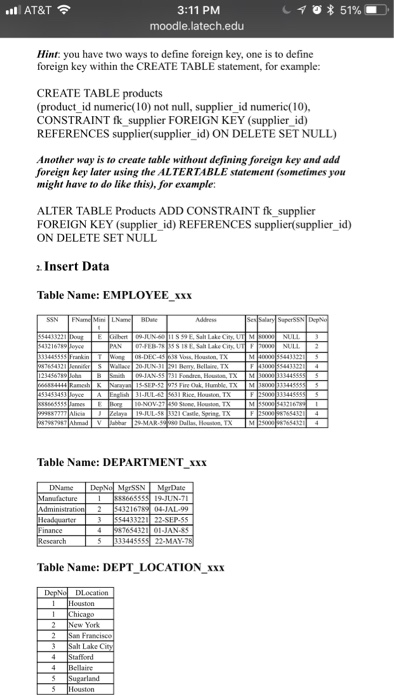
3:11 PM moodle.latech.edu AT&T sure to put each code block with its query result. TO ACCESS SQL Tools: FIRST you will need to open the command line window (on anywhere.latech.edu or lab computers). Once the window is opened (access the Command Prompt) then use the following directions to get to an SQL prompt: ntype SQLlocalDB create type SQLlocalDB start ) type SQLlocalDB info )REM-note that you'll need to copy the string beginning with "np. . . returned after the command above 4) type sqlcmd -S np:\pipe'LOCALDB#STRING ABOVEtsalquery a) You'll now have access to the SQL prompt and able to create and modify tables and questions NOTES Be aware of typing in commands exactly as indicated but do not be surprised if they don't work flawlessly, as mentioned in class, SQL differs with various flavors and versions..be persistent and troubleshoot when needed. BE RESOURCEFUL: Great places to visit for additional information or to seek advice are www.stackoverflow.com or l. Create Tables NOTE: Replace the "xxx" with your initials in lowercase Table Name: EMPLOYEE XXX Attribute SSN Number Data Type Primary Foreign Constraint NOT NULL NOT NULL VARCHAR(15) Mid Name Last Name NOT NULL VARCHAR( 1 5> DATE VARCHARISO) CHAR Gender Gender CHECK DEFAULT 80000 Salary Supervisor SSN CHAR9 MONEY employee (SSN) Department Number INT Table Name: DEPARTMENT XXxx Attribute Department Name VARCHARIS) Department Number INT Manager SSN CHAR9) Data Type Primary Foreign NOT NULL NOT NULL NOT NULL Employee (SSN) ON DELETE SET Manage Start Date DATE Table Name: DEPT LOCATION XXX Data Tyee Primary Foreign
Step by Step Solution

There are 3 Steps involved in it

1 Expert Approved Answer
Step: 1 Unlock blur-text-image
Question Has Been Solved by an Expert!

Get step-by-step solutions from verified subject matter experts

Step: 2 Unlock
Step: 3 Unlock

Students Have Also Explored These Related Databases Questions!