







Question: I need help figuring this out. Color139.Java and the documentation for Color139 are all separated below. Color139.Java is Below: /********************************************************************* * This class implements a
I need help figuring this out. Color139.Java and the documentation for Color139 are all separated below.
Color139.Java is Below:
/*********************************************************************
* This class implements a color object. Colors are defined by
* three component colors: red, green, blue. Each of these three
* components has a value betwen 0 and 255.
*********************************************************************/
public class Color139
{
/*************************************************************
* Some constants that define the 8 "standard" computer colors.
*************************************************************/
public static final Color139 BLACK = new Color139(0,0,0);
public static final Color139 RED = new Color139(255,0,0);
public static final Color139 GREEN = new Color139(0,255,0);
public static final Color139 YELLOW = new Color139(255,255,0);
public static final Color139 BLUE = new Color139(0,0,255);
public static final Color139 MAGENTA = new Color139(255,0,255);
public static final Color139 CYAN = new Color139(0,255,255);
public static final Color139 WHITE = new Color139(255,255,255);
/*************************************************************
* Below are the three "instance" variables which store the
* "attribute" values in objects of type Color139.
*************************************************************/
private int red; // Red component of the Color139 object
private int green; // Green component of the Color139 object
private int blue; // Blue component of the Color139 Object
/*************************************************************
* This constructor creates a Color139 object with the specified
* RGB component values. If a component value less than 0 is
specified,
* that component value is set to 0. If a component value greater
* than 255 is specified, that component's value is set to 255.
* @param redComponent The color's red component as a value 0-255
* @param greenComponent The color's green component as a value 0-255
* @param blueComponent The color's blue component as a value 0-255
*************************************************************/
public Color139(int redComponent, int greenComponent, int
blueComponent)
{
// MAKE ME
}
/*************************************************************
* This method returns a string representation of the color
* in the form "#RRGGBB" where RR, GG, and BB are the red, green
* and blue component values expressed as hexidecimal digits.
* @return The string representation of the color.
*************************************************************/
public String toString()
{
String redStr; // red component hex value as a string
String greenStr; // green component hex value as a string
String blueStr; // blue component hex value as a string
redStr = Integer.toHexString(this.red);
if (redStr.length() == 1)
redStr = "0" + redStr;
greenStr = Integer.toHexString(this.green);
if (greenStr.length() == 1)
greenStr = "0" + greenStr;
blueStr = Integer.toHexString(this.blue);
if (blueStr.length() == 1)
blueStr = "0" + blueStr;
return "#" + redStr + greenStr + blueStr;
}
/*************************************************************
* The method returns a new Color139 value that is the sum of
* this color and the other color. The value of the red components of
* the two colors are added, as are the green and blue components.
* Any result greater than 255 is set to 255.
* @param other The color to be added to this color
* @return The sum of the two colors
*************************************************************/
public Color139 add(Color139 other)
{
Color139 newcolor; // new color object that is dimmer than this
color
int newRed; // new red color value
int newGreen; // new green color value
int newBlue; // new blue color value
newRed = this.red + other.red;
newGreen = this.green + other.green;
newBlue = this.blue + other.blue;
newcolor = new Color139 (newRed, newGreen, newBlue);
return newcolor;
}
/*************************************************************
* The method returns a new Color139 value that is the difference
between
* this color and the other color. The value of the red components of
* the other color is subtracted from the red component of this color.
* The green and blue components are calculated similarly.
* Any result less than 0 is set to 0.
* @param other The color to be subtracted from this color
* @return The sum of the two colors
*************************************************************/
public Color139 sub(Color139 other)
{
// MAKE ME
return Color139.BLACK;
}
/*************************************************************
* The method returns a dimmer new Color139 value. Each of
* the red, green, and blue components is decreased by 20%.
*
* @return The dimmer color
*************************************************************/
public Color139 dim()
{
Color139 newcolor; // new color object that is dimmer than this
color
int newRed; // new red color value
int newGreen; // new green color value
int newBlue; // new blue color value
newRed = (int) (this.red / 1.2);
newGreen = (int) (this.green / 1.2);
newBlue = (int) (this.blue / 1.2);
newcolor = new Color139 (newRed, newGreen, newBlue);
return newcolor;
}
/*************************************************************
* The method returns a darker new Color139 value. Each of
* the red, green, and blue components is decreased by 32 down
* to a minimum of 0.
* @return The darker color
*************************************************************/
public Color139 darken()
{
// MAKE ME
return Color139.BLACK;
}
/*************************************************************
* This method returns true if this color is equal to the
* other color and returns false if it is not equal.
* @param other The color to be compared to this color
* @return Whether or not the two colors are equal
*************************************************************/
public boolean equals(Color139 other)
{
// MAKE ME
return false;
}
/*************************************************************
* The method returns a lighter new Color139 value. Each of
* the red, green, and blue components is increased by 32 up
* to a maximum of 255.
* @return The lighter color
*************************************************************/
public Color139 lighten()
{
// MAKE ME
return Color139.BLACK;
}
/*************************************************************
* The method returns a brighter new Color139 value. Each of
* the red, green, and blue components is increased by 20%.
* @return The brighter color
*************************************************************/
public Color139 brighten()
{
// MAKE ME
return Color139.BLACK;
}
}
Documentation for color139 is below:
Package
Class
Tree
Deprecated
Index
Help
PREV CLASS NEXT CLASS FRAMES NO FRAMES All Classes SUMMARY: NESTED | FIELD | CONSTR | METHOD DETAIL: FIELD | CONSTR | METHOD
Class Color139 java.lang.Object Color139
public class Color139 extends java.lang.Object This class implements a color object. Colors are defined by three component colors: red, green, blue. Each of these three components has a value betwen 0 and 255.
Field Summary static Color139 BLACK static Color139 BLUE static Color139 CYAN static Color139 GREEN static Color139 MAGENTA static Color139 RED static Color139 WHITE static Color139 YELLOW Constructor Summary Color139(int redComponent, int greenComponent, int blueComponent) This constructor creates a Color139 object with the specified RGB component values.
Method Summary Color139 add(Color139 other) The method returns a new Color139 value that is the sum of this color and the other color. Color139 brighten() The method returns a brighter new Color139 value. Color139 darken() The method returns a darker new Color139 value. Color139 dim() The method returns a dimmer new Color139 value. boolean equals(Color139 other) This method returns true if this color is equal to the other color and returns false if it is not equal. Color139 lighten() The method returns a lighter new Color139 value. Color139 sub(Color139 other) The method returns a new Color139 value that is the difference between this color and the other color. java.lang.String toString() This method returns a string representation of the color in the form "#RRGGBB" where RR, GG, and BB are the red, green and blue component values expressed as hexidecimal digits. Methods inherited from class java.lang.Object clone, equals, finalize, getClass, hashCode, notify, notifyAll, wait, wait, wait Field Detail BLACK public static final Color139 BLACK
RED public static final Color139 RED
GREEN public static final Color139 GREEN
YELLOW public static final Color139 YELLOW
BLUE public static final Color139 BLUE
MAGENTA public static final Color139 MAGENTA
CYAN public static final Color139 CYAN
WHITE public static final Color139 WHITE Constructor Detail Color139 public Color139(int redComponent, int greenComponent, int blueComponent) This constructor creates a Color139 object with the specified RGB component values. If a component value less than 0 is specified, that component value is set to 0. If a component value greater than 255 is specified, that component's value is set to 255. Parameters: redComponent - The color's red component as a value 0-255 greenComponent - The color's green component as a value 0-255 blueComponent - The color's blue component as a value 0-255 Method Detail toString public java.lang.String toString() This method returns a string representation of the color in the form "#RRGGBB" where RR, GG, and BB are the red, green and blue component values expressed as hexidecimal digits. Overrides: toString in class java.lang.Object Returns: The string representation of the color
equals public boolean equals(Color139 other) This method returns true if this color is equal to the other color and returns false if it is not equal. Parameters: other - The color to be compared to this color Returns: Whether or not the two colors are equal
lighten public Color139 lighten() The method returns a lighter new Color139 value. Each of the red, green, and blue components is increased by 32 up to a maximum of 255. Returns: The lighter color
darken public Color139 darken() The method returns a darker new Color139 value. Each of the red, green, and blue components is decreased by 32 down to a minimum of 0. Returns: The darker color
brighten public Color139 brighten() The method returns a brighter new Color139 value. Each of the red, green, and blue components is increased by 20%. Returns: The brighter color
dim public Color139 dim() The method returns a dimmer new Color139 value. Each of the red, green, and blue components is decreased by 20%. by 2. Returns: The dimmer color
add public Color139 add(Color139 other) The method returns a new Color139 value that is the sum of this color and the other color. The value of the red components of the two colors are added, as are the green and blue components. Any result greater than 255 is set to 255. Parameters: other - The color to be added to this color Returns: The sum of the two colors
sub public Color139 sub(Color139 other) The method returns a new Color139 value that is the difference between this color and the other color. The value of the red components of the other color is subtracted from the red component of this color. The green and blue components are calculated similarly. Any result less than 0 is set to 0. Parameters: other - The color to be subtracted from this color Returns: The sum of the two colors
Package
Class
Tree
Deprecated
Index
Help
PREV CLASS NEXT CLASS
FRAMES NO FRAMES All Classes SUMMARY: NESTED | FIELD | CONSTR | METHOD DETAIL: FIELD | CONSTR | METHOD
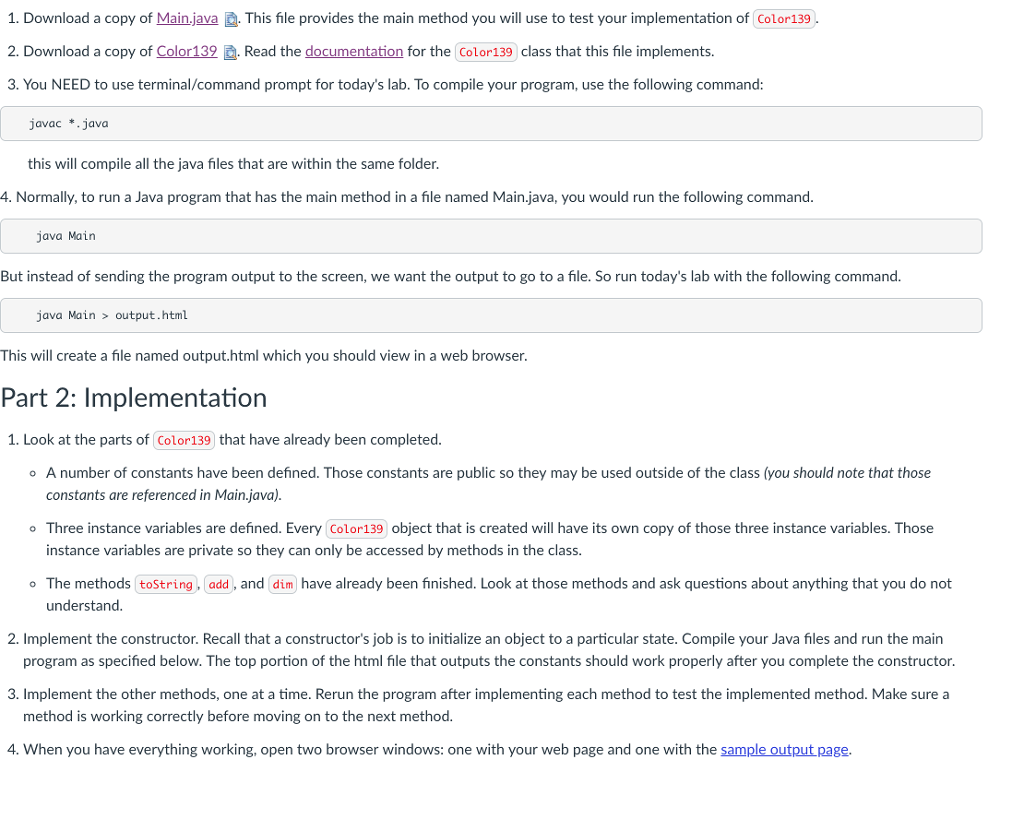
1. Download a copy of Main.java This file provides the main method you will use to test your implementation of Color139 2. Download a copy of Color139 . Read the documentation for the Color139 class that this file implements. 3. You NEED to use terminal/command prompt for today's lab. To compile your program, use the following command: javac *.java this will compile all the java files that are within the same folder. 4. Normally,to run a Java program that has the main method in a file named Main.java, you would run the following command. java Main But instead of sending the program output to the screen, we want the output to go to a file. So run today's lab with the following command java Main >output.htm This will create a file named output.html which you should view in a web browser. Part 2: Implementation 1. Look at the parts of Color139 that have already been completed. A number of constants have been defined. Those constants are public so they may be used outside of the class (you should note that those constants are referenced in Main.java) o Three instance variables are defined. Every Color139 object that is created will have its own copy of those three instance variables. Those instance variables are private so they can only be accessed by methods in the class. The methods (toString, add, and dim have already been fnished. Look at those methods and ask questions about anything that you do not understand. o 2. Implement the constructor. Recall that a constructor's job is to initialize an object to a particular state. Compile your Java files and run the main program as specified below. The top portion of the html file that outputs the constants should work properly after you complete the constructor. 3. Implement the other methods, one at a time. Rerun the program after implementing each method to test the implemented method. Make sure a method is working correctly before moving on to the next method. 4. When you have everything working, open two browser windows: one with your web page and one with the sample output page. 1. Download a copy of Main.java This file provides the main method you will use to test your implementation of Color139 2. Download a copy of Color139 . Read the documentation for the Color139 class that this file implements. 3. You NEED to use terminal/command prompt for today's lab. To compile your program, use the following command: javac *.java this will compile all the java files that are within the same folder. 4. Normally,to run a Java program that has the main method in a file named Main.java, you would run the following command. java Main But instead of sending the program output to the screen, we want the output to go to a file. So run today's lab with the following command java Main >output.htm This will create a file named output.html which you should view in a web browser. Part 2: Implementation 1. Look at the parts of Color139 that have already been completed. A number of constants have been defined. Those constants are public so they may be used outside of the class (you should note that those constants are referenced in Main.java) o Three instance variables are defined. Every Color139 object that is created will have its own copy of those three instance variables. Those instance variables are private so they can only be accessed by methods in the class. The methods (toString, add, and dim have already been fnished. Look at those methods and ask questions about anything that you do not understand. o 2. Implement the constructor. Recall that a constructor's job is to initialize an object to a particular state. Compile your Java files and run the main program as specified below. The top portion of the html file that outputs the constants should work properly after you complete the constructor. 3. Implement the other methods, one at a time. Rerun the program after implementing each method to test the implemented method. Make sure a method is working correctly before moving on to the next method. 4. When you have everything working, open two browser windows: one with your web page and one with the sample output page
Step by Step Solution
There are 3 Steps involved in it

Get step-by-step solutions from verified subject matter experts
 Study Help