



Question: i need help fiquring out the equation for the Rate row [ Date 2/22/21 12:00 AM Rate Call Type Name 3 Network Troubleshooting 4 Network
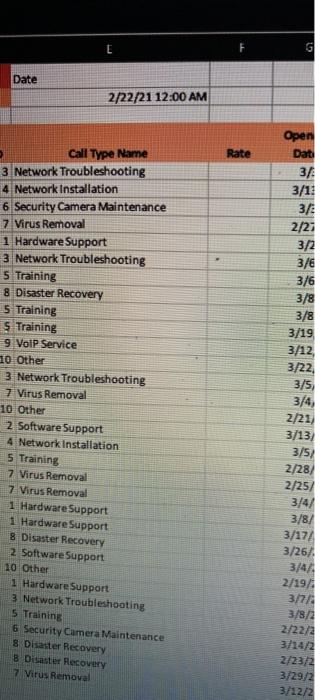
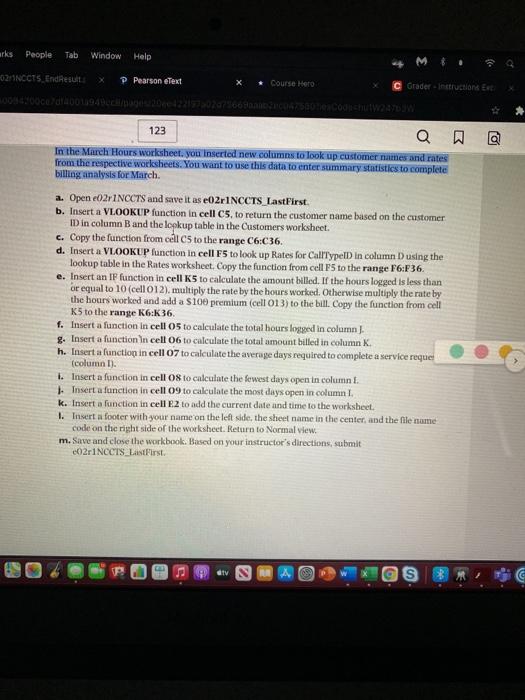
[ Date 2/22/21 12:00 AM Rate Call Type Name 3 Network Troubleshooting 4 Network Installation 6 Security Camera Maintenance 7 Virus Removal 1 Hardware Support 3 Network Troubleshooting 5 Training 8 Disaster Recovery 5 Training 5 Training 9 VoIP Service 10 Other 3 Network Troubleshooting 7 Virus Removal 10 Other 2 Software Support 4 Network Installation 5 Training 7 Virus Removal 7 Virus Removal 1 Hardware Support 1 Hardware Support 8 Disaster Recovery 2 Software Support 10 Other 1 Hardware Support 3 Network Troubleshooting 5 Training 6 Security Camera Maintenance 8 Disaster Recovery Disaster Recovery 7 Virus Removal Open Dat 34 3/13 3/ 2/21 3/2 3/ 3/6 3/8 3/8 3/19 3/12 3/22 3/5) 3/4, 2/21 3/13/ 3/5/ 2/28/ 2/25 3/4/ 3/8/ 3/17/ 3/26/ 3/44 2/19/1 3/7/ 3/8/2 2/22/2 3/14/2 2/23/2 3/29/2 3/12/2 irks People Tab Window Help 02 NCCTS EndResults P Pearson eText Course Hero C Grader - Instructions et 123 Q @ In the March Hours worksheet you inserted new.columns to look up customer names and rates from the respective worksheets. You want to use this data to enter summary statistics to complete billing analysis for March. a. Open 02r1NOCTS and save it as e02 INCCTS_LastFirst. b. Insert a VLOOKUP function in cell C5, to return the customer name based on the customer ID in column B and the lookup table in the Customers worksheet. c. Copy the function from cell cs to the range C6.C36. d. Insert a VLOOKUP function in cell 5 to look up Rates for CalllypeID in column D using the lookup table in the Rates worksheet.Copy the function from cell P to the range 16:36 e. Insert an IF function in cell 5 to calculate the amount billed. If the hours logged is less than or equal to 10 (cell 012), multiply the rate by the hours worked. Otherwise multiply the rate by the hours worked and add a s10 premium (cell 013) to the bill. Copy the function from cell K5 to the range K6:K 36. f. Insert a function in cell 05 to calculate the total hours logged in column] g. Insert a function in cell 06 to calculate the total amount billed in column h. Insert a function in cell 07 to calculate the average days required to complete a service requer (column 1). Insert a function in cell 08 to calculate the fewest days open in column. Insert a function in cell 09 to calculate the most days open in column k. Insert a function in cell E2 to add the current date and time to the worksheet. 1. Insert a footer with your name on the left side, the sheel name in the center, and the file name code on the right side of the worksheet. Return to Normal view, m. Save and close the workbook. Based on your instructor's directions, submit CO2r1NCCTS Last First IV [ Date 2/22/21 12:00 AM Rate Call Type Name 3 Network Troubleshooting 4 Network Installation 6 Security Camera Maintenance 7 Virus Removal 1 Hardware Support 3 Network Troubleshooting 5 Training 8 Disaster Recovery 5 Training 5 Training 9 VoIP Service 10 Other 3 Network Troubleshooting 7 Virus Removal 10 Other 2 Software Support 4 Network Installation 5 Training 7 Virus Removal 7 Virus Removal 1 Hardware Support 1 Hardware Support 8 Disaster Recovery 2 Software Support 10 Other 1 Hardware Support 3 Network Troubleshooting 5 Training 6 Security Camera Maintenance 8 Disaster Recovery Disaster Recovery 7 Virus Removal Open Dat 34 3/13 3/ 2/21 3/2 3/ 3/6 3/8 3/8 3/19 3/12 3/22 3/5) 3/4, 2/21 3/13/ 3/5/ 2/28/ 2/25 3/4/ 3/8/ 3/17/ 3/26/ 3/44 2/19/1 3/7/ 3/8/2 2/22/2 3/14/2 2/23/2 3/29/2 3/12/2 irks People Tab Window Help 02 NCCTS EndResults P Pearson eText Course Hero C Grader - Instructions et 123 Q @ In the March Hours worksheet you inserted new.columns to look up customer names and rates from the respective worksheets. You want to use this data to enter summary statistics to complete billing analysis for March. a. Open 02r1NOCTS and save it as e02 INCCTS_LastFirst. b. Insert a VLOOKUP function in cell C5, to return the customer name based on the customer ID in column B and the lookup table in the Customers worksheet. c. Copy the function from cell cs to the range C6.C36. d. Insert a VLOOKUP function in cell 5 to look up Rates for CalllypeID in column D using the lookup table in the Rates worksheet.Copy the function from cell P to the range 16:36 e. Insert an IF function in cell 5 to calculate the amount billed. If the hours logged is less than or equal to 10 (cell 012), multiply the rate by the hours worked. Otherwise multiply the rate by the hours worked and add a s10 premium (cell 013) to the bill. Copy the function from cell K5 to the range K6:K 36. f. Insert a function in cell 05 to calculate the total hours logged in column] g. Insert a function in cell 06 to calculate the total amount billed in column h. Insert a function in cell 07 to calculate the average days required to complete a service requer (column 1). Insert a function in cell 08 to calculate the fewest days open in column. Insert a function in cell 09 to calculate the most days open in column k. Insert a function in cell E2 to add the current date and time to the worksheet. 1. Insert a footer with your name on the left side, the sheel name in the center, and the file name code on the right side of the worksheet. Return to Normal view, m. Save and close the workbook. Based on your instructor's directions, submit CO2r1NCCTS Last First IV
Step by Step Solution
There are 3 Steps involved in it

Get step-by-step solutions from verified subject matter experts