







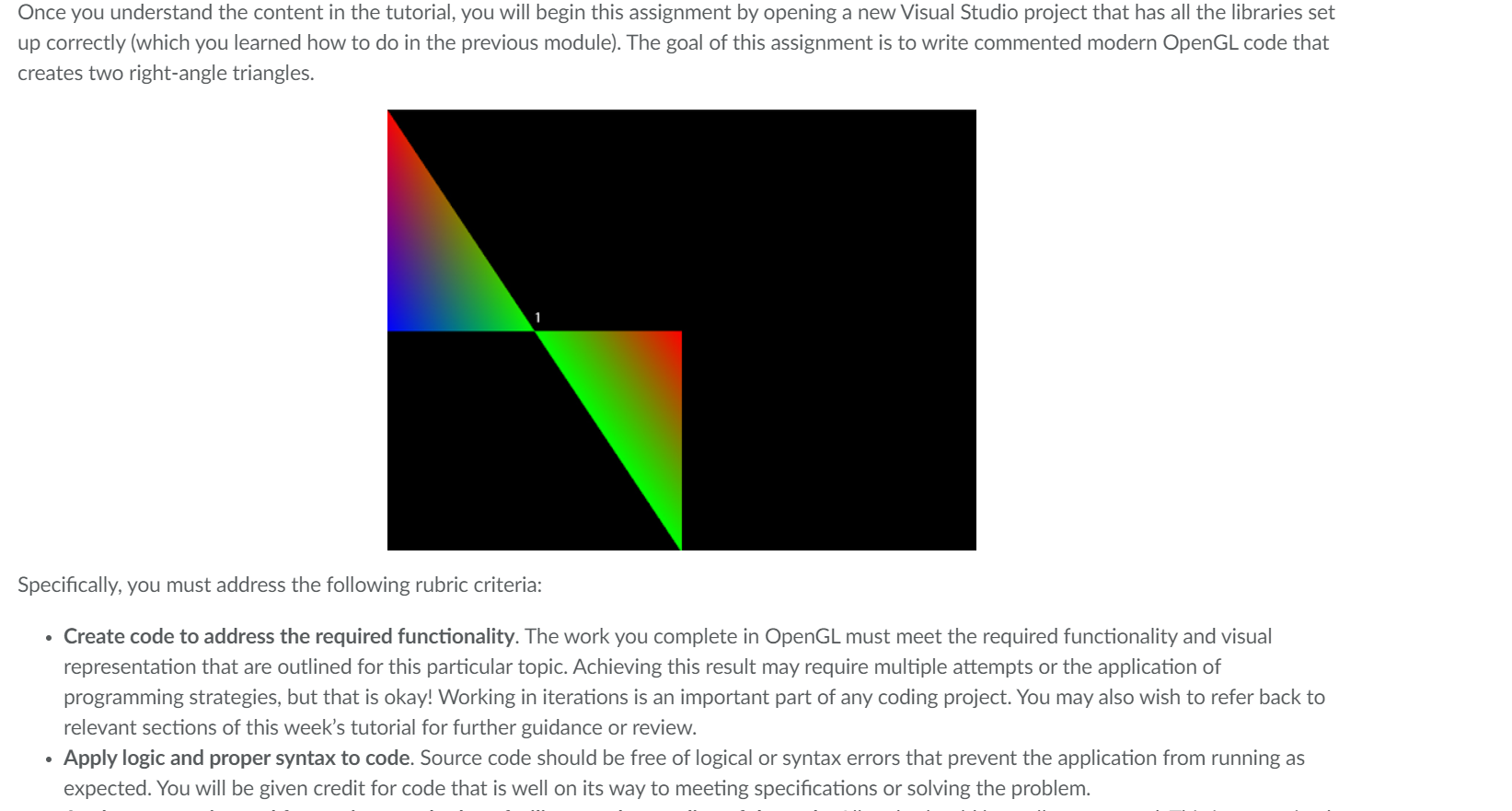
Question: i need help. i need two right triangles that can look like the one in the picture with the colors ty in advance #include /
i need help. i need two right triangles that can look like the one in the picture with the colors ty in advance
#include cout, cerr
#include EXITFAILURE
#include GLEW library
#include GLFW library
using namespace std; Uses the standard namespace
Unnamed namespace
namespace
const char const WINDOWTITLE "Tutorial ; Macro for window title
Variables for window width and height
const int WINDOWWIDTH ;
const int WINDOWHEIGHT ;
Stores the GL data relative to a given mesh
struct GLMesh
GLuint vao; Handle for the vertex array object
GLuint vbo; Handle for the vertex buffer object
GLuint nvertices; Number of vertices of the mesh
;
Main GLFW window
GLFWwindow gWindow nullptr;
Triangle mesh data
GLMesh gMesh;
Shader program
GLuint gProgramId;
Userdefined Function prototypes to:
initialize the program, set the window size,
redraw graphics on the window when resized,
and render graphics on the screen
bool UInitializeint char GLFWwindow window;
void UResizeWindowGLFWwindow window, int width, int height;
void UProcessInputGLFWwindow window;
void UCreateMeshGLMesh& mesh;
void UDestroyMeshGLMesh& mesh;
void URender;
bool UCreateShaderProgramconst char vtxShaderSource, const char fragShaderSource, GLuint& programId;
void UDestroyShaderProgramGLuint programId;
Vertex Shader Program Source Code
const char vertexShaderSource #version core
"layout location in vec aPos;
"layout location in vec colorFromVBO;
"out vec colorFromVS;
"void main
glPosition vecaPosx aPos.y aPos.z;
colorFromVS colorFromVBO;
;
Fragment Shader Program Source Code
const char fragmentShaderSource #version core
in vec colorFromVS;
"out vec FragColor;
"void main
FragColor colorFromVS;
;
main function. Entry point to the OpenGL program
int mainint argc, char argv
if UInitializeargc argv, &gWindow
return EXITFAILURE;
Create the mesh
UCreateMeshgMesh; Calls the function to create the Vertex Buffer Object
Create the shader program
if UCreateShaderProgramvertexShaderSource fragmentShaderSource, gProgramId
return EXITFAILURE;
Sets the background color of the window to black it will be implicitely used by glClear
glClearColorffff;
render loop
while glfwWindowShouldClosegWindow
input
UProcessInputgWindow;
Render this frame
URender;
glfwPollEvents;
Release mesh data
UDestroyMeshgMesh;
Release shader program
UDestroyShaderProgramgProgramId;
exitEXITSUCCESS; Terminates the program successfully
Initialize GLFW GLEW, and create a window
bool UInitializeint argc, char argv GLFWwindow window
GLFW: initialize and configure
glfwInit;
glfwWindowHintGLFWCONTEXTVERSIONMAJOR, ;
glfwWindowHintGLFWCONTEXTVERSIONMINOR, ;
glfwWindowHintGLFWOPENGLPROFILE, GLFWOPENGLCOREPROFILE;
#ifdef APPLE
glfwWindowHintGLFWOPENGLFORWARDCOMPAT, GLTRUE;
#endif
GLFW: window creation
window glfwCreateWindowWINDOWWIDTH, WINDOWHEIGHT, WINDOWTITLE, NULL, NULL;
if window NULL
std::cout "Failed to create GLFW window" std::endl;
glfwTerminate;
return false;
glfwMakeContextCurrentwindow;
glfwSetFramebufferSizeCallbackwindow UResizeWindow;
GLEW: initialize
Note: if using GLEW version or earlier
glewExperimental GLTRUE;
GLenum GlewInitResult glewInit;
if GLEWOK GlewInitResult
std::cerr glewGetErrorStringGlewInitResult std::endl;
return false;
Displays GPU OpenGL version
cout "INFO: OpenGL Version: glGetStringGLVERSION endl;
return true;
process all input: query GLFW whether relevant keys are pressedreleased this frame and react accordingly
void UProcessInputGLFWwindow window
if glfwGetKeywindow GLFWKEYESCAPE GLFWPRESS
glfwSetWindowShouldClosewindow true;
glfw: whenever the window size changed by OS or user resize this callback function executes
void UResizeWindowGLFWwindow window, int width, int height
glViewport width, height;
Functioned called to render a frame
void URender
Clear the background
glClearColorff
Step by Step Solution
There are 3 Steps involved in it
1 Expert Approved Answer
Step: 1 Unlock

Question Has Been Solved by an Expert!
Get step-by-step solutions from verified subject matter experts
Step: 2 Unlock
Step: 3 Unlock
 Study Help