







Question: Need Help in knowing how the excel sheet would look like. With functions and formulas displaying in cells and one of how it should look
Need Help in knowing how the excel sheet would look like. With functions and formulas displaying in cells and one of how it should look like complete! instructions would be very appreciated! Thank you in advance!
Fine Art Dealer
Project Description:
You are an analyst for an authorized Greenwich Workshop fine art dealer (www.greenwichworkshop.com). Customers are especially fond of James C. Christensens art. The Subtotals worksheet contains a list of artwork released in 2010-2012. You want to calculate subtotals by Type of art (e.g. Limited Edition Canvas) for Issue Price and Est. Price. The Art worksheet contains artwork from 2004-2006. Studying this data will help you discuss value trends with art collectors.
Instructions:
For the purpose of grading the project you are required to perform the following tasks:
| Step | Instructions | Points Possible |
|---|---|---|
| 1 | Start Excel. |
|
| 2 | In the Subtotals worksheet, sort the data by Type and then by Name of Art, both in alphabetical order. |
|
| 3 | In the Subtotals worksheet, use the Subtotals feature to identify the highest Issue Price and Est. Value by Type. |
|
| 4 | Use the Art worksheet to create a blank PivotTable on a new worksheet named PivotTable. |
|
| 5 | Include the Type, Release Date, and Issue Price fields in the PivotTable. Remove the Release Date field and add the Est. Value field to the PivotTable. |
|
| 6 | Modify the two VALUES fields to determine the Average Issue Price and Average Est. Value instead of the Sum. Change the custom name to Average Issue Price and Average Est. Value, respectively. |
|
| 7 | Format the two VALUES fields with Accounting Number type with zero decimal places. |
|
| 8 | Insert a calculated field on the right side of the PivotTable to calculate the percentage increase in value from the Issue Price to the Est. Value. Accept the default field name, Field1. |
|
| 9 | Format the calculated field with Percent type with two decimal places. Use the custom name Percentage Change. |
|
| 10 | Type Type in cell A3 and Overall Averages in the cell containing the text Grand Total. |
|
| 11 | Set a filter to display only sold-out art (indicated by Yes). |
|
| 12 | Apply Pivot Style Medium 5, display banded columns, and display banded rows. |
|
| 13 | Use the Art worksheet to create a PivotChart on a new sheet named PivotChart. Change the chart type to Clustered Bar. |
|
| 14 | Include the Type, Issue Price, and Est. Value fields. Set a filter to display only sold-out art (indicated by Yes) for the PivotChart. |
|
| 15 | Hide the field buttons in the PivotChart. Insert a chart title above the chart and type 2005-2007 Art. |
|
| 16 | Format the value axis with Accounting with zero decimal places. Apply 8-pt size to the category axis and value axis. Apply 7-pt size to the legend. |
|
| 17 | Adjust the size of the PivotChart for the range D1:K14. |
|
| 18 | Sort the data in the PivotCharts PivotTable in reverse alphabetical order by Type. Type Art Type in cell A3 and type Overall Averages in the cell containing the text Grand Total. |
|
| 19 | Ensure that the worksheets are correctly named and placed in the following order in the workbook: Subtotals, PivotTable, PivotChart, Art. Save the workbook. Close the workbook and then exit Excel. Submit the workbook as directed. |
|
|
|
|
|
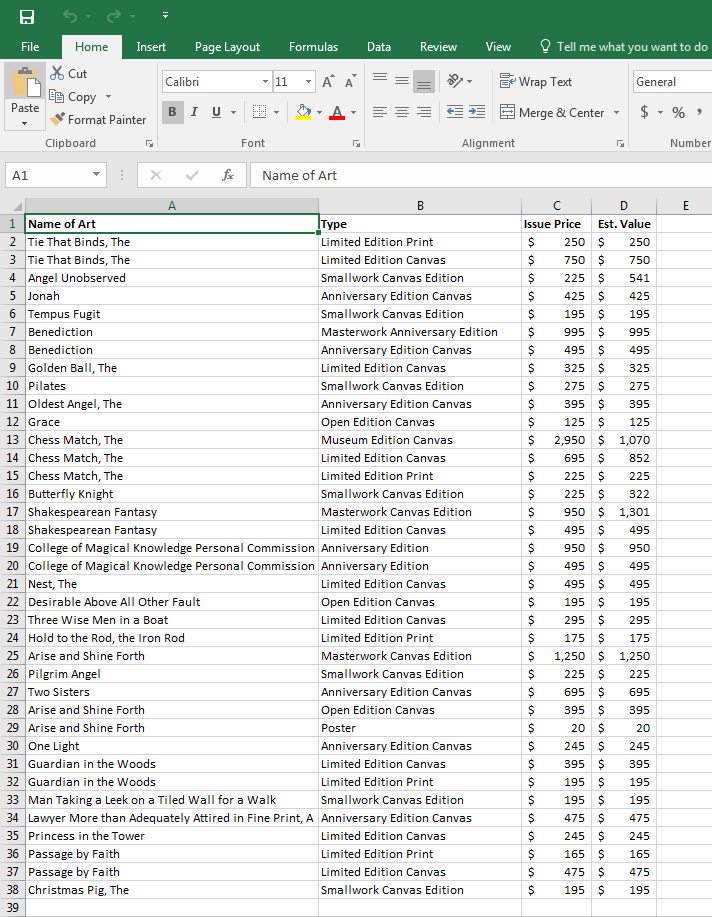
Insert Page Layout Formulas Data ReviewView Tell me what you want to do Insert Page Layout FormulasData Review View me General opy Format Painter Clipboard Alignment Number X v/ Name of Art 1 Name of Art Issue Price Est. Value Limited Edition Print Limited Edition Canvas Smallwork Canvas Edition Anniversary Edition Canvas Smallwork Canvas Edition Masterwork Anniversary Edition$995 Anniversary Edition Canvas Limited Edition Canvas Smallwork Canvas Edition Anniversary Edition Canvas Open Edition Canvas Museum Edition Canvas Limited Edition Canvas Limited Edition Print Smallwork Canvas Edition Masterwork Canvas Edition Limited Edition Canvas 2 Tie That Binds, The 3 Tie That Binds, The 4 Angel Unobserved $ 195 195 $995 $ 495 $495 6 Tempus Fugit 7 Benediction 8 Benediction 9 Golden Bal, The 10 Pilates 11 Oldest Angel, The 12 Grace $395 $395 $ 2,9501,070 852 14 Chess Match, The 17 Shakespearean Fantasy 18 Shakespearean Fantasy 19 College of Magical Knowledge Personal Commission Anniversary Edition 20 College of Magical Knowledge Personal Commission Anniversary Edition 21 Nest, The 22 Desirable Above All Other Fault 23 Three Wise Men in a Boat 24 Hold to the Rod, the Iron Rod 25 Arise and Shine Forth 26 Pilgrim Angel 27 Two Sisters 28 Arise and Shine Forth 29 Arise and Shine Forth 30 One Light 31 Guardian in the Woods 32 Guardian in the Woods 33 Man Taking a Leek on a Tiled Wall for a Walk 34 Lawyer More than Adequately Attired in Fine Print, A Anniversary Edition Canvas 35 Princess in the Tower 36 Passage by Faith 37 Passage by Fait 38 Christmas Pig, The 39 $ 9501,301 $ 495 $495 $ 495 $495 $ 495 $495 $ 195 195 Limited Edition Canvas Open Edition Canvas Limited Edition Canvas Limited Edition Print Masterwork Canvas Edition Smallwork Canvas Edition Anniversary Edition Canvas Open Edition Canvas $ 695 $695 $395 $395 Anniversary Edition Canvas Limited Edition Canvas Limited Edition Print Sm $395 $395 $ 195 195 allwork Canvas Edition Limited Edition Canvas Limited Edition Print Limited Edition Canvas Smallwork Canvas Edition $ 195 195
Step by Step Solution
There are 3 Steps involved in it

Get step-by-step solutions from verified subject matter experts
 Study Help